
Turn HTML/CSS/JS into real Android & iOS apps — no Android Studio, no Gradle, no Xcode.
Quick Start • Google Play • Configuration • Native APIs • Plugins • Security • Frameworks • How it works • iOS • Limitations
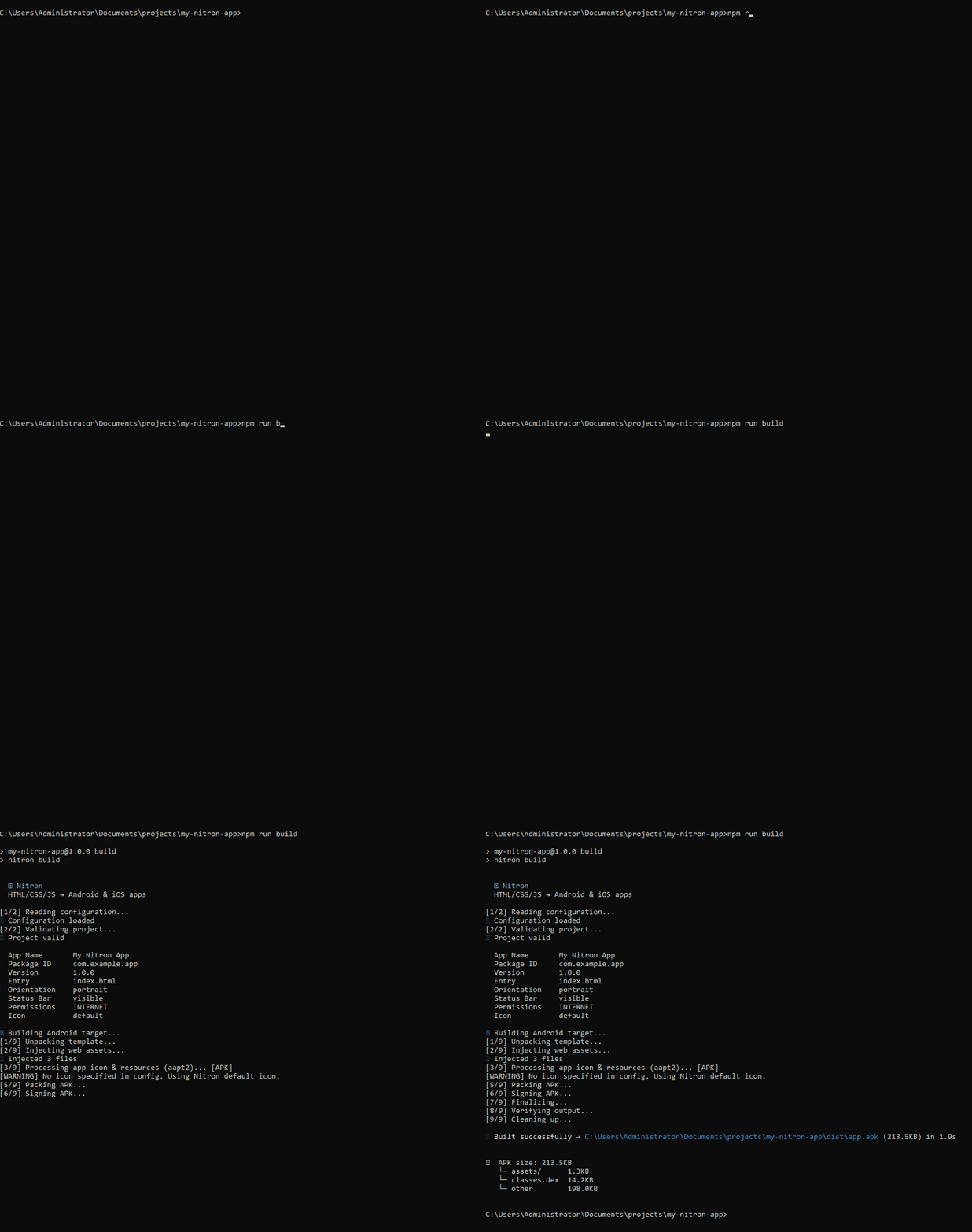
A small app builds into a ~214 KB APK in about two seconds, using only Node.js and a Java runtime.
Every tool that turns a web app into an Android app eventually makes you open Android Studio, install Gradle, configure a JDK, and think like an Android developer.
- Capacitor says "web-first", then asks you to install Android Studio.
- Cordova says "cross-platform", then needs gigabytes of RAM for a build.
- PWAs can't ship to Google Play as real apps.
Nitron keeps Android out of your way. You write HTML, CSS and JavaScript, run one command, and get a real APK or AAB.
# 1. Create the config in your web project
npx nitron init --preset vanilla     # or: nextjs | vite | react

# 2. Build your web app into static files (skip for plain HTML)
npm run build

# 3. Build the Android app
npx nitron build                     # → dist/app.apk  (for testing on a device)
init generates a nitron.config.json in your project root. Install the APK on any Android device to test it.
Requirements: Node.js 18+ and a Java Runtime (JRE 8+) for signing. No Android SDK, no Android Studio, no Gradle.
Google Play requires an Android App Bundle (.aab) for new apps, and a release signing key you keep forever.
# once: create your release keystore (back it up — you cannot update your app without it)
npx nitron keystore

# every release
npx nitron build --target aab --release # → dist/app.aab--releasesigns withnitron-release.keystore. For CI, set the password in theNITRON_KEYSTORE_PASSWORDenvironment variable.- The default
targetSdkis 36, and Nitron warns you when you build an AAB with a lower one. Google raises its minimum every year, so check the current requirement in the Play Console before you upload. - Raise
versioninnitron.config.jsonbefore every upload. - Signing an AAB needs a full JDK (8+), not just a JRE.
- Set a real
iconin the config; the default Nitron icon is meant for testing.
Use the .apk for testing on devices and the .aab for the Play Console.
Everything lives in nitron.config.json:
{
  "name": "My App",
  "packageId": "com.myname.myapp",
  "version": "1.0.0",
  "entry": "out/index.html",
  "orientation": "portrait",
  "statusBar": true,
  "permissions": ["INTERNET", "ACCESS_NETWORK_STATE", "CAMERA"],
  "icon": "./public/icon.png",
  "network": { "cleartext": false },
  "webview": {
    "backButton": "history",
    "clearCacheOnStart": false,
    "externalLinks": "browser",
    "allowedHosts": []
  },
  "splashScreen": { "backgroundColor": "#FFFFFF" }
}| Option | Description |
|---|---|
name, packageId, version |
App name, unique Android package ID, and version. |
entry |
Path to your compiled entry file (e.g. out/index.html). Nitron packages the whole directory it sits in. |
orientation |
portrait, landscape or auto. |
permissions |
Android permissions. 70+ are recognized (API 21–34+); INTERNET is always included. |
icon |
A .png or .jpg. Nitron generates adaptive icons for all densities. If omitted, the default Nitron icon is used. |
android.targetSdk, android.minSdk |
Override the SDK levels (defaults: target 36, min 21). |
webview.backButton |
"history" makes the hardware back button navigate browser history; "exit" closes the app. |
webview.externalLinks |
"browser" (default) opens links to other websites in the system browser. "inapp" loads them inside the WebView (see Security model). |
webview.allowedHosts |
Hostnames (for example "pay.example.com") that may load inside the WebView even when externalLinks is "browser". Use for payment or sign-in pages. |
plugins |
Java files or folders to compile into the app as native plugins. |
onPluginError |
"error" (default) stops the build when a plugin fails; "warn" builds the app without that plugin. |
network.cleartext |
true allows plain HTTP. Default false (HTTPS only). |
exclude |
Files or folders to keep out of the app (see below). |
Keep tools, backend folders or secrets out of the final bundle:
{
  "exclude": ["*.exe", "my-backend-folder", "secret.config"]
}
Glob patterns like *.exe and exact file or folder names are supported.
Nitron exposes a small bridge to your JavaScript as window.Nitron:
window.Nitron.requestLocationPermission()
window.Nitron.requestCameraPermission()
window.Nitron.requestStoragePermission()
window.Nitron.showNotification('Title', 'Message')
These work in the standard build, with no extra tools installed. Add the matching Android permission to permissions in your config. On Android 13+ notifications also need the POST_NOTIFICATIONS permission.
Need an Android feature that window.Nitron doesn't cover, such as Bluetooth or usage stats? Write it in Java. Nitron compiles it into the app and your JavaScript calls it as an async function.
public class BatteryPlugin extends NitronPlugin {
    @NitronMethod
    public void getStatus(PluginCall call) throws Exception {
        // ... read the battery ...
        call.resolve(new JSONObject().put("level", level));
    }
}
{ "plugins": ["./plugins/BatteryPlugin.java"] }const { level } = await Nitron.plugins.Battery.getStatus()
Nitron.on('Bluetooth:found', device => console.log(device)) // events from Java- Needs a full JDK on your machine. Standard builds without plugins still need only a JRE.
- If a plugin has an error, the build stops and shows it. Set
"onPluginError": "warn"to build the app without that plugin instead. - Examples (battery, Bluetooth) are in
examples/plugins/. The full guide is docs/PLUGINS.md.
Nitron serves your files from https://appassets.androidplatform.net inside the app, and attaches the window.Nitron bridge to that WebView. To keep the bridge away from third-party pages:
- External links open in the system browser by default. Set
webview.externalLinksto"inapp"only if you really need other websites inside the WebView, and prefer listing specific hosts inwebview.allowedHosts. - Bridge calls are checked against the app origin.
showNotification, the permission requests and every plugin call do nothing unless the current page comes from the app's own origin. - WebView permission and geolocation prompts are granted only to the app origin. The check compares the exact host, so look-alike hosts such as
appassets.androidplatform.net.example.comare rejected. - Cross-origin iframes: Android exposes a JavaScript bridge to every frame of the page. Do not embed untrusted iframes in an app that relies on sensitive bridge calls.
Nitron packages the static output of whatever you use to build your site. Point entry at the built index.html.
- Vite / React / Vue / Svelte: work with their normal static build. Absolute paths such as
/assets/script.jsresolve correctly, so you don't needbase: './'. - Next.js: supported through static export (
output: "export"innext.config.js).
Next.js dynamic routes:
output: "export"rejects routes like/products/[id]/page.tsxunless you providegenerateStaticParams. For apps, use a query parameter instead (/products/detail?id=...), read it withuseSearchParams(), and wrap the component in<Suspense>.
| Feature | Status | Notes |
|---|---|---|
| Static pages | ✅ | |
| Client components | ✅ | Wrap useSearchParams in <Suspense>. |
fetch() to external HTTPS APIs |
✅ | Your backend must allow the origin https://appassets.androidplatform.net in its CORS settings. |
Dynamic routes (/[id]) |
Use query parameters instead. | |
| Server Actions / API routes | ❌ | There is no Node.js server at runtime. |
Local origin. Nitron does not load your files over file://. Its shouldInterceptRequest handler serves them from the APK's assets/www/ as https://appassets.androidplatform.net/.... The WebView behaves as if it were browsing a real HTTPS site: absolute paths, cookies, localStorage and fetch() work as in a browser. The Android runtime itself is a ~14 KB classes.dex.
Build pipeline. nitron build skips Gradle entirely:
- Read and validate
nitron.config.json. - Unpack a pre-compiled
base.apktemplate. - Inject your web assets into
assets/www/. - Compile icon, resources and manifest with a small auto-downloaded
aapt2. - Repack, sign, verify.
Android compatibility: API 21 (Android 5.0) and up, targeting API 36 by default, tested up to Android 16. Feature availability on old versions depends on the device's WebView.
The same config builds iOS apps through a separate engine (initron) that wraps your app in a WKWebView shell.
npx nitron build --target ios-simulator   # unsigned .app for the iOS Simulator
npx nitron build --target ios # signed .ipa for a real device| Target | What you need |
|---|---|
ios (device / TestFlight / App Store) |
A one-time shell build on Linux or WSL2 (no Mac, no Xcode), plus an Apple Developer certificate for a real signature (NITRON_IOS_P12_PATH, NITRON_IOS_P12_PASSWORD, NITRON_IOS_PROVISION_PATH). |
ios-simulator |
A one-time macOS step, because the iPhoneSimulator SDK isn't available from the same Linux-friendly source as the device SDK. No Apple Developer account needed. |
Run scripts/build-ios-toolchain.sh and scripts/build-shell-device.sh once (or trigger .github/workflows/build-shell-device.yml, which runs on a plain Linux runner). The full walkthrough and every design decision are in ARCHITECTURE.md. Minimum deployment target: iOS 13.
- Plugins are Java only, for Android, and cannot use extra libraries (
.jar/.aar) yet. - No automatic route fallback. A request for a path that is not a file in your build (for example
/aboutafter a reload or deep link) is not rewritten toindex.htmlorabout.html. Use hash routing, or make sure every route exists as a file. - No server at runtime. Server Actions and API routes don't exist in an app; call a hosted backend instead.
- Tests cover the plugin runtime only (
npm run test:plugins). The rest is checked by building and installing real apps.
Contributions and test reports are welcome. See CONTRIBUTING.md.
To modify the Java template you need a full JDK:
- Edit the code in
template-src/base/. - Run
node scripts/prepare-template.jsto compile it intotemplate/base.apkandtemplate/nitron-plugin-api.jar. The script finds or downloadsandroid.jarand the R8 dexer for you (JDK 11+ is required for R8). - Run
npm run test:pluginsto check the plugin runtime (no device needed).
Regular users never need this; they get the template pre-compiled.
See CHANGELOG.md.
Nitron is licensed under GPL-2.0 with the Nitron Output Exception. The exception is what lets you build and ship your own apps with Nitron, including proprietary ones. See LICENSE for the full terms.