Last updated: 2026-09-26
nudl ("naked URL", pronounced noodle) strips the tracking junk off any link you copy — in Slack, Discord, a terminal, a doc, your browser — and hands back the same real link, trimmed.
winget install Coreho.nudl
Or try it in your browser — paste a link or a whole message; nothing you paste leaves the page.
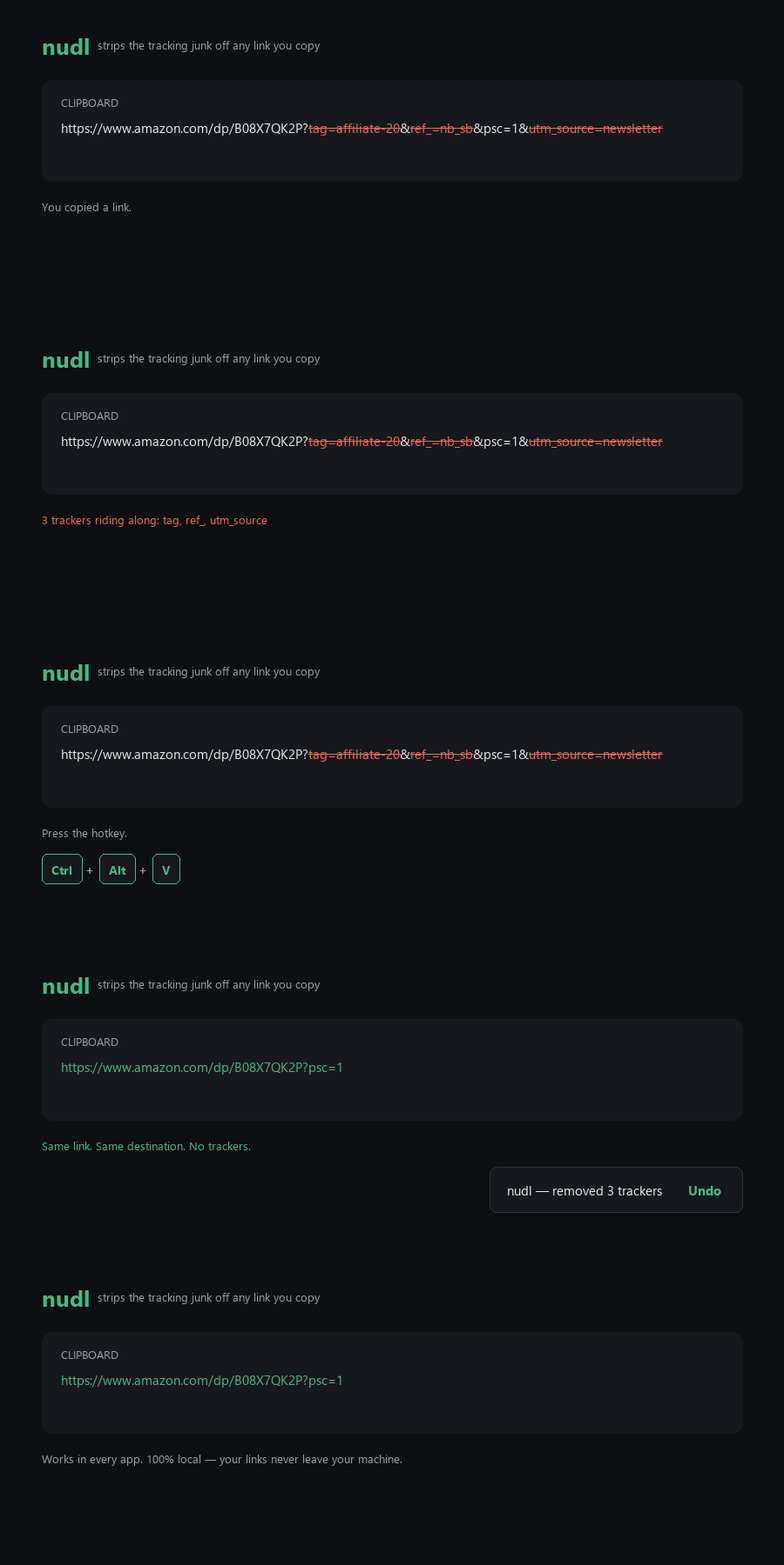
Note what survives: psc=1 is a real parameter the link needs, so nudl leaves it alone. It
strips only what it recognises as tracking, and nothing else.
https://youtu.be/dQw4w9WgXcQ?si=Ab12Cd34Ef56&t=42
                        ->  https://youtu.be/dQw4w9WgXcQ?t=42

https://l.facebook.com/l.php?u=https%3A%2F%2Fsite.com%2Fx&h=AT1
                        ->  https://site.com/x
Redirect wrappers get unwrapped too — the output is the destination they were hiding.
It is not a URL shortener. No alias, no server, no redirect — the output is the real destination, just shorter. The link can't rot, because it was never replaced.
Browser extensions and Firefox's Copy Link Without Site Tracking only work inside the browser. nudl works on the clipboard, so it doesn't matter where the link came from.
On Windows, the tray app (nudlw). Copy something and press Ctrl+Alt+V: every link in
it is cleaned — a bare link, a whole chat message, a formatted paragraph from a web page with
its links hiding behind the text. Or switch on automatic mode and every link is cleaned the
moment you copy it. It can start with Windows, so it's simply there.
Anywhere, the command line (nudl). Windows, macOS and Linux:
nudl --clipboard                          # clean the clipboard in place — bind this to a key
Get-Clipboard | nudl | Set-Clipboard      # or as a filter (PowerShell)
pbpaste | nudl | pbcopy                   # macOS
nudl < notes.md > clean.md                # every link in a file; everything else untouched
nudl "https://example.com/p?fbclid=IwAR123"
Bind nudl --clipboard to a key (Raycast, Hammerspoon, your desktop's keyboard settings) and
you have nudl's hotkey on any OS. It reads the same settings and rules file as the tray app.
nudl --help has the options.
On any device, the web page. Paste a link or a message,
copy the clean version. It runs nudl's actual cleaning code — the same clean.py — inside the
page, and its security policy doesn't let it talk to anything but itself and the CDN it loads
from. On Android, install it (browser menu → Install app) and it appears in the Share menu:
share a link to nudl, copy it back clean. Shared links are handled on the phone and never sent
to the server.
The cleaning engine makes zero network calls. No account, no telemetry, nothing leaves your machine. That's not a policy, it's a property of the code: the test suite replays every URL in the corpus with the socket layer patched to explode on any connection attempt.
It doesn't even read what your password manager copies. Apps mark private copies for clipboard tools to ignore, and nudl does: it doesn't look at them, let alone change them. You can also tell automatic mode to ignore whole apps (Settings → ignore copies from these apps).
There's a local audit log at %AppData%\nudl\clean.log recording every change the tray app
has made (timestamp · original · what was removed · result), so you can check its work
rather than trust it. Tray → View log opens it. The tray tooltip keeps a running count —
"412 trackers removed from 230 links" — stored on your machine and nowhere else.
Deliberately absent: no network un-shortening of bit.ly / t.co (it would leak the link and
can burn one-time URLs), and no "check for updates" (it would mean phoning home — winget and
Scoop already do that job, when you ask them to).
nudl never silently breaks a link you needed. Everything below serves that.
- When in doubt, do nothing. A malformed URL, a signed URL, a domain you've excluded, a result identical to the input, or any internal error — nudl leaves your clipboard exactly as it found it.
- Signed URLs are never touched. Anything carrying
sig,signature,hmac,token,expires,policy, or anX-Amz-*key is left alone. Signed URLs compute their signature over the whole query, so removing any parameter turns the link into a 403. - Only known trackers are stripped. nudl works from a small allowlist and never guesses,
which is why YouTube's
?v=and?t=, Spotify's?si=,?page=,?q=and everything nobody has thought of yet survive by default. - Values are never rewritten. Only the key of each parameter is inspected, so a parameter
whose value merely looks like a tracker (
?redirect=utm_source_page) can't be mangled, and%20never quietly becomes+. - Only the links change. When nudl cleans a message, every other character — spacing, line breaks, Markdown, formatting — comes back exactly as it was.
- Every real change is loud and reversible. A toast says what was removed; one click — or the hotkey again within three seconds — restores the exact original, formatting included. A no-op is silent: if nudl changed nothing, you'll never know it ran.
Windows 11 (Windows 10 best-effort) for the tray app; the command line runs anywhere Python 3.11+ does; the web page runs in any modern browser.
winget — the easiest:
winget install Coreho.nudl
Then run nudlw (or press Win+R and type it) to start the tray app; nudl is the command
line. winget upgrade Coreho.nudl gets you new rules and fixes — nudl never updates itself.
scoop install https://raw.githubusercontent.com/Coreho/nudl/master/scoop/nudl.json
pip / pipx — the command line on any OS (on Windows it brings the tray app too):
pipx install nudl
On Linux, nudl --clipboard uses wl-clipboard (Wayland) or xclip/xsel (X11).
Or download the latest release, unzip it
anywhere, and run nudlw.exe. (Double-clicking nudl.exe works too — it hands over to the
tray app.)
It's an unsigned build, so SmartScreen will show "Windows protected your PC." Click More info → Run anyway. See Is it safe? — I'd rather tell you up front than have you find out.
From source (Python 3.11+):
git clone https://github.com/Coreho/nudl.git
cd nudl
python -m venv .venv
.venv\Scripts\pip install -e .
.venv\Scripts\nudlw          # the tray app
.venv\Scripts\nudl --help    # the command line
On first launch nudl asks how it should work: Hotkey (copy, press Ctrl+Alt+V) or
Automatic (links are cleaned as you copy them) — and whether to start with Windows.
The tray icon is always visible on purpose — a tool that reads your clipboard and hides itself
is exactly what you should be suspicious of.
Tray → Settings… has everything else: the mode, the shortcut (it takes effect immediately, and if another app already owns it, nudl says so and keeps the old one), start with Windows, referral codes, sites to never touch, and apps whose copies automatic mode ignores. Start with Windows is an ordinary entry in Task Manager's Startup apps, so you can see it and switch it off there too.
Undo: click Undo on the toast, press the hotkey again within three seconds, or use Tray → Undo last clean.
Found a link nudl got wrong? Tray → Report a link nudl got wrong… opens a short form on GitHub. nudl doesn't fill in the link for you — you paste it, or a redacted version, and see exactly what you're sharing.
The full list is here. Every parameter nudl touches, and — just as importantly — the ones it deliberately won't.
The short version: utm_*, fbclid, gclid, msclkid and the other cross-site click IDs
everywhere; the share-button trackers people paste most — YouTube's si, Instagram's igsh,
Facebook's mibextid, LinkedIn's rcm, TikTok's _t/_r; site-specific junk from Amazon,
Reddit, eBay, Etsy, AliExpress, Booking, Airbnb, Substack, Twitch, Steam and more; and the
redirect wrappers (l.facebook.com/l.php, google.com/url, …) get unwrapped to the real
destination.
What it won't remove is the interesting half. Medium's ?sk= looks like a tracker but is
a friend link — strip it and you paywall the article you were sharing. Spotify's si= has
broken shared playlists (YouTube's si is a pure tracker, so that one goes). eBay's hash=
identifies the item. Instagram's img_index= picks which photo. Amazon's keywords= is
the search. Each of those has a test guarding it, because breaking a link the user needed
always outranks removing a tracker.
Tray → Rules… (or Settings → Edit my rules…) opens %AppData%\nudl\rules.json —
~/.config/nudl/rules.json for the command line on macOS and Linux. It holds only what you
want on top of the bundled rules, which keep improving with every release and always
apply:
{
  "global_tracker_keys": ["my_newsletter_id"],
  "keep": ["utm_campaign"],
  "providers": [{ "name": "youtube", "rules": ["ab_channel"] }]
}global_tracker_keys— extra keys to strip on every site ('x'exact,'^x_.*$'regex,'x_*'prefix).keep— exact keys nudl must never strip, even when a bundled rule says so. This is how you switch a bundled rule off.providers— rules for one site. Named like a bundled provider, it extends that one; a new name adds a site.
Then Tray → Validate rules re-reads it and says what it added. Break it and nudl tells you,
instead of quietly reverting: the last version that loaded cleanly is kept beside it as
rules.json.bak and nudl runs on that for the session, so your customisations survive your
typo. nudl never writes over your rules file. (A file declaring a schema_version newer
than this engine understands is refused outright rather than half-read.)
Domains you never want touched go in Settings → Never touch links to these sites — a list you write; nudl just compares hostnames against it locally.
nudl-validate (or python -m src.validate) shows you exactly what a rule would do — before it
goes anywhere near your links. Local and offline, like everything else here. It comes with the
pip install; the packaged download ships Tray → Validate rules, which is the same check
on the whole file.
> nudl-validate --test "^utm_.*$" --url "https://www.amazon.com/dp/B08X?utm_source=google&tag=aff-20&v=123"
Pattern:  ^utm_.*$  (anchored regex)
Before:   https://www.amazon.com/dp/B08X?utm_source=google&tag=aff-20&v=123
After:    https://www.amazon.com/dp/B08X?tag=aff-20&v=123
Removed:  utm_source
Kept:     tag, v
It knows which parameters are load-bearing, so it argues back:
> nudl-validate --test "si" --url "https://open.spotify.com/playlist/abc?si=share123"
Removed:  si
warning 'si' matches 'si', which is deliberately absent: Spotify share id — removing it has
        broken shared-playlist and invite flows.
--check audits your file and exits non-zero if anything is broken — including a regex that
could take minutes on a long URL, which the engine refuses to run. With no arguments you get an
interactive prompt to test, add, remove, save and try wrappers and rawRules against
sample URLs. It drives the real engine rather than a reimplementation, so what it shows is
what nudl will do — and it never edits your live rules file; save refuses that path.
nudl does not bundle ClearURLs' rules data — it ships under a separate, unverified license, and its 600-provider long tail is irrelevant for "clean the link I just copied." A rule set you can actually read is the point.
It's a small unsigned tool that reads your clipboard, so it's fair to be suspicious.
- It uses
RegisterHotKey, which asks Windows to deliver one specific chord and nothing else. It does not install a low-level keyboard hook — that's the keylogger technique, and nudl never sees any keystroke but its own shortcut. - It skips anything an app marks as private — which is what password managers do with every secret they copy.
- It's open source, and the entire cleaning engine is one file:
src/clean.py. - SmartScreen will warn about the unsigned build. That means Windows doesn't recognise the publisher — not that it found anything. Code signing is on the roadmap.
1 of ~70 engines flags the v0.1.0 download — nudl-0.1.0-win64.zip, SHA-256 96d64007…4261. Verify any download yourself with Get-FileHash; each release lists its hash.
I'd rather you hear that from me than find it yourself.
That one detection is a machine-learning heuristic, and what it reacts to is PyInstaller, not nudl. Bundling a Python interpreter into a self-extracting executable looks structurally like a packer, and packers are what malware uses to hide — so aggressive engines flag tools built this way regardless of what they do. It's a known false-positive pattern, not a finding about this code.
- Microsoft Defender scans it clean, with current signatures and real-time protection on — the v0.2.0 zip included. Defender is what actually decides whether nudl runs on your machine.
- Every major engine reads clean.
- For completeness: the bootloader
nudl.exescanned on its own draws 3 flags (ArcticWolf, SecureAge). That file is a stub — it contains none of nudl's logic and cannot even run without the_internalfolder beside it. The zip above is the honest scan, and it's the one you download.
Not satisfied? That's a completely reasonable place to land. Run it from source instead — no packed binary at all, and every line is readable. Or use the web page, which needs no install at all.
- Every link in what you copied. The hotkey cleans a whole message or paragraph, and formatted copies keep their formatting — including links hidden behind link text.
- The command line,
nudl— on Windows, macOS and Linux, and on PyPI.nudl --clipboardis the hotkey for any OS. The tray app is nownudlw(double-clickingnudl.exestill opens it). - The web page, with a Share target on Android.
- Settings, a real window instead of a JSON file. Start with Windows, asked once.
- Private copies left alone, and apps automatic mode ignores.
- Your own rules, on top of the bundled ones — with
keepto switch a rule off. - The trackers people paste most: YouTube
si, Instagramigsh, Facebookmibextid, LinkedInrcm, TikTok_t/_r. - A running count, and Report a link nudl got wrong…
- Hardening: bounded regexes and URL sizes (in every rule field), stricter redirect unwrapping, far more secrets masked in the audit log, system shortcuts refused as hotkeys.
.venv\Scripts\pip install -e ".[dev]"
.venv\Scripts\python -m pytest      # 439 tests
.venv\Scripts\python -m ruff check .
The test suite is the specification. src/tests/test_clean.py holds 82 hand-vetted before/after
URLs, 24 of them "looks like tracking but isn't" tripwires — the cases where a careless cleaner
breaks a working link. test_clean_text.py does the same for links inside text, and
test_html_clip.py for formatted copies. It's the standing gate: if it isn't green, the build
doesn't ship.
src/tests/integration/ drives the real Windows clipboard — a real message pump, a real listener,
no test doubles anywhere. Those tests close nothing and fake nothing, which is why they found two
bugs the mocked tests had been cheerfully passing over. They will skip themselves if nudl is
already running, and they give you your clipboard back when they're done. Don't copy things
while they run: they share the clipboard with you.
.\build.ps1 builds the Windows download — nudl.exe and nudlw.exe over one shared runtime
(nudl.spec) — and smoke-tests the command line before zipping it.
python tools/build_web.py builds the web page into dist/web/; the
Pages workflow runs the engine's tests and publishes it on every
push to master. docs/RELEASING.md is the release checklist: GitHub, winget,
Scoop, PyPI, Pages.
MIT.