
A scalable RESTful backend for a video-sharing platform, built with Node.js, Express.js, MongoDB, and modern backend engineering practices.
This project is a full-featured backend for a video-sharing platform inspired by modern streaming and content platforms.
It provides APIs for user management, authentication, video publishing, comments, likes, subscriptions, playlists, watch history, search, and creator dashboards.
The backend is designed with a modular architecture focused on security, maintainability, scalability, and clean API design.
- JWT-based authentication and authorization
- User profile management
- Video upload and management
- Cloud-based media storage
- Comments and likes
- Channel subscriptions
- Playlist management
- Watch history
- Video search and pagination
- Creator dashboard analytics
- MongoDB aggregation pipelines
- Centralized API error handling
- Secure protected routes
| Technology | Purpose |
|---|---|
| Node.js | JavaScript runtime |
| Express.js | REST API framework |
| MongoDB | Primary database |
| Mongoose | MongoDB ODM |
| JWT | Authentication & authorization |
| Bcrypt | Password hashing |
| Cloudinary | Image & video storage |
| Multer | Multipart file handling |
| Cookie Parser | Cookie management |
| CORS | Cross-origin resource sharing |
| dotenv | Environment configuration |
The application follows a modular MVC-inspired architecture, separating HTTP routing, middleware, controllers, business logic, database models, and utility functions.
┌─────────────────────┐
│       Client        │
└──────────┬──────────┘
           │
           ▼
┌─────────────────────┐
│       Routes        │
└──────────┬──────────┘
           │
           ▼
┌─────────────────────┐
│    Middlewares      │
│ Auth / Upload / etc │
└──────────┬──────────┘
           │
           ▼
┌─────────────────────┐
│    Controllers      │
└──────────┬──────────┘
           │
           ▼
┌─────────────────────┐
│      Services       │
│   Business Logic    │
└──────────┬──────────┘
           │
           ▼
┌─────────────────────┐
│   Mongoose Models   │
└──────────┬──────────┘
           │
           ▼
┌─────────────────────┐
│      MongoDB        │
└─────────────────────┘
This structure keeps responsibilities separated and makes individual components easier to maintain and extend.
src/
│
├── controllers/
│   ├── auth.controller.js
│   ├── user.controller.js
│   ├── video.controller.js
│   ├── comment.controller.js
│   ├── like.controller.js
│   ├── playlist.controller.js
│   ├── subscription.controller.js
│   └── dashboard.controller.js
│
├── models/
│   ├── user.model.js
│   ├── video.model.js
│   ├── comment.model.js
│   ├── like.model.js
│   ├── subscription.model.js
│   ├── playlist.model.js
│   └── watchHistory.model.js
│
├── routes/
│   ├── auth.routes.js
│   ├── user.routes.js
│   ├── video.routes.js
│   ├── comment.routes.js
│   ├── like.routes.js
│   ├── playlist.routes.js
│   ├── subscription.routes.js
│   └── dashboard.routes.js
│
├── middlewares/
│   ├── auth.middleware.js
│   ├── multer.middleware.js
│   └── error.middleware.js
│
├── services/
│
├── db/
│   └── index.js
│
├── utils/
│   ├── ApiError.js
│   ├── ApiResponse.js
│   ├── asyncHandler.js
│   └── cloudinary.js
│
├── constants/
│
├── app.js
└── index.js
The application consists of seven core models: Users, Videos, Comments, Likes, Tweets, Playlists, and Subscriptions.
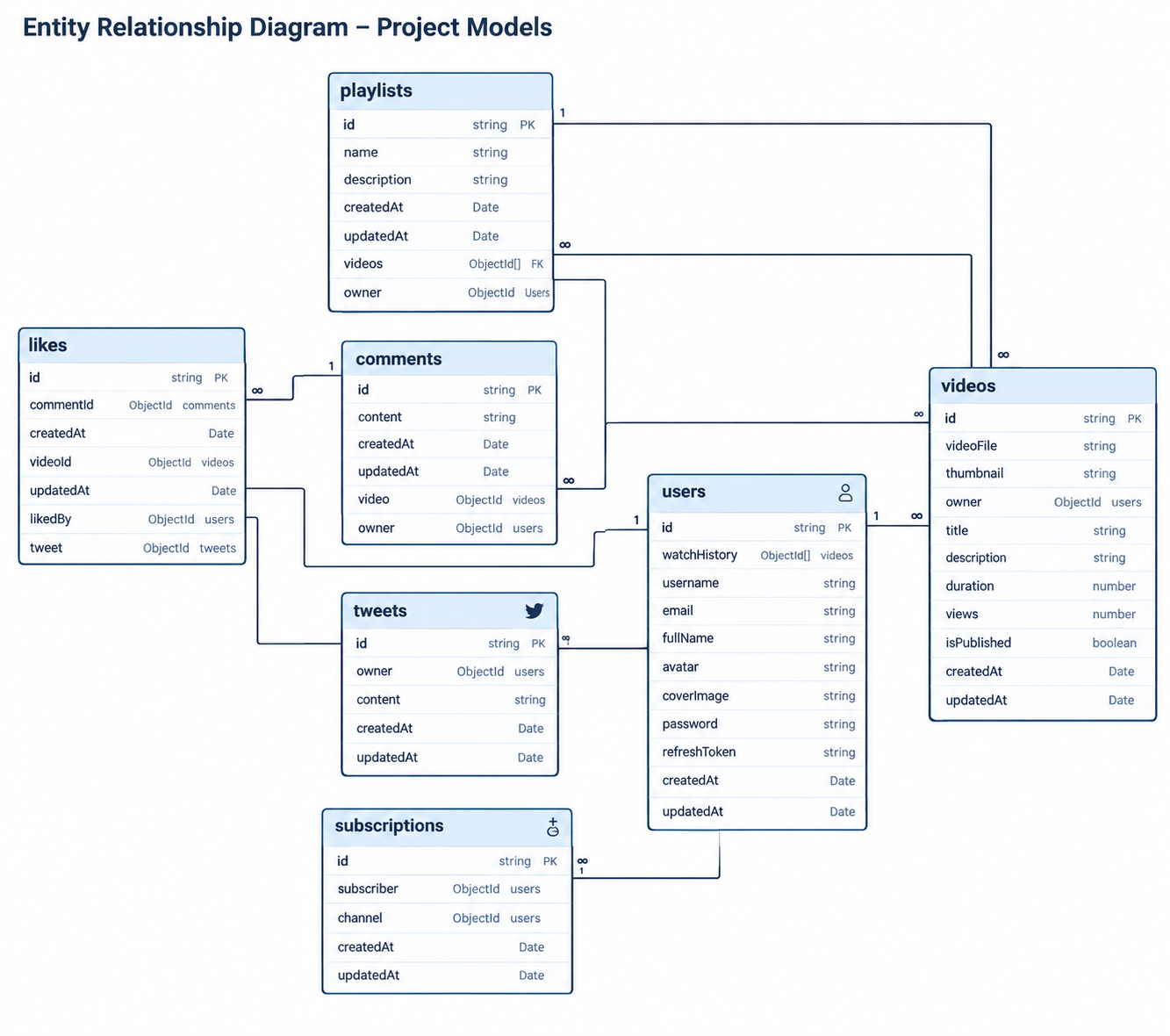
Authentication is implemented using JWT access and refresh tokens.
                 Login Request
                      │
                      ▼
              Validate Credentials
                      │
                      ▼
               Hash Verification
                      │
                      ▼
             Generate JWT Tokens
                ┌─────┴─────┐
                ▼           ▼
           Access Token  Refresh Token
                │           │
                └─────┬─────┘
                      ▼
                 Authenticated
                    Session
Client
  │
  ▼
Authentication Middleware
  │
  ├── Invalid Token → 401
  │
  └── Valid Token
          │
          ▼
      Controller
          │
          ▼
       Response
- Password hashing using Bcrypt
- JWT access tokens
- JWT refresh tokens
- Token expiration
- Protected routes
- Authorization middleware
- HTTP-only cookies where applicable
- Environment-based secrets
- Centralized error handling
Media files are processed using Multer and stored using Cloudinary.
Client
  │
  │ multipart/form-data
  ▼
Multer
  │
  ▼
File Processing
  │
  ▼
Cloudinary
  │
  ▼
Secure Media URL
  │
  ▼
MongoDB
MongoDB stores media metadata and URLs while Cloudinary handles the actual media storage and delivery.
- Profile avatars
- Cover images
- Video files
- Video thumbnails
Base API path:
/api/v1
| Method | Endpoint | Auth |
|---|---|---|
POST |
/users/register |
❌ |
POST |
/users/login |
❌ |
POST |
/users/logout |
✅ |
POST |
/users/refresh-token |
❌ |
POST /api/v1/users/register
{
  "username": "john_doe",
  "email": "john@example.com",
  "fullName": "John Doe",
  "password": "strongPassword"
}
POST /api/v1/users/login
{
  "email": "john@example.com",
  "password": "strongPassword"
}
| Method | Endpoint | Auth |
|---|---|---|
GET |
/users/current-user |
✅ |
PATCH |
/users/update-account |
✅ |
PATCH |
/users/avatar |
✅ |
PATCH |
/users/cover-image |
✅ |
GET |
/users/history |
✅ |
DELETE |
/users/history |
✅ |
| Method | Endpoint | Auth |
|---|---|---|
POST |
/videos |
✅ |
GET |
/videos |
❌ |
GET |
/videos/:videoId |
❌ |
PATCH |
/videos/:videoId |
✅ |
DELETE |
/videos/:videoId |
✅ |
PATCH |
/videos/toggle/publish/:videoId |
✅ |
POST /api/v1/videos
Content-Type: multipart/form-data
Authorization: Bearer <access_token>
| Method | Endpoint | Auth |
|---|---|---|
GET |
/comments/:videoId |
❌ |
POST |
/comments/:videoId |
✅ |
PATCH |
/comments/c/:commentId |
✅ |
DELETE |
/comments/c/:commentId |
✅ |
POST /api/v1/comments/:videoId
{
  "content": "Great video!"
}
| Method | Endpoint | Auth |
|---|---|---|
POST |
/likes/toggle/v/:videoId |
✅ |
POST |
/likes/toggle/c/:commentId |
✅ |
GET |
/likes/videos |
✅ |
| Method | Endpoint | Auth |
|---|---|---|
POST |
/subscriptions/c/:channelId |
✅ |
GET |
/subscriptions/u/:subscriberId |
❌ |
GET |
/subscriptions/c/:channelId |
❌ |
| Method | Endpoint | Auth |
|---|---|---|
POST |
/playlist |
✅ |
GET |
/playlist/user/:userId |
❌ |
GET |
/playlist/:playlistId |
❌ |
PATCH |
/playlist/:playlistId |
✅ |
DELETE |
/playlist/:playlistId |
✅ |
PATCH |
/playlist/add/:videoId/:playlistId |
✅ |
PATCH |
/playlist/remove/:videoId/:playlistId |
✅ |
| Method | Endpoint | Auth |
|---|---|---|
GET |
/users/history |
✅ |
DELETE |
/users/history |
✅ |
Dashboard endpoints provide creator-level statistics using MongoDB aggregation pipelines.
Potential metrics include:
- Total videos
- Total views
- Total subscribers
- Total likes
- Video performance
- Recent uploads
- Channel statistics
Example:
GET /api/v1/dashboard/stats
Authentication: Required
The video API supports scalable data retrieval through query parameters.
Example:
GET /api/v1/videos?query=nodejs&page=1&limit=10&sortBy=createdAt&sortType=desc
Supported operations include:
- Search
- Pagination
- Sorting
- Filtering
- Result limits
- Database aggregation
Request
   │
   ▼
Parse Query Parameters
   │
   ▼
Apply Filters
   │
   ▼
Search
   │
   ▼
Sort
   │
   ▼
Skip + Limit
   │
   ▼
Paginated Response
MongoDB aggregation pipelines are used for complex queries and analytics.
They support operations such as:
- Dashboard statistics
- Subscriber counts
- Video statistics
- Like counts
- Channel analytics
- Cross-collection queries
Example:
[
  {
    $match: {
      owner: userId
    }
  },
  {
    $lookup: {
      from: "videos",
      localField: "owner",
      foreignField: "owner",
      as: "videos"
    }
  },
  {
    $project: {
      totalVideos: {
        $size: "$videos"
      }
    }
  }
]
The API uses centralized error handling and standardized responses.
{
  "success": true,
  "statusCode": 200,
  "message": "Video fetched successfully",
  "data": {}
}
{
  "success": false,
  "statusCode": 404,
  "message": "Video not found",
  "errors": []
}
This provides a predictable response format for frontend clients.
Make sure the following are installed:
- Node.js
- npm
- MongoDB account or MongoDB server
- Cloudinary account
git clone https://github.com/your-username/your-repo.git
cd your-repo
npm install
Create a .env file in the project root:
PORT=8000

MONGODB_URI=your_mongodb_connection_string

ACCESS_TOKEN_SECRET=your_access_secret
REFRESH_TOKEN_SECRET=your_refresh_secret

ACCESS_TOKEN_EXPIRY=1d
REFRESH_TOKEN_EXPIRY=10d

CLOUDINARY_CLOUD_NAME=your_cloud_name
CLOUDINARY_API_KEY=your_api_key
CLOUDINARY_API_SECRET=your_api_secret
Keep credentials and secrets outside version control. Never commit
.envto the repository.
npm run dev
The server will run on:
http://localhost:8000
The API can be tested using tools such as:
- Postman
- Insomnia
- Thunder Client
Recommended Postman collection structure:
API Collection
│
├── Authentication
├── Users
├── Videos
├── Comments
├── Likes
├── Subscriptions
├── Playlists
├── Watch History
└── Dashboard
Detailed API documentation should cover:
- Endpoint
- HTTP method
- Authentication requirements
- Headers
- Path parameters
- Query parameters
- Request body
- Response body
- HTTP status codes
- Error responses
- Example requests
For larger deployments, the API can also be documented using OpenAPI/Swagger.
| Feature | Status |
|---|---|
| Project Setup | ✅ |
| Database Connection | ✅ |
| User Model | ✅ |
| Authentication | 🚧 |
| Authorization | 🚧 |
| File Uploads | 🚧 |
| Video APIs | 🚧 |
| Comment APIs | 🚧 |
| Like System | 🚧 |
| Playlist APIs | 🚧 |
| Subscription APIs | 🚧 |
| Watch History | 🚧 |
| Search | 🚧 |
| Pagination | 🚧 |
| Aggregation Pipelines | 🚧 |
| Dashboard APIs | 🚧 |
| API Documentation | 🚧 |
| Automated Testing | ⬜ |
| Deployment | ⬜ |
- Request validation
- Rate limiting
- API versioning
- Automated unit tests
- Integration testing
- Docker support
- CI/CD pipeline
- Structured application logging
- Redis caching
- Advanced search
- Recommendation system
- Production deployment
- OpenAPI/Swagger specification
The backend is designed with several security considerations:
- Passwords are never stored in plain text
- Authentication uses signed JWTs
- Secrets are stored through environment variables
- Protected resources require authentication
- Authorization checks restrict resource ownership
- Uploaded media is handled through dedicated storage
- API errors are centrally managed
- CORS is explicitly configured
This project demonstrates practical implementation of:
- RESTful API architecture
- MVC-based application structure
- MongoDB data modeling
- Mongoose relationships
- JWT authentication
- Access/refresh token architecture
- Password hashing
- Cloud media storage
- Multipart file processing
- Pagination and filtering
- MongoDB aggregation pipelines
- Centralized error handling
- Modular backend architecture
This project is intended for educational and portfolio purposes.
Abdul Hafeez
Backend Developer
Node.js • Express.js • MongoDB • REST APIs • Backend Architecture
⭐ If you find this project useful or interesting, consider giving the repository a star.