Super Pads helps manage samples on a SP-404SX.
Check the releases page for the latest version.
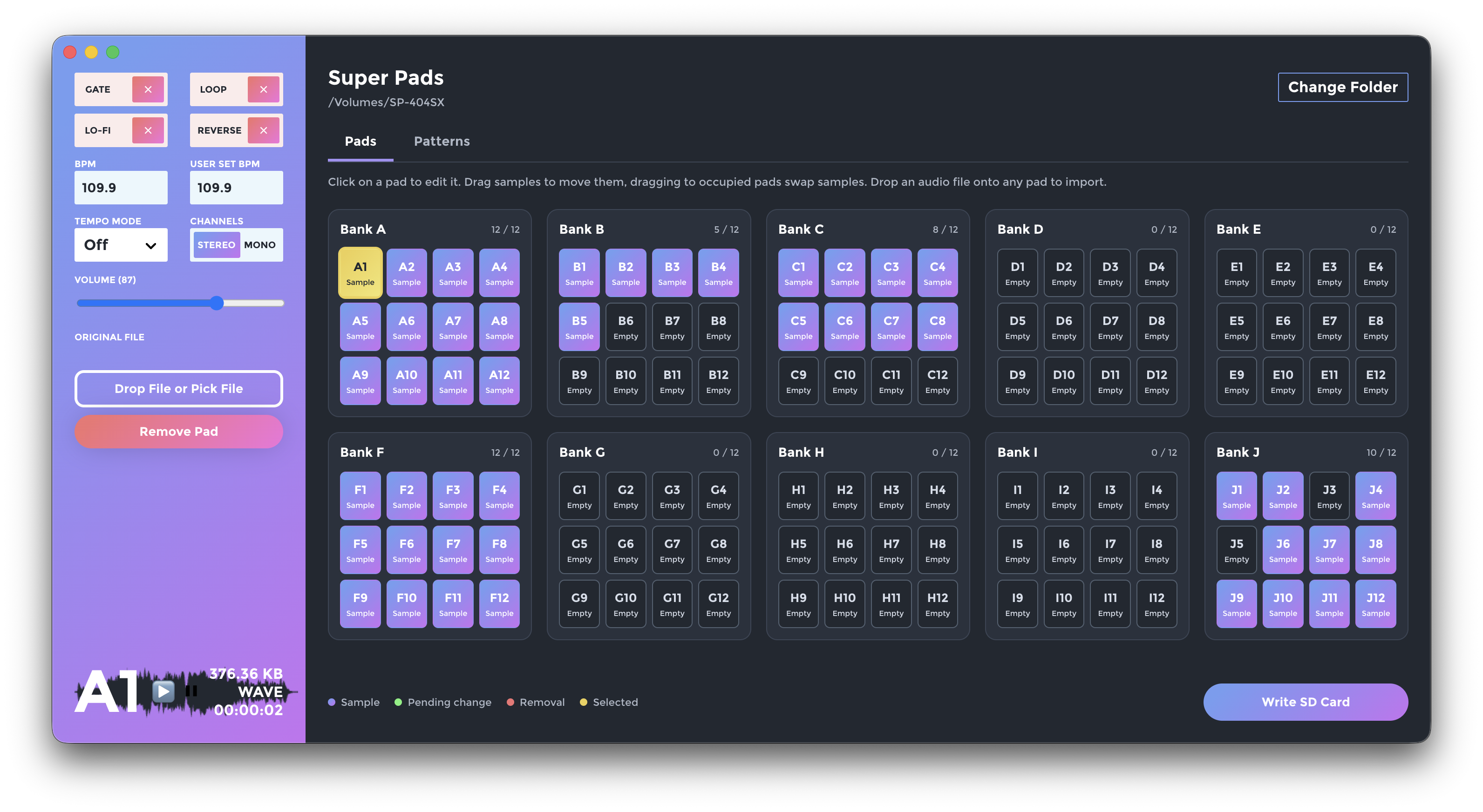
- Pad Editor now shows all ten pad banks together in a wider and resizable window.
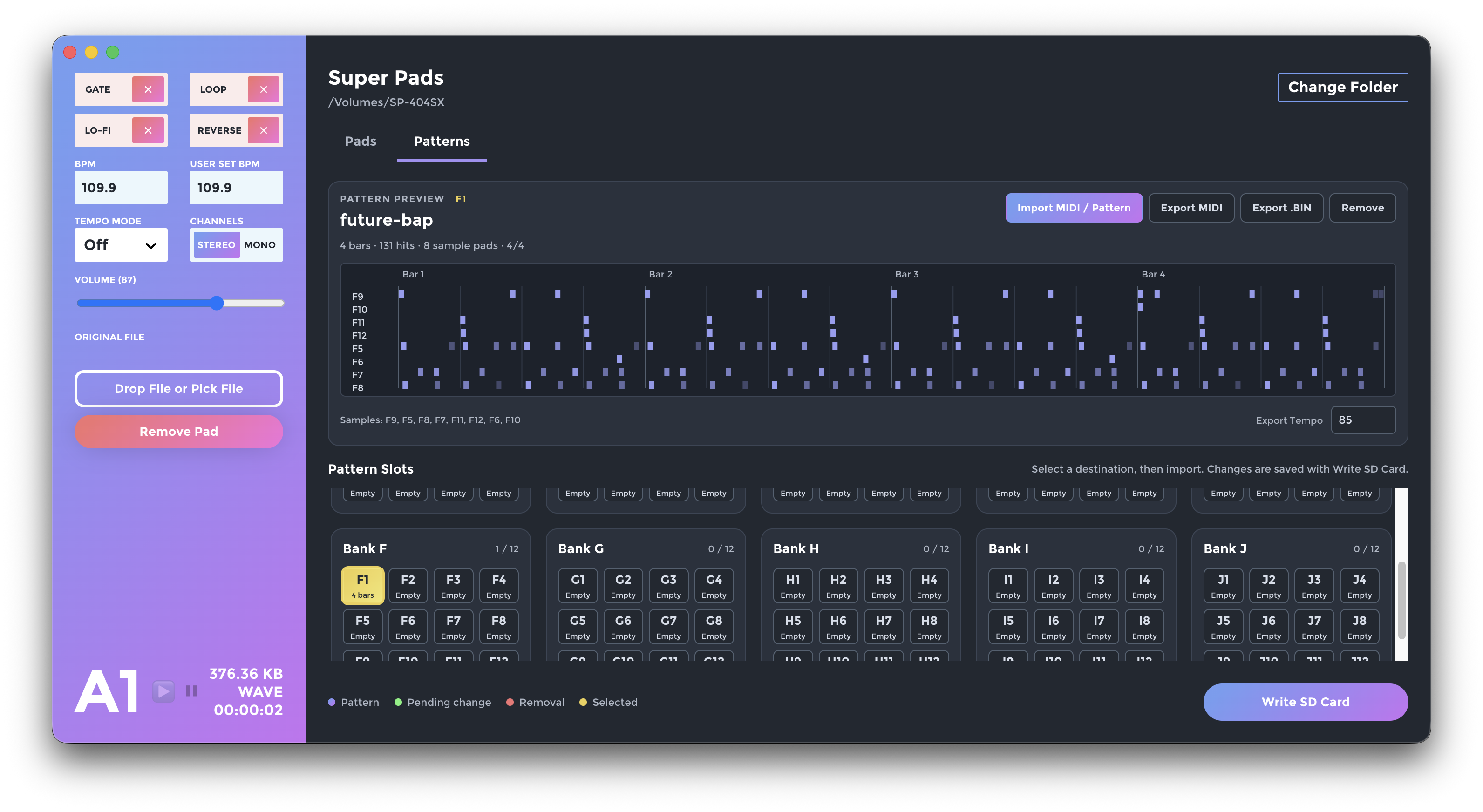
- Pattern Import / Export! You can now import and export your patterns to and from MIDI with MIDI preview and custom pad assignment.
- Preserved tenths of BPM in sample edits.
- Made canceled file / card pickers leave the editor unchanged.
- Fixed several bugs and edge cases.
- Open the app
- Select your SD Card root directory by clicking
Pick Folder - Click any pad in banks A–J to edit its settings on the left.
- Adjust parameters, remove samples, or drop an audio file directly onto any pad. You can also use
Drop File or Pick Fileon the left. Imported files are converted to Wave with FFmpeg when saving. - Drag a sample to another pad to move it. Dropping onto an occupied pad swaps both samples, including their settings and trim points. Pending imports can be moved too.
- Click
Write SD Cardto save your changes and convert imported files. Imports, transfers, and removals stay queued until you write the card. - If any error comes up you will see it above the pad matrix, click it to dismiss.
- If you think something should be working but it not, please file an issue or tweet at me.
Card writes stage imports and transfers before changing the card and keep recovery backups until the save completes. Failed conversions retain your pending edits for a retry. If a save is interrupted, reopen the card in Super Pads to recover it before using it in the sampler. Leave the .super-pads-transaction recovery folder in place until recovery completes. Staging and backups require free space for the changed samples and their previous versions.
Open an SD card and select Patterns. The matrix shows all 120 pattern slots independently of the sample pads. Select a slot, then choose Import MIDI / Pattern, or drop a .mid, .midi, or native SX/A .bin file onto the slot. A timeline above the matrix shows the selected pattern's sample lanes, note durations, velocity, bar count, and hit count.
MIDI import detects the notes actually used and opens an editable note assignment table. Sample Group defaults to the selected pattern slot's bank, with Drum Rack as the default layout. For a pattern in bank F, this maps C1 (MIDI 36) → F9, C#1 → F10, D1 → F11, D#1 → F12, E1 → F5, F1 → F6, F#1 → F7, and G1 → F8; a pattern in bank C uses the same pad positions in group C. You can change the group or edit individual assignments. Auto assignment preserves those positions and assigns other notes to unused pads, continuing into other groups when needed. Ascending maps the lowest used pitch to pad 1 instead. Each pitch must have a unique sample pad; empty pads are called out so you can import the matching samples in All Pads.
Import and removal remain pending until Write SD Card, which saves patterns and sample changes together with recovery backups. Native pattern files are read from ROLAND/SP-404SX/PTN. The SX file order rotates pad 12 to the start of each bank: A12 is PTN00000.BIN, A1 is PTN00001.BIN, and F1 is PTN00061.BIN.
Export MIDI lets you review or change the notes for every used sample pad, imported patterns default to their original MIDI notes. Export .BIN saves the native bytes. SX/A patterns do not store tempo: the optional Export Tempo field adds a MIDI tempo event, and an imported initial MIDI tempo is retained in editor metadata. The converter supports 4/4 MIDI patterns up to 64 bars, scales to the SX's 96 ticks per quarter note, and preserves velocity, duration, and trailing rests. Names, note maps, and export tempo are restored only while the card's pattern bytes still match the saved editor snapshot.
Some super kind folks have made videos showing how to use Super Pads:
- Super Pads: a New Program for Loading Sounds Onto Your SP-404SX
- Short Super Pads Tutorial by lilblizzard97 / Mirror
Tempo Mode is another name for the Time Modify / Time Adjust settings when adjusting the BPM, where turning the knob all the way to the left is Off oFF, so the sample will play at its original length.
Turning the knob all the way to the right is Pattern Ptn and will set the sample to play at the tempo of the pattern. The BPM can be between 40 and 200, and User will use the custom value.
The BPM can only be adjusted to any value from 0.5 to ~1.3 times the original BPM on the machine.
See page 30 of the manual.
To disable and remove the dot files from your SD Cards and free up some space, run these commands in your Terminal of choice where <FS NAME> is your SD Card, by default on the name of card that came with the SP-404SX is SP-404SX, so you would access it like /Volumes/SP-404SX/:
# Prevent the OS from using DS files on USB drives
sudo defaults write com.apple.desktopservices DSDontWriteUSBStores -bool true

# Disable Spotlifht from index this drive
sudo mdutil -i off /Volumes/<FS NAME>

# Remove existing cruft
cd /Volumes/<FS NAME>
sudo rm -rf .{DS_Store,fseventsd,Spotlight-V*,Trashes}

# If this has been used on a Windows OS, you can remove the `System Volume Information` as well
sudo rm -rf System\ Volume\ Information/Use Node.js 24 or newer (Node.js 24 LTS is selected by .nvmrc). Electron 44 requires macOS 13 Ventura or newer and Windows 10 or newer. See Electron's breaking changes for platform support details.
Install the locked dependencies and run the build for your platform. On macOS this produces a separate .dmg for each architecture:
# If you use nvm:
nvm install
nvm use

npm ci
npm start

# Validate audio workers and the Electron UI
npm test
npm run test:smoke

# Compile styles once, or watch with npm run scss
npm run scss-build

# macOS - builds both Apple Silicon (arm64) and Intel (x64) dmgs
npm run build
#  -> dist/Super Pads-mac-arm64.dmg   (Apple Silicon)
#  -> dist/Super Pads-mac-x64.dmg     (Intel)

# Build a single macOS architecture
npm run package-mac-arm   # Apple Silicon only
npm run package-mac-x64   # Intel only

# Other platforms
npm run package-win
npm run package-linux
The bundled FFmpeg (ffmpeg-static-electron) ships native binaries for both arm64 and x64, and the correct one is selected automatically at runtime, so each build runs natively with no Rosetta.
Electron downloads its development binary on the first npm start or npm run test:smoke, those first runs require network access.
Run this on macOS to build all five release files into dist/:
npm run packageSuper Pads-mac-arm64.dmg- Apple SiliconSuper Pads-mac-x64.dmg- Intel macOSSuper Pads-win.exe- Windows x64 portable appSuper Pads-linux.tar.bz2- Linux x64 archiveSuper Pads-linux.AppImage- Linux x64 AppImage
Upload these files to a GitHub release. The command uses --publish never to keep uploading a separate step. Windows and Linux targets explicitly use x64 because the bundled FFmpeg package has no ARM64 binaries for those platforms; macOS builds both architectures.
Cross-platform packaging downloads additional build tools on the first run. See electron-builder's multi-platform build requirements for host prerequisites.
- Code signing is skipped automatically when no Developer ID certificate is available; set up signing/notarization for distribution.
- The
.dmgpackaging step shells out topython3(provided by recent electron-builder). Building on Apple Silicon with an Intel (Rosetta) Node can make that step pick the wrong architecture forxcrun; building with a nativearm64Node avoids it. - Keep application file rules in the shared
build.fileslist. Separate platform lists containing only exclusions can add a second catch-all matcher in electron-builder, inadvertently bundling other workspaces and old build outputs.
Super Pads uses @uttori/data-tools SP404PadInfo for parsing and writing PAD_INFO.BIN and SP404Pattern for native SX pattern and MIDI conversion. The class supports the native SX pattern format: addresses 47–106 with a separate A–E/F–J selector, delays after each hit, big-endian note lengths, and bar count at footer byte 9. The Patterns tab supplies explicit note maps through src/patternMetadata.js and the convertPattern worker. The same package's AudioWAV parses FFmpeg output and encodes its format and Roland RLND header before samples are saved. An Electron wrapper provides the editor interface.
Note: I do not have an OG SP-404 or SP-404A but this could easily support those if someone is willing to help debug issues.
If you would like to suggest something or have found an issue please file a bug or message me on Twitter @superfamicom.
If you would like to support development, listen to my songs, follow me, or playlist my songs 😏
Features I have planned to work on as time permits, roughly in order:
- Investigate alternatives to Electron like Tauri.
- Copy & Paste between pads to move one pad to another or copy one pad to another.
- Saved Sets for easier and fast switching of arrangements.
- Preview Sounds
- Automatic Updates
1.3.0 - 2026-09-14
- Updated Electron to 44.3.0 and refreshed dependencies.
- Updated external-link and drag-and-drop handling for modern Electron.
- Made SD-card saves recoverable with staged writes, backups, rollback, and interrupted-save recovery.
- Failed conversions now preserve pending edits for retry.
- Fixed stereo-to-mono conversion, trim handling when replacing samples, pad-10 metadata, and invalid-card error handling.
- Improved audio previews: switching pads stops playback, waveforms show the full sample, stale previews are cancelled, and special characters in file paths work correctly.
- Reduced resource usage through worker cleanup, waveform caching, faster WAV scans, limited conversion concurrency, and fewer UI rebuilds.
- Fixed accumulating loading animations and bank-dropdown text overlapping the arrow.
- Added npm run package to build all five release assets: macOS ARM64/x64 DMGs, Windows x64 portable executable, and Linux x64 AppImage/archive.
- Fixed oversized bundles and platform-specific FFmpeg packaging.
- Updated icon generation and stylesheet build commands.
- Added 20 automated tests and expanded Electron UI regression coverage.
- Requirements: macOS 13+ or Windows 10+. Building from source requires Node.js 24+.
1.2.0 - 2020-04-04
- 🧰 Update to Electron 12 and rebuild.
- 🧰 More fixes for importing some even weirder WAV files.
1.1.1 - 2020-01-02
- 🧰 Forgot to bump the version number in the previous release 🙃
1.1.0 - 2020-01-01
- 🧰 Fix issue with some errant WAV files preventing SD cards from being read.
1.0.0 - 2020-12-28
- 🧰 Released
- Paul Battley - His Roland SP-404SX sample file format was a huge help.
- Colin Espinas - Weather App Design was the original basis for the app layout and made me think of making the app.
- Himalaya Singh - The beautiful switches you see in the app.
- Envato Tuts+ -The simple and effective tooltips.
- David A. - The trippy perin loading screen.
- alphardex - The rainbow drop area background.