


A local-first file system interface for humans and AI agents.
Browse any path, understand what lives there, and take reversible actions.
Clean Your Data is a keyboard-first terminal disk explorer. It turns an opaque folder into a navigable map with search, filters, sorting, tabs, file previews, local AI questions, duplicate detection, and approval-gated moves to Trash. It is built for humans first, with a metadata contract that local Agents can understand.
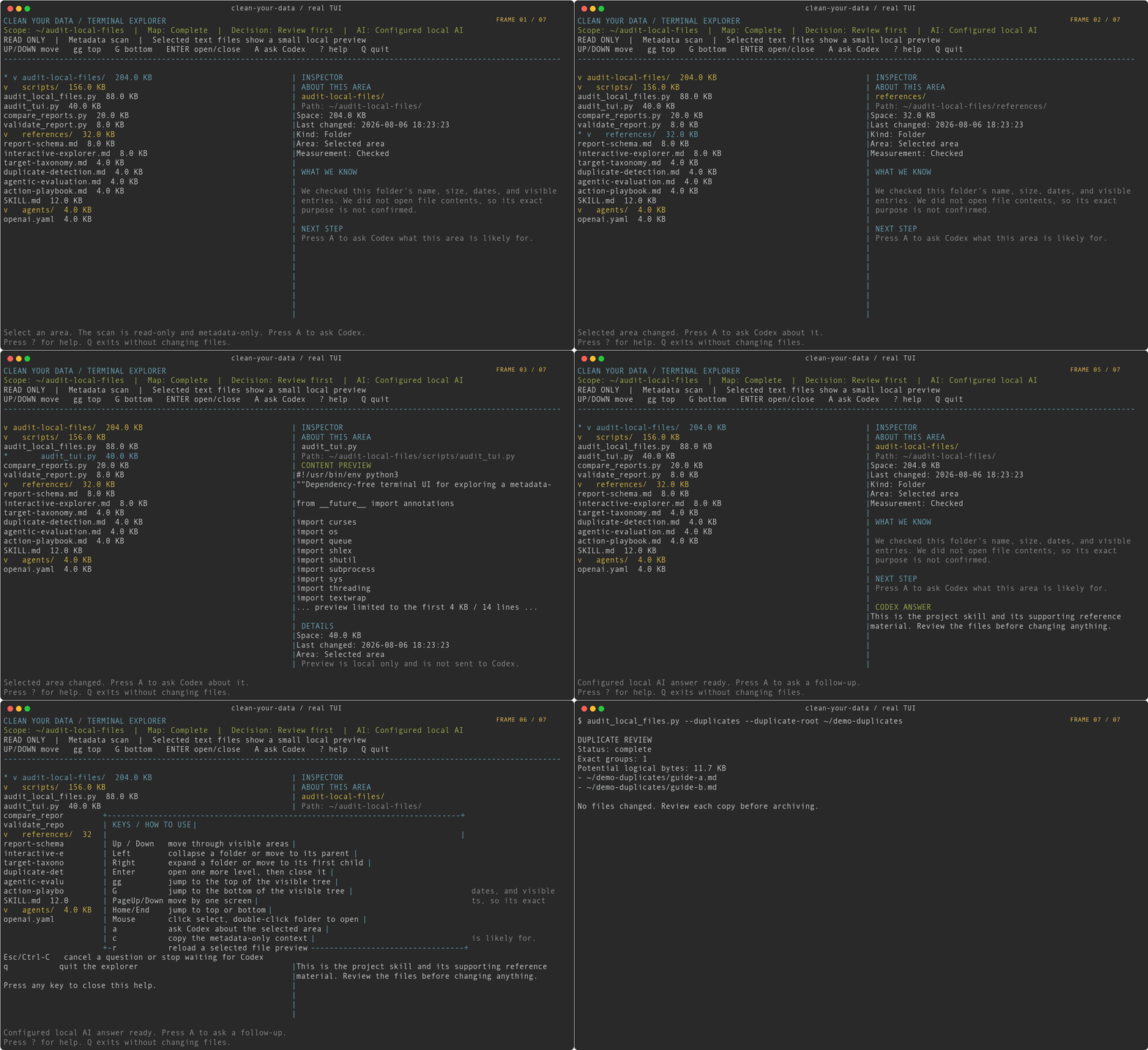
Watch or download the 20-second MP4 demo
Install the package and launch the explorer from any directory:
# Install the current GitHub version immediately.
uv tool install git+https://github.com/MicroMilo/clean-your-data.git

# Explore the current directory, or pass any path you want to inspect.
cyd
cyd ~/Documents/project
When the package is published to PyPI, the install becomes:
python3 -m pip install --user clean-your-data
# or: uv tool install clean-your-data
For a checkout under development, run python3 -m pip install .. cyd --version prints the installed version. The demo uses a sanitized copy of this repository; it does not use a real user's home directory, ~/github, or node_modules.
- Read-only by default. The initial map reads metadata, not file contents.
- No uploads. The scanner never changes files; the TUI can move only an exact, user-confirmed path to the system Trash.
- Exact duplicate matching is opt-in and hashes candidate files locally; raw hashes are not written to reports.
- Home paths are redacted to
~by default. Review project and folder names before sharing a report.
You can send this repository URL to Codex or another local agent:
https://github.com/MicroMilo/clean-your-data
Use a message like this:
Read and use the Clean Your Data skill from this repository. Analyze my local home directory with a read-only, metadata-only audit. Start with the quick audit, keep paths anonymized, do not read chat, browser, mail, document, source, or credential contents, and do not move or delete anything. Give me a decision-ready report: what is accumulating, what owns it, what is durable versus rebuildable, the risks, and the safest next actions.
The agent can clone the repository, read audit-local-files/SKILL.md, and run the bundled scanner locally. The GitHub page itself never receives access to the user's computer.
You can always ask an Agent to inspect a folder. cyd is useful when you want a persistent, human-controlled workspace for that inspection:
| A shell or one-off prompt | Clean Your Data |
|---|---|
| A list of paths or a one-off answer | A live, keyboard-first map you can keep exploring |
| You decide what to inspect from memory | Search, filters, sorting, bookmarks, tags, and tabs keep context visible |
| Deletion is easy to make irreversible | Exact-path staging, review, Trash moves, and undo keep actions reversible |
| An Agent sees an ad hoc prompt | The local metadata context is structured and safe to hand to an Agent |
| You repeat the same investigation manually | Save snapshots and compare what grew over time |
The optional Skill adds a repeatable audit protocol for Agents. The package is the main product: a local file-system interface that gives people control and gives Agents clean context.
discover -> classify -> explain -> assess risk -> plan action -> compare over time
The useful question is not only “what is large?” It is:
What is this data, who owns it, can it be rebuilt, and what can I safely do next?
After installing the package:
cyd ~/Documents/projectFrom the repository root, the compatibility script still works:
python3 audit-local-files/scripts/audit_local_files.py --format markdownOpen the focused terminal explorer:
python3 audit-local-files/scripts/audit_local_files.py \
  --tui \
  --path ~/Documents/project \
  --focus-depth 2
The first scan uses depth 2 and shows the root plus its first two levels. The explorer has no fixed depth limit: deeper folders load when opened, and folders always carry a trailing /.
Core navigation is Up/Down or j/k, Left/Right or h/l, Enter to open/close, gg/G for the endpoints, Home/End for the same endpoints, and PageUp/PageDown for a screen. Mouse clicks select an area, double-clicking a folder opens it, and the scroll wheel moves the selection. Press ? for the complete key list and q to quit.
Advanced browsing is always available from the same tree:
/fuzzy-searches loaded names, paths, areas, and tags;ffilters to folders, files, large items, recent changes, likely rebuildable paths, bookmarks, cleanup candidates, or tagged paths;ssorts each sibling group by tree order, name, allocated size, modification time, or kind;Tedits comma-separated local tags;@marks tagged rows;Nopens the selected folder in a new tab;gt/gTswitch tabs;Xcloses the current tab.
Search, filter, and sort are view controls over the current metadata map. They do not rescan or change files. While / or T is editing, Enter applies, Esc cancels, and Ctrl-U clears the input.
TUI startup is focused: it measures only the selected --path roots before opening and does not run the home-wide audit. Use the non-TUI commands when you want the full home report.
Explore one path as an interactive, metadata-only map:
python3 audit-local-files/scripts/audit_local_files.py \
  --path ~/Documents/project \
  --focus-depth 2 \
  --tui
The terminal explorer shows an area's name, path, size, last-change time, and inferred area. Selecting a file also shows a small local text preview, limited to 4 KB and 14 lines; binary files and likely credential files are hidden. Press a to enter a question for Codex. When the codex CLI is available, it uses a read-only, ephemeral codex exec session; otherwise set CLEAN_YOUR_DATA_AI_COMMAND to a trusted local command that reads the prompt from stdin. The preview is never included in that prompt. The scanner never makes network requests; pressing a hands only metadata to the selected local AI command, whose own authentication and network rules apply.
The selected path is also the context for local actions: t opens Terminal, v opens VS Code, c opens Cursor, and o reveals the path in Finder. a opens the Codex question box beside the tree, m saves a bookmark, M browses bookmarks and recent paths, w saves the current workspace, and W restores it. D runs a bounded metadata-only relationship analysis that connects project markers, source files, dependencies, build folders, outputs, and possible repeated files. These local actions do not pass paths through a shell. Bookmarks, tags, recents, and the last workspace stay in the local ~/.clean-your-data/workspace-state.json file and are never added to reports.
Tabs are session-local views. Opening a tab on a selected folder keeps that path's report, selection, search, filter, and sort state available while you inspect another area. Closing a tab does not touch its files.
Find exact duplicates only when you explicitly want content hashing:
python3 audit-local-files/scripts/audit_local_files.py \
  --duplicates \
  --format markdown \
  --output duplicate-audit.md
The duplicate pass first groups files by size, then streams SHA-256 locally for candidate files. It does not upload content or expose raw hashes. By default it scans common workspace roots, skips app-managed/cloud-sync roots and rebuildable directories, and reports hard-link aliases and parent-scope overlap so “potential duplicate bytes” is not mistaken for guaranteed reclaimable space. Use --duplicate-root PATH only for an explicitly understood additional scope.
Write a local report:
python3 audit-local-files/scripts/audit_local_files.py \
  --format markdown \
  --output local-file-audit.md
Run a deeper audit before reorganizing a machine:
python3 audit-local-files/scripts/audit_local_files.py \
  --mode full \
  --children \
  --artifacts \
  --git-status \
  --format markdown \
  --output local-file-audit-full.md
The scanner never changes the scanned files. In the TUI, cleanup is a separate, approval-gated action: dd stages a candidate, the local coding agent gives a preliminary metadata-only recommendation, and an explicit confirmation moves the exact path to system Trash. Press u to undo the most recent move during the session. App-managed data, cloud-sync roots, unknown paths, and incomplete measurements are blocked.
select -> dd stage -> preliminary scan -> coding-agent advice -> review exact path -> y confirm -> system Trash -> refresh map -> u undo
The initial scan is evidence, not permission. The agent's recommendation is advisory and cannot execute a command. After a successful move or restore, the TUI re-scans only the focused path. It also records the original path locally so an approved Trash move can be restored without overwriting a newer path.
JSON output is a local snapshot. Save two snapshots and compare them:
mkdir -p snapshots

python3 audit-local-files/scripts/audit_local_files.py \
  --mode full --children --artifacts --git-status \
  --format json --output snapshots/before.json

# Use the machine normally, then run the same command again as after.json.

python3 audit-local-files/scripts/compare_reports.py \
  snapshots/before.json snapshots/after.json
The comparison highlights disk usage, target areas, Codex workspace counts, Git dirty changes, rebuildable artifacts, exact duplicate groups, and interactive-map coverage that changed. Keep snapshots local unless you review their paths first.
The JSON report now carries a small decision contract:
measurement_statusdistinguishes measured, timeout, error, missing, and unknown;coveragerecords which target families were actually measured;findingslinks each recommendation to evidence, owner, risk, confidence, and rollback/rebuild guidance;space_maprecords a bounded, keyboard-navigable view of a selected path using names, sizes, dates, and measurement status only;action_gatekeeps the result inreview_onlywhen evidence is incomplete or dirty Git work must be preserved.
Validate a saved snapshot before handing it to another Agent:
python3 audit-local-files/scripts/validate_report.py snapshots/before.jsonTerminal output is intended for local review. It follows the report's redaction settings, but you should still review project and folder names before sharing a saved report. TUI bookmarks, recent paths, and the last workspace are stored locally in ~/.clean-your-data/workspace-state.json and are never included in reports.
Artifact rows are candidate subsets. They may already be included in a parent workspace total, so the report does not present them as additive reclaimable space.
The project uses a maintainer-only evaluation loop: run a real local audit, aggregate and redact the evidence, ask independent roles to review it, synthesize the smallest change, then run contract and fixture tests before publishing. Raw local reports never enter the repository. See the evaluation loop.
The report is designed to turn raw measurements into a next step:
Main pattern: data is concentrated in AI workspaces, app-managed storage,
and project build artifacts.

Interpretation:
- AI workspace: inspect and promote durable outputs before archiving.
- App-managed storage: use the owning app's storage controls; do not delete
  its container directly.
- Build artifact: potentially rebuildable, but check the project and disk
  cost before removal.
- Dirty Git repository: preserve or commit/stash changes before moving it.

Next action: review exact paths, then approve one reversible category at a time.
See the anonymized sample report and the agent handoff prompt.
The scanner collects local metadata only:
- path existence and home-relative paths;
- allocated directory size;
- modification time;
- optional Git repository and dirty-entry counts.
It does not read chat messages, browser history, email bodies, document text, source code, credentials, or keychains. The selected-file preview is a separate local exception: it reads at most 4 KB and 14 lines, skips binary and likely credential files, and is never sent to Codex. The scanner does not make network requests and does not upload reports.
Exact duplicate mode is an explicit exception to the metadata-only default: it reads candidate file bytes locally to calculate SHA-256 matches. It still makes no network requests, stores no raw hashes in the report, and never modifies files.
Reports redact the home directory to ~ by default. Git origin URLs are omitted by default. Review project and folder names before sharing any report publicly. Do not publish reports generated with --no-redact or --include-git-origins.
The scanner does not perform cleanup. App-managed data should be handled by the owning app; rebuildable artifacts should be removed only after their exact paths, rebuild cost, and rollback options are understood.
An agent can install the audit-local-files/ directory as a Codex skill. For a manual local install:
git clone https://github.com/MicroMilo/clean-your-data.git
mkdir -p ~/.codex/skills
cp -R clean-your-data/audit-local-files ~/.codex/skills/audit-local-files
Then ask Codex:
Use $audit-local-files to audit my local file organization. Start read-only and anonymized. Do not delete anything.
- Python 3.9+
duon macOS/Linux for fast allocated-size measurementgitonly for Git discovery or status checkscursesand an interactive terminal for--tui(standard library on macOS/Linux)
No third-party Python packages are required.
先看清,再动手。
Clean Your Data 把电脑里的文件沉积转换成一份隐私友好、可以做决定的本地审计报告。它会检查 Desktop、Downloads、AI 工作区、Git 仓库、微信/飞书等协作 App、本地云盘,以及 node_modules、.venv、build 等可重建产物。
默认只读、只读取元数据;TUI 仅在选中文件时提供受限的本地预览,不上传数据。清理时必须先用 dd 加入候选,再确认精确路径;确认后只移入系统废纸篓,不做永久删除,动作完成后会重新扫描指定路径,u 可以撤销最近一次移动。
把这个 GitHub 地址发给 Codex 或其他本地 Agent:
https://github.com/MicroMilo/clean-your-data
可以直接附上:
请读取并使用这个仓库里的 Clean Your Data skill。对我的本地 home 目录做一次只读、只读取元数据的审计。先运行快速模式,路径保持匿名化,不读取聊天、浏览器、邮件、文档、源码或凭据内容,也不要移动或删除任何文件。请输出一份可以做决定的报告:哪些数据正在沉积、由谁管理、哪些是长期资产或可重建产物、风险是什么,以及最安全的下一步。
Agent 可以下载仓库、读取 audit-local-files/SKILL.md,然后在用户电脑本地运行扫描器。GitHub 页面本身不会获得用户电脑的访问权限。
Codex 可以完成一次分析,但这个仓库把每次都应该保持一致的部分固定下来:覆盖范围、隐私边界、分类标准、风险判断、行动审批和历史比较。它不是替代 Codex,而是让 Codex 以一套可重复、可审计的本地数据体检流程工作。
发现 -> 分类 -> 解释 -> 追问 -> 判断风险 -> 生成行动计划 -> 定期比较
真正要回答的不是“哪里最大”,而是:
这些数据是什么、由谁管理、能否重建、我接下来怎样处理才不会误删?
安装包后,从任意目录打开磁盘浏览器:
# 直接安装 GitHub 当前版本
uv tool install git+https://github.com/MicroMilo/clean-your-data.git

# 浏览当前目录,或传入指定路径
cyd
cyd ~/Documents/project
开发仓库时可以在仓库根目录执行 python3 -m pip install .。发布到 PyPI 后,也可以执行 python3 -m pip install --user clean-your-data。cyd --version 查看版本。
旧的脚本入口仍然保留,方便已有用户和 Agent 继续使用:
python3 audit-local-files/scripts/audit_local_files.py --format markdown更适合人直接阅读的终端交互界面:
python3 audit-local-files/scripts/audit_local_files.py \
--tui --path ~/Documents/project --focus-depth 2终端界面第一次只扫描两层目录,显示根目录和下面两层。使用方向键浏览,gg 跳到顶部,G 跳到底部,Home/End 跳到两端,PageUp/PageDown 按屏幕翻页,Enter 按需加载下一层或收起当前文件夹,a 在树右侧打开问题框,Enter 发送问题,Esc 或 Ctrl-C 取消,t 在当前目录打开 Terminal,v 用 VS Code 打开,c 用 Cursor 打开,o 在 Finder 中定位,m/M 管理书签,w/W 保存或恢复工作区,D 深度分析当前路径,dd 把选中的精确路径加入清理篮,Y 打开废纸篓确认框,确认框中按 y 执行,u 撤销最近一次移动,C 复制只包含元信息的提问上下文,r 重新读取文件预览,? 查看帮助,q 退出。dd 不会立即移动文件;右侧会分别显示初步扫描结论和 coding agent 的建议。鼠标单击选择区域,双击文件夹展开,滚轮移动选择。问题框打开时,q 会作为问题文字输入;要离开问题框请按 Esc 或 Ctrl-C。文件夹会显示为 venv/ 这种形式,深度没有固定上限,会在进入时继续加载。
TUI 启动时只测量你指定的 --path,不会先做整个 home 目录的审计;需要完整 home 报告时使用非 TUI 命令。
如果你想持续追问某个目录,而不是只看一次总表,可以指定路径生成可点击的空间地图:
python3 audit-local-files/scripts/audit_local_files.py \
  --path ~/Documents/project \
  --focus-depth 2 \
  --tui
终端界面会展示名称、路径、大小、最后修改时间和所属区域;选中文件后,右侧会显示最多 4 KB、14 行的本地文本预览,二进制文件和疑似凭据文件会隐藏。按 a 输入“这个文件夹是干什么的?”之类的问题;如果本机有 codex 命令,TUI 会在后台使用只读、临时的 Codex 会话回答,期间仍可移动光标。按 D 会在后台做一次只读取元信息的深度分析,尝试关联项目标记、源码、依赖、构建目录、输出目录和可能重复的文件。按 dd 后,TUI 会用另一条只包含元信息的清理顾问请求,让 coding agent 判断“保留、复核、归档、可重建候选、交给所属应用或不要触碰”;这只是初步建议,不是删除授权。没有 Codex CLI 时,可以设置可信的 CLEAN_YOUR_DATA_AI_COMMAND,让本地命令从 stdin 接收元信息上下文。文件预览不会发送给 Codex;按下 a 或 dd 后,是否联网由本地 Codex 或其他命令自己的配置决定。回答会保留在对应区域,移动回来仍然可见。
如果明确需要查找精确重复文件,可以显式开启本地哈希:
python3 audit-local-files/scripts/audit_local_files.py \
  --duplicates --format markdown --output duplicate-audit.md
该模式先按文件大小筛选候选,再在本机流式计算 SHA-256;不会上传文件,也不会把原始哈希写入报告。默认只扫描常见工作区,排除 App 私有数据、云同步目录和可重建产物,并标注硬链接、父目录和同步范围重叠。“潜在重复空间”是逻辑字节,不等于可以直接删除或一定能回收的空间。只有在明确理解范围后,才使用 --duplicate-root PATH 增加目录。
深度模式:
python3 audit-local-files/scripts/audit_local_files.py \
  --mode full --children --artifacts --git-status \
  --format markdown --output local-file-audit-full.md
保存 JSON 快照后,可以用 audit-local-files/scripts/compare_reports.py 比较两次审计,观察哪些区域在增长。
交给其他 Agent 之前,可以先运行 python3 audit-local-files/scripts/validate_report.py snapshots/before.json 校验报告契约。
JSON 报告还会区分 measured、timeout、error、missing 和 unknown,记录 coverage、证据关联的 findings,以及是否因为证据不足或 Git dirty 状态而只能停留在 review_only。artifact 可能已经包含在父工作区大小中,不会被当成可回收空间重复相加;重复组也会记录父目录、硬链接和云同步重叠。
交互地图由 space_map 保存。它只扫描指定路径的有限层级,使用名称、大小、修改时间、类别和测量状态;超过时间或节点预算时会明确标记为不完整,不把未知区域当成零空间。
扫描器只读取路径、占用大小、修改时间和可选的 Git 状态计数;不会读取聊天、浏览器历史、邮件正文、文档正文、源码、凭据或 keychain。选中文件时,TUI 会额外提供一个本地预览例外,最多读取 4 KB、14 行,跳过二进制和疑似凭据文件,且不会发送给 Codex。默认把 home 目录显示为 ~,默认不输出 Git origin URL。清理历史保存在本机 ~/.clean-your-data/cleanup-history.json,书签、最近路径和最后工作区保存在 ~/.clean-your-data/workspace-state.json;这些文件只在本地使用,不会写入报告或上传。任何公开分享前,都应检查项目名和文件夹名。
项目维护时会使用真实本机审计的聚合匿名证据包,让不同 Agent 角色独立评审,再通过确定性 fixture 和 schema 测试后发布;原始本机报告不会进入仓库。
安装包没有第三方运行时依赖。需要 Python 3.9+;macOS/Linux 上的 du;只有在进行 Git 检查时才需要 git;TUI 需要支持 curses 的交互式终端。若要按 a 或 dd 询问 Codex,还需要本机已登录的 codex CLI,或自行配置 CLEAN_YOUR_DATA_AI_COMMAND;D 的深度关系分析只使用 Python 标准库。t/v/c/o 会调用本机已有的 Terminal、VS Code、Cursor 或 Finder;移动到系统废纸篓使用本机文件系统。
MIT. See LICENSE.