
An embedded Linux platform for building, deploying, updating and managing connected products —
a native app runtime, signed apps, an app store, atomic OTA updates and one hardware API for Go, Python and Java.


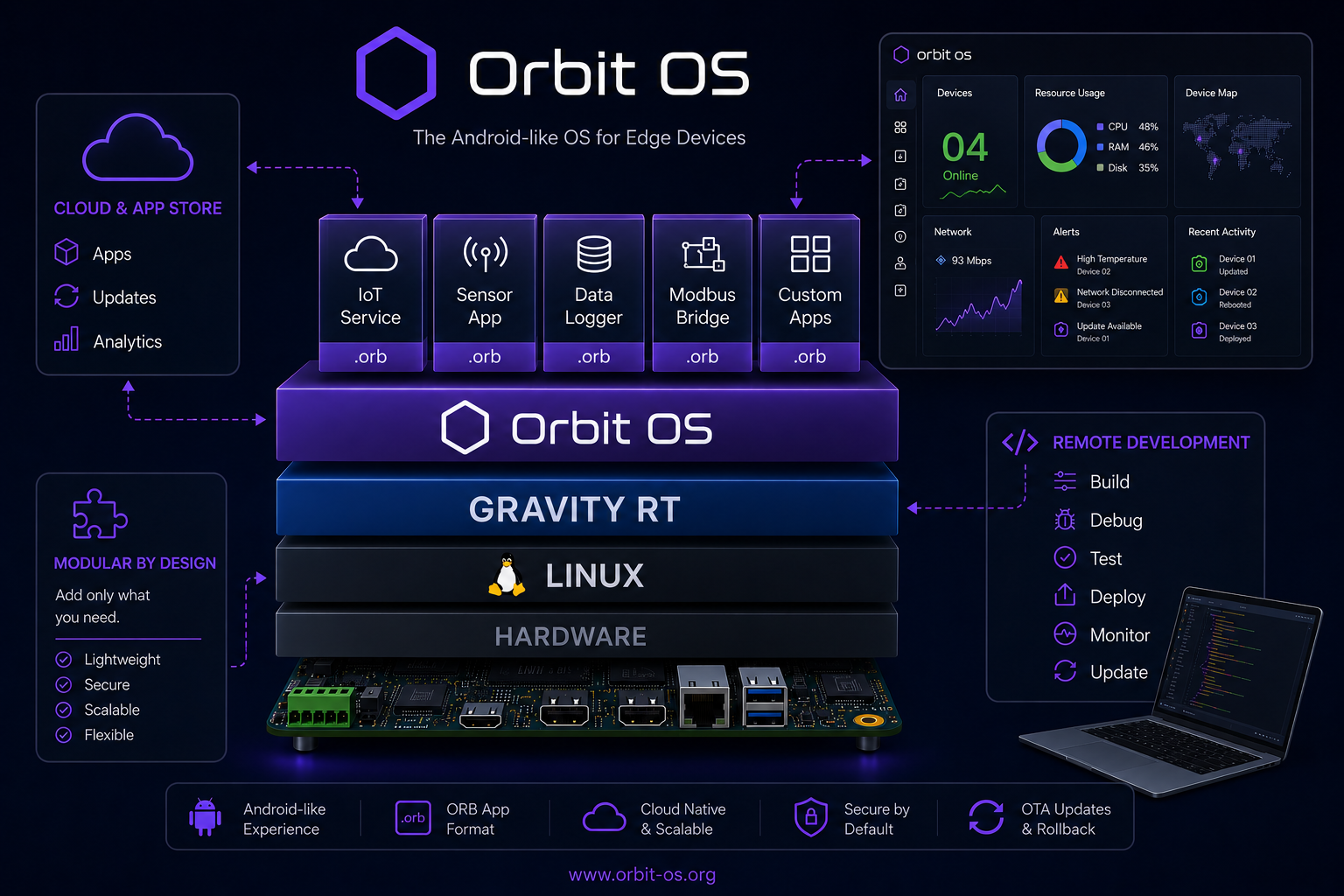
Every embedded Linux product rebuilds the same platform layer: hardware access, app lifecycle, remote deployment, OTA updates, security. Orbit OS ships it ready-made, so you write only the application.
- Installs on top of your existing Linux — no reflashing. A native runtime (Gravity RT) supervises every app — no Docker.
- Real-time development on real hardware — run your code from your laptop against the device's GPIO, I²C, UART, camera and AI APIs, then ship it as a signed
.orb. - One API for all hardware, the same in Go, Python and Java, locally or remotely (IPC on the device, a secure mTLS connection from outside).
- App Store, OTA and fleet — install apps in one click, update apps and the runtime over the air with rollback.
- Edge AI built in — TFLite and ONNX runtimes on the device.
| 1 · Install | 2 · Develop | 3 · Ship |
|---|---|---|
| Run the installer on a Raspberry Pi, Arduino UNO Q or other ARM64 board — guide | Create a project in Orbit Studio (VS Code) and run it live against the device | Build a signed .orb, deploy it, or publish it on the Orbit OS Store |
// UDS on the device, TCP + mTLS from your laptop (Developer Mode) — same API
c, err := client.NewClientAuto("192.168.1.100")
if err != nil {
	log.Fatal(err)
}
defer c.Close()

led := &client.GpioPin{Name: "GPIO17", Number: 17, ChipNumber: 0}
c.GpioManager.SetDirection(led, client.GPIO_DIR_OUT)
c.GpioManager.SetLevel(led, client.GPIO_LEVEL_HIGH)
Python
from client import Client
from client.gpio_manager import GpioPin, GpioDirection, GpioLevel

device = Client.connect("192.168.1.100")
led = GpioPin(name="GPIO17", number=17, chip_number=0)
device.gpio_manager.set_direction(led, GpioDirection.OUT)
device.gpio_manager.set_level(led, GpioLevel.HIGH)
Java
try (Client client = Client.connect("192.168.1.100", "my-app")) {
    var led = new GpioManager.GpioPin("GPIO17", 17, 0);
    client.gpioManager().setDirection(led, GpioManager.Direction.OUT);
    client.gpioManager().setLevel(led, GpioManager.Level.HIGH);
}
Full reference: SDK & API reference (API 26) · PDF manuals
SDKs — one hardware API, three languages (Apache-2.0)
| Language | Repository | Requires |
|---|---|---|
| Go | orbit-os-sdk-go | Go 1.25+ |
| Python | orbit-os-sdk-python | Python 3.10+ |
| Java | orbit-os-sdk-java | Java 17+ |
| C++ | Coming soon — planned for Q4 2026 | — |
Documentation — downloadable manuals
| Repository | What it has |
|---|---|
| orbit-os-docs | SDK API Reference as a printable PDF, one per API version, covering Go, Java and Python |
Apps — open-source apps you can install from the Store or build yourself
| App | Repository | What it does | Language | License |
|---|---|---|---|---|
| MCP Server | orbit-os-app-mcp-server | Let AI agents (Cursor, Claude Code…) control GPIO, I²C, UART, Wi-Fi and Bluetooth on a real device | Go | Apache-2.0 |
| Edge AI – Smart Image Detection | orbit-os-app-smart-image-detection | On-device object detection (YOLOv8, TFLite) on your own images — an example of the Orbit OS AI API | Go | AGPL-3.0 |
| Edge AI – Face Recognition | orbit-os-app-face-recognition | Face detection and recognition from a camera, on the device: enroll a person in seconds and see names live in the browser | Go | Apache-2.0 |
| Mochi MQTT Broker | orbit-os-app-mochi | Mochi MQTT broker with a web admin UI: listeners, MQTT users, topic filters and live messages | Go | Apache-2.0 |
| Moquette MQTT Broker | orbit-os-app-moquette | Moquette MQTT broker with a web admin UI: start/stop, live clients, configuration and MQTT users | Java | Apache-2.0 |
| Orbit Flow | orbit-os-app-orbit-flow | Build automation by wiring blocks in your browser, the Node-RED way: Modbus, OPC UA, S7, MQTT, GPIO, PWM and a dashboard for your phone | Go | AGPL-3.0 |
| Pulse | orbit-os-app-pulse | Device monitor with history: CPU, memory, temperature, disk, network and per-app use as charts in the browser, from the last hour to a year | Python | Apache-2.0 |
| RPI 4-Channel Relay | orbit-os-app-rpi-4ch-relay-keyestudio | 4-channel relay controller with web UI, Modbus TCP and MQTT / Home Assistant | Go | Apache-2.0 |
| Serial Console | orbit-os-app-serial-console | A serial terminal in your browser: reach a device's UART over the network, with a real terminal emulator | Go | Apache-2.0 |
Apps and products made by other teams that run on Orbit OS.
| Project | What it is | Links |
|---|---|---|
| Sprinqua | Smart irrigation controller for Raspberry Pi relay boards: watering programs, weather-based Smart Watering and Home Assistant over MQTT. Open source (GPL-3.0). | Website · GitHub · Orbit OS Store |
Built something on Orbit OS? Tell us at info@orbit-os.org or in the forum and we'll add it here.
| Area | Services |
|---|---|
| Hardware I/O | GPIO, I²C, SPI, UART, PWM, Camera |
| Connectivity | Wi-Fi, Ethernet, Cellular, Bluetooth (BLE), VPN |
| AI | TFLite and ONNX model loading and inference |
| System | OTA updates, package manager (.orb), events, power, metrics, firewall |
| Apps & users | AppHub (web UIs behind one login), push notifications to the Orbit OS mobile app |
Community Edition (free for any use): Raspberry Pi 3 / 4 / 5 / Zero 2 W, Arduino UNO Q and other ARM64 embedded Linux boards. Building your own device? See the Hardware Certification Program.
Website · Getting started · Downloads · Docs (PDF) · App Store · Forum · YouTube · info@orbit-os.org
The Orbit OS Community Edition is free for any use. The SDKs are open source under Apache-2.0; the apps listed above are open source under the license shown for each one.