
See how many real people read your content, right inside Strapi. No cookies, no cookie pop-up, no bots.
You publish content in Strapi, but your visitor numbers live somewhere else. And the usual tools use cookies, so in many countries your website must first show a cookie pop-up (the box that asks visitors to say yes to cookies). Many people click no, and their visits never show up. Bots add fake visits on top.
This plugin brings Privatus Analytics into your Strapi admin panel. You see your visitors, top pages and top sources next to your content. Each entry shows its own page views for the last 30 days, so editors know which posts work. And your front end gets the tracking script from one API call.
The Privatus Analytics script sets no cookies and keeps no IP addresses. Known bots and data center traffic are left out before they are counted.
Free plan, no card: 10,000 events a month (an event is a page view or an action you track) on up to 3 sites. Start free at privatusanalytics.com.
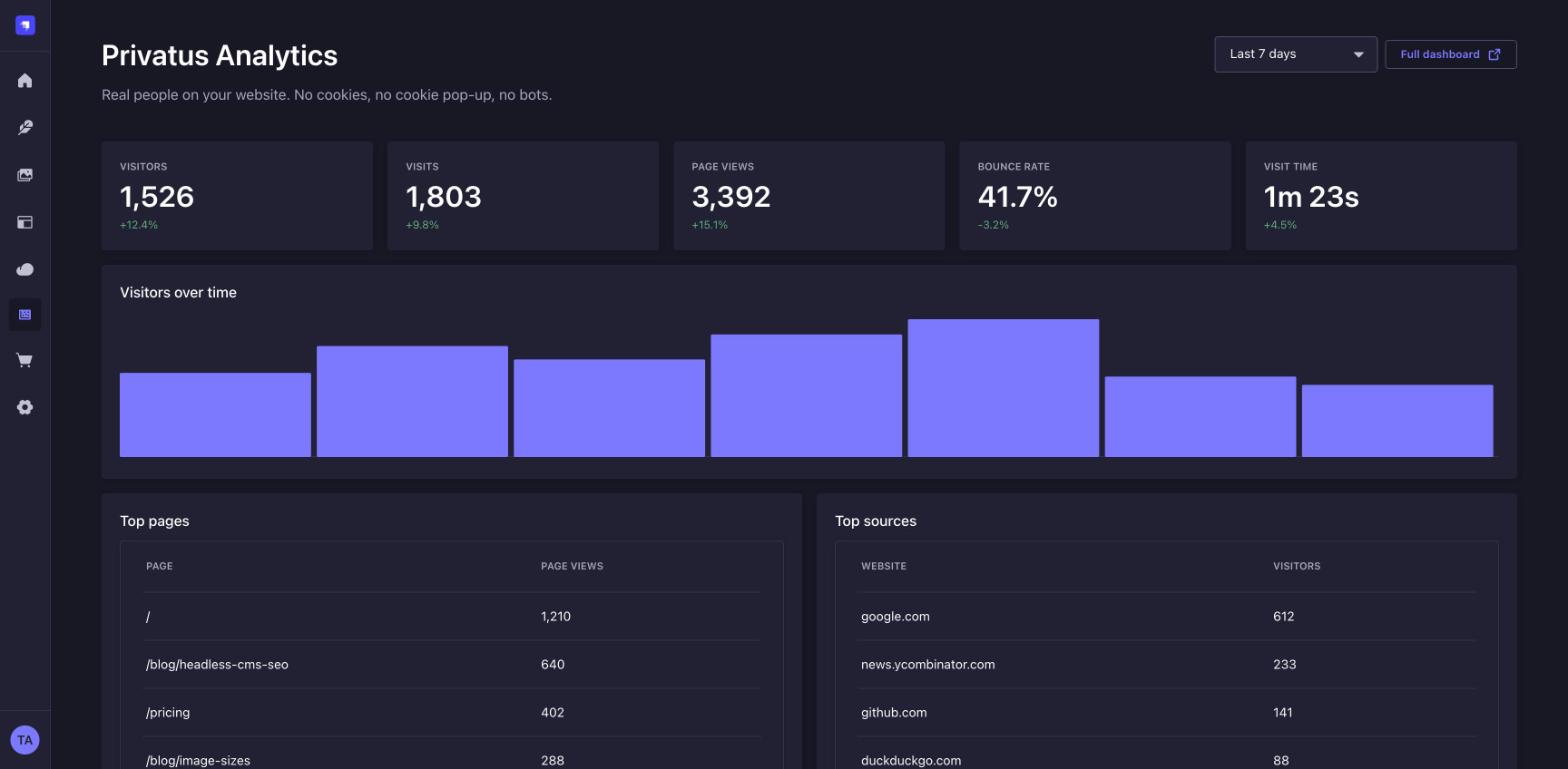
- A stats page in the admin panel. Visitors, visits, page views, bounce rate and visit time, with the change from the period before. Plus a visitor chart, top pages and top sources. Pick a date range from today to the last 12 months.
- Page views on each entry. A side panel on the Content Manager edit view shows the entry's visitors, page views and top sources for the last 30 days.
- A home page widget. The last 7 days at a glance on the Strapi home page (Strapi 5.13 and later).
- The tracker tag for your front end. Copy it from the settings page, or
fetch it from
GET /api/privatus-analytics/tracker. - Roles and permissions. "See stats" and "Change settings" can be given to any admin role.
Works with Strapi 5. The plugin adds no database tables.
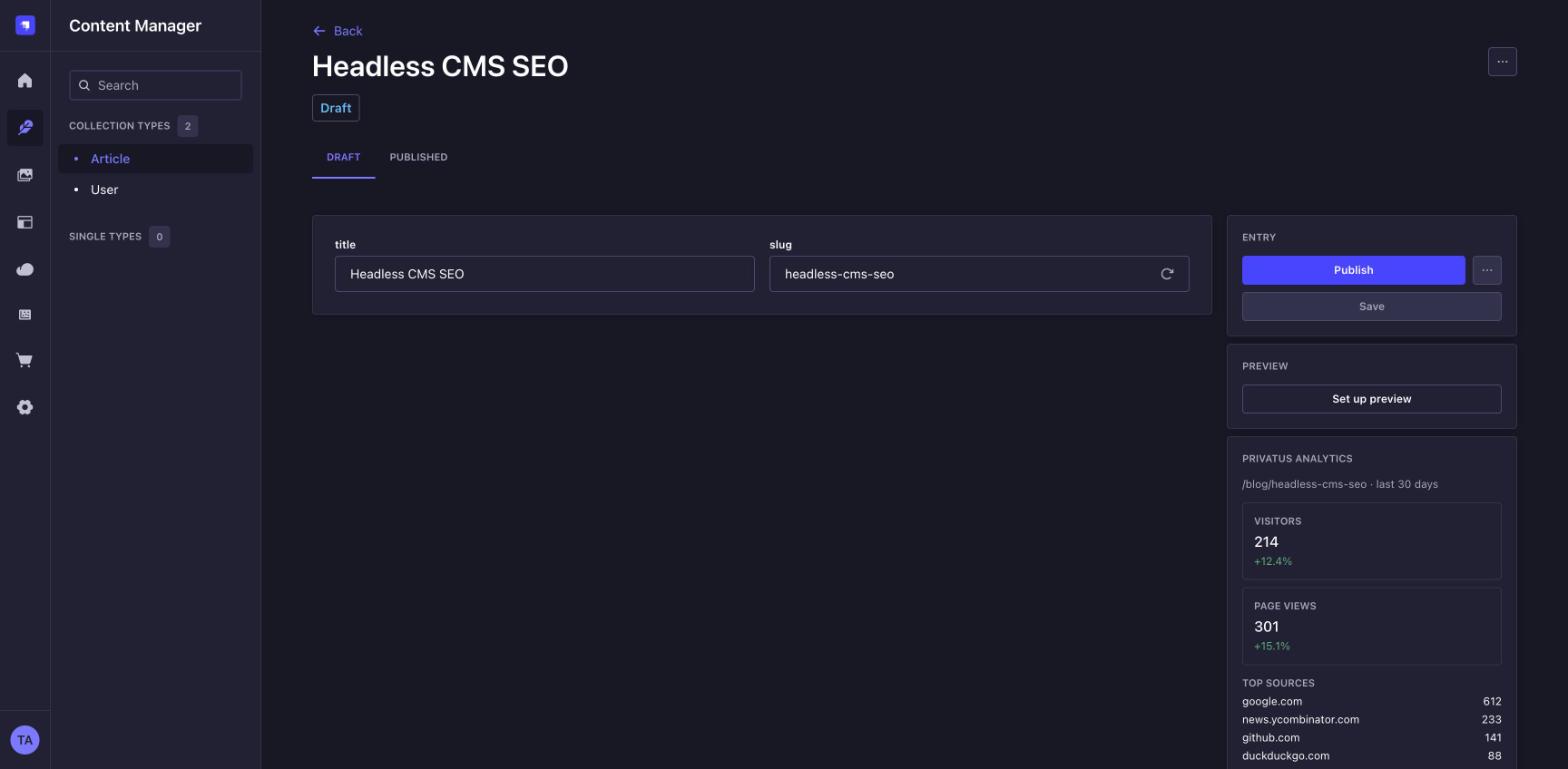
The screenshots use example numbers from the test setup in e2e/.
npm install strapi-plugin-privatus-analyticsAdd your API token to .env. Create the token in your Privatus Analytics
account settings. It starts with pat_.
PRIVATUS_API_TOKEN=pat_your_token
PRIVATUS_SITE_ID=pa_your_site_id
Then turn the plugin on in config/plugins.ts:
import type { Core } from '@strapi/strapi';

const config = ({ env }: Core.Config.Shared.ConfigParams): Core.Config.Plugin => ({
  'privatus-analytics': {
    enabled: true,
    config: {
      apiToken: env('PRIVATUS_API_TOKEN'),
      siteId: env('PRIVATUS_SITE_ID'), // you can also set it on the settings page
    },
  },
});

export default config;
In a JavaScript project, use config/plugins.js with
module.exports = ({ env }) => ({ ... }) and the same object.
Rebuild the admin panel and restart Strapi:
npm run build
npm run develop
You now have Privatus Analytics in the main menu, and a settings page under Settings > Global settings > Privatus Analytics.
The API token is only used on your Strapi server. It is never saved in the database and never sent to the browser.
Strapi is headless, so the tracking script goes on your front end (Next.js,
Nuxt, Astro, a plain HTML site and so on). Add this tag to the <head> of every
page:
<script defer src="https://privatusstats.com/js/pa.js" data-site="pa_YOURSITEID" data-modules="engage,auto,vitals,clicks,ask"></script>The settings page shows the exact tag for your site. Or fetch it at build time or run time:
- Go to Settings > Users & Permissions plugin > Roles > Public.
- Under Privatus-analytics, tick tracker and save.
- Call the route:
curl https://your-strapi.example.com/api/privatus-analytics/tracker{
"data": {
"siteId": "pa_YOURSITEID",
"src": "https://privatusstats.com/js/pa.js",
"modules": "engage,auto,vitals,clicks,ask",
"tag": "<script defer src=\"https://privatusstats.com/js/pa.js\" data-site=\"pa_YOURSITEID\" data-modules=\"engage,auto,vitals,clicks,ask\"></script>"
}
}You can also call it with a Strapi API token instead of opening it to the Public role.
To track actions such as sign-ups, call window.privatus.track(name, props) in
your front end. See the docs.
The plugin needs to know where each entry lives on your website. On the settings page, give each content type a URL pattern with field names in curly brackets:
| Content type | Pattern | Entry | Page |
|---|---|---|---|
| Article | /blog/{slug} |
slug hello-world |
/blog/hello-world |
| Product | /{locale}/products/{slug} |
locale de, slug mug |
/de/products/mug |
| About (single type) | /about |
/about |
The side panel shows only for content types that have a pattern. If a field in the pattern is empty, the panel says so instead of guessing.
All options go under config in config/plugins.
| Option | Default | What it does |
|---|---|---|
apiToken |
none | Your Privatus Analytics API token (pat_...). Needed for stats. |
siteId |
none | Your site ID, such as pa_ABC123. The settings page can override it. |
modules |
engage,auto,vitals,clicks,ask |
Tracker modules in the script tag. The settings page can override it. |
scriptUrl |
https://privatusstats.com/js/pa.js |
Where the tracker script loads from. |
apiUrl |
https://privatusanalytics.com |
Where the stats API lives. Change it only for testing. |
cacheSeconds |
60 |
How long stats are kept in memory, so busy editors do not use up your API rate limit. 0 turns it off. |
The plugin adds two actions under Settings > Administration panel > Roles > Plugins > Privatus Analytics:
- See stats for the stats page, the widget, the entry panel and reading the settings.
- Change settings for saving the settings page.
Super Admins have both. Give "See stats" to Editors and Authors if they should see how their content does.
This plugin does not track you or your Strapi users. It sends no usage data anywhere. It only calls the Privatus Analytics API with your token when someone opens a stats view in your admin panel.
The tracker on your website sets no cookies and keeps no IP addresses. Laws differ by country, so check with your own legal adviser.
npm install
npm run build && npm run verify
npm test          # unit tests
npm run typecheck
npm run e2e       # a real Strapi 5 app in Docker with a stand-in API
KEEP_RUNNING=1 npm run e2e keeps the test app up on http://localhost:1337.
Found a bug or have an idea? Open an issue at https://github.com/Privatus-Analytics/strapi/issues or email hello@privatusanalytics.com.
MIT, Two Phase LLC. Privatus Analytics is made by Two Phase LLC.