

One shared workspace. One interface. Safe collaboration from Desktop and Visual Studio Code.
Download · VS Code extension · Issues & feedback
TAcroMan is a profile-driven acronym and glossary manager for LaTeX projects. The desktop application and the VS Code extension use the same Webview interface and workspace. Every installation owns one small fragment, while TAcroMan merges all participants' entries into one shared view automatically.
The data model is not limited to acronyms: profiles define the fields, validation,
completion behavior, and generated output. This makes TAcroMan suitable for
acronym, acro, glossaries-extra, CSV, and custom text-based workflows.
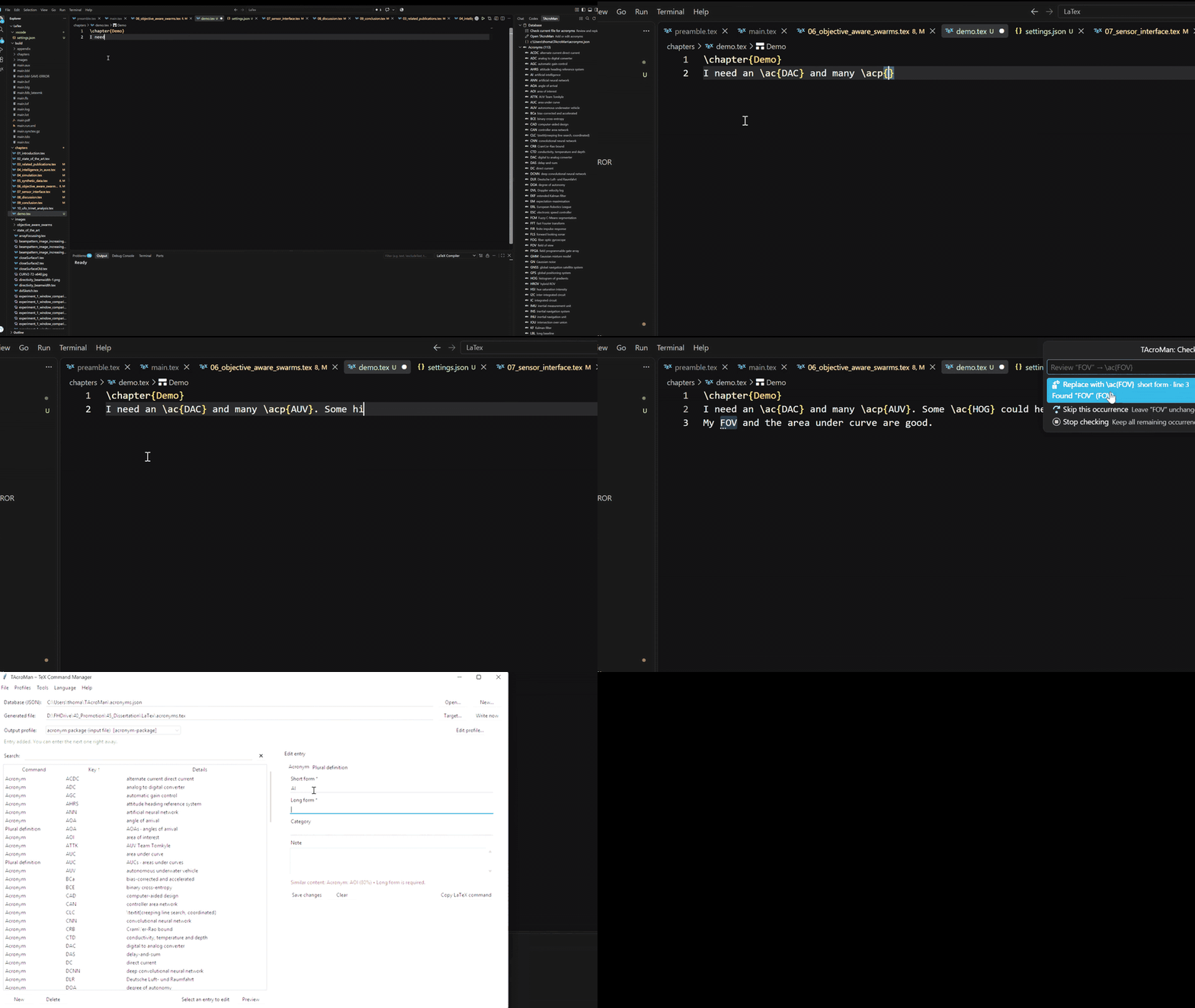
Create, edit, duplicate, filter, and delete entries in the table. The editor form stays visible while the table scrolls, so larger workspaces remain comfortable to work with.
Validation is derived from the active profile. Required fields, duplicate keys, and profile-specific rules are checked before data is saved.
Start typing an acronym in a TeX document and select a matching entry. TAcroMan ranks exact acronym matches ahead of incidental matches in descriptions or other metadata.
Press Ctrl+Space to open the suggestions. Depending on the configured command, completion can insert:
\ac{auv}
\acp{auv}
\acl{auv}If you write a known acronym directly in normal text:
The AUV performs the mission autonomously.TAcroMan can offer a Quick Fix:
The \ac{AUV} performs the mission autonomously.Plural forms are supported as well, for example AUVs → \acp{AUV}. The
singular and plural commands are configurable.
Forgot the acronym key? Start typing a known long form such as
autonomous underwater. IntelliSense can still find \ac{AUV}.
The extension can scan the active TeX document for known entries. This makes it easy to review older chapters and decide for each plain-text occurrence whether it should be replaced. Existing commands, comments, citations, labels, definitions, and verbatim content are ignored.
TAcroMan turns the merged workspace into the format described by its shared profile. Included profiles cover:
| Profile | Typical output |
|---|---|
acronym-package |
\acro{AUV}{autonomous underwater vehicle} |
acronym-complete-snippet |
Complete acronym environment snippets |
acro-package |
Entries for the acro package |
glossaries-extra |
Glossary and acronym declarations |
csv |
Delimited exports |
Custom profiles can generate other line-oriented formats without changing the application code.
The standalone application contains the shared manager plus tools for larger maintenance jobs:
- Profile editor: edit command types, fields, templates, validation rules, and output behavior with immediate validation.
- Citation migration: compare an old and a new bibliography, review detected key mappings, update TeX files, and optionally create backups.
- Reference audit: compare bibliography keys with citations used in TeX files and inspect unused, unknown, and repeated references.
- TeX import: import compatible declarations from an existing TeX file into your participant fragment.
- Output control: choose the active workspace, profile, output location, and regenerate the TeX file on demand.
- Contextual help: every dialog includes a circled question mark explaining its purpose and the steps to complete the task.
The desktop app and extension watch the manifest and all participant fragments. Identical duplicates are merged once. Divergent variants are shown in the conflict center and block regeneration without replacing the last valid output.
Download the archive for your system from the latest GitHub release:
- Windows:
TAcroMan-<version>-windows-x64.zip - Linux:
TAcroMan-<version>-linux-x64.tar.gz
Extract the archive and start TAcroMan/TAcroMan.exe on Windows or
TAcroMan/TAcroMan on Linux. The packaged application does not require a
separate Python installation. The Windows window uses the Microsoft Edge
WebView2 Runtime.
The release also contains SHA256SUMS.txt so the downloaded archive can be
verified.
GitHub Packages is intended for package registries rather than general desktop archives. The current Windows and Linux executables are therefore published as release assets, which provides a direct and versioned download location.
Open the Extensions view in Visual Studio Code and install the TAcroMan extension,
or build/install the VSIX from the vscode-extension directory.
After installation:
- Open TAcroMan in the Secondary Side Bar or run TAcroMan: Open TAcroMan.
- Select Open TAcroMan.
- Choose or create a workspace folder.
- Use the shared profile stored in its manifest.
- Add your first entry.
The extension embeds the full manager UI. The desktop application does not need to be running for normal extension use.
TAcroMan creates and shares these files:
| File | Purpose |
|---|---|
~/TAcroMan/state.json |
Local installation ID, active workspace and output mode |
~/TAcroMan/workspace/.tacroman-workspace.json |
Workspace identity and authoritative render profile |
~/TAcroMan/workspace/<Name>_<suffix>.tacroman.json |
Entries owned by this installation |
state.json is the only authoritative local registration source. An old
entries.json or acronym database is never reused implicitly. Import it explicitly
with Import Existing Database; its original file remains unchanged.
For the default acronym workflow, include the generated file from your document:
\usepackage{acronym}

\begin{document}
\input{entries.tex}

The \ac{auv} begins its mission.
\end{document}
The exact output depends on the selected profile.
                       ~/TAcroMan/state.json
                                │
          ┌─────────────────────┴─────────────────────┐
          │                                           │
  Desktop application                         VS Code extension
          │                                           │
          └────────────── shared Web UI ──────────────┘
                                │
                 shared workspace with fragments
                                │
                      generated TeX or text file
Both frontends host the same HTML, CSS, and JavaScript application. Platform adapters only provide filesystem dialogs, lifecycle integration, and editor features. This keeps behavior and styling aligned without maintaining a second Tkinter interface.
| Menu | Actions |
|---|---|
| File | Open/create workspace, import old database or TeX, write output, exit |
| Profiles | Edit the workspace profile or copy another profile into the manifest |
| Tools | Citation migration and reference audit |
| Language | Switch the application language |
| Help | Open information and guidance |
Opening one menu closes the previously selected menu. Tool dialogs provide their own contextual help in the title area.
A profile describes the input fields and how an entry is rendered. A shortened profile looks like this:
{
  "schema_version": 2,
  "id": "acronym-package",
  "header": "\\begin{acronym}\n",
  "footer": "\n\\end{acronym}\n",
  "commands": [
    {
      "id": "acronym",
      "label": "Acronym",
      "template": "\\acro{[[short]]}{[[long]]}",
      "usage_template": "\\ac{[[short]]}",
      "fields": [
        {
          "id": "short",
          "label": "Short form",
          "required": true,
          "comparison_group": "acronym-key"
        },
        {
          "id": "long",
          "label": "Long form",
          "required": true,
          "similarity_group": "long-form"
        }
      ]
    }
  ]
}
Profiles can define:
- command types with independent fields and templates;
- field IDs, labels, required values, and multiline inputs;
- exact duplicate checks through
comparison_group; - non-blocking similarity hints through
similarity_group; - optional case-sensitive comparisons and field output wrappers;
- output templates, headers, footers, separators, sorting, and escaping;
- usage templates copied from the manager.
Use Profiles → Edit profile in the desktop application for guided editing and validation. Existing profile JSON files remain portable; the desktop application can load one and copy the selected profile into the workspace manifest.
| Property | Meaning |
|---|---|
id |
Machine-readable field ID used in templates |
label |
Text shown beside the field |
required |
Blocks saving when the field is empty |
multiline |
Allows a multi-line value |
comparison_group |
Enables exact duplicate checks between matching groups |
similarity_group |
Enables non-blocking similarity hints |
case_sensitive |
Makes comparisons for the field case-sensitive |
output_template |
Wraps a non-empty value and must contain [[value]] |
Templates can use all field IDs declared by their command, plus [[id]] and
[[command]].
Legacy schema-v1 and schema-v2 databases can be imported explicitly into the current participant fragment. UIDs are preserved and the source file is never modified. Older single-template render profiles remain available for importing into a workspace manifest.
Exporting is fully profile-driven. TeX importing is intentionally narrower: the
built-in importer currently understands \acro{SHORT}{long form} definitions.
Other command formats can be created and edited normally, but need a dedicated
import adapter.
The TAcroMan Secondary Side Bar provides:
- the active workspace and its merged entries;
- search and filtering;
- commands to select or reload the workspace;
- singular and plural insertion actions;
- access to the integrated manager;
- the interactive current-file check.
Right-click an acronym to insert it directly into the active LaTeX document.
Open the Command Palette with Ctrl+Shift+P and search for TAcroMan.
| Command | Purpose |
|---|---|
TAcroMan: Check Current File for Acronyms |
Scan the active TeX file and review replacements interactively |
TAcroMan: Open TAcroMan |
Open the integrated manager |
TAcroMan: Open Desktop Application |
Launch the separately installed desktop application |
TAcroMan: Workspace auswählen / Select Workspace |
Open or create a workspace folder |
TAcroMan: Workspace erstellen / Create Workspace |
Create a workspace in a selected folder |
TAcroMan: Teilnehmernamen ändern / Rename Participant |
Rename the local fragment without changing its identity |
TAcroMan: Import Existing Database |
Copy a legacy database into the local fragment |
TAcroMan: Select Database |
Temporary compatibility alias for workspace selection |
TAcroMan: Reload Workspace |
Reload the workspace from disk |
TAcroMan: Select Generated TeX Output |
Select the generated output file |
TAcroMan: Insert \ac{...} |
Insert the selected acronym in singular form |
TAcroMan: Insert \acp{...} |
Insert the selected acronym in plural form |
TAcroMan primarily uses the shared state file so that desktop and extension stay
in sync. Extension settings control editor-specific behavior. The most relevant
options are tacroman.latexCommands, tacroman.maxCompletionItems,
tacroman.plainTextCompletion, tacroman.plainTextDiagnostics,
tacroman.quickFixSingularCommand, tacroman.quickFixPluralCommand,
tacroman.inferPlainTextPlurals, tacroman.ignoredArgumentCommands, and
tacroman.launchArguments.
Output modes
TAcroMan preserves three output-location modes:
projectwrites to the current VS Code project.databasewrites to<Workspace>/entries.tex.custompreserves an explicitly selected output path.
When acronym data changes in either frontend, output is regenerated according to the shared mode and active profile.
Multiple workspaces and custom profiles
Use the manager or desktop File menu to select another workspace. Selecting or editing a profile stores the full active profile in that workspace's manifest, so every participant validates, merges and exports by the same rules.
Put one TAcroMan workspace folder in a shared drive, cloud-sync folder, or Git
repository and let every author open that folder. Each installation writes only
its own <Name>_<suffix>.tacroman.json; foreign fragments are read-only.
Entries with the same logical key and identical content appear and export once.
If their fields differ, the conflict center shows the owners and field changes.
Conflicting entries are withheld from completion and Quick Fixes, and output
regeneration pauses until an owner aligns, changes, or deletes a local variant.
The last conflict-free entries.tex remains untouched throughout.
The watcher retries partially synchronized files, rescans every five seconds and rejects stale writes. Invalid manifests, wrong workspace IDs, duplicate installation IDs and malformed fragments remain visible workspace errors rather than being silently ignored.
The citation migration tool helps update TeX projects after bibliography keys change:
- Select the old and new bibliography files.
- Let TAcroMan match entries using their bibliographic data.
- Review and correct the proposed old-to-new key mappings.
- Select TeX files or a complete project folder.
- Enable backups when desired.
- Apply the migration.
Mappings are shown for review before source files are changed.
The reference audit scans a bibliography and TeX sources to show:
- keys defined in the bibliography;
- citations used in the selected TeX files;
- unused bibliography entries;
- unknown citation keys;
- occurrence counts and source locations.
This is useful before submitting a paper or cleaning a long-running project.
TAcroMan generates ordinary TeX files, so it works naturally with LaTeX Workshop. Point the active profile at a file included by the document and let LaTeX Workshop rebuild after changes.
If the generated file belongs in the current project, use the project output
mode. For a shared central workspace, database or custom may be more suitable.
The Linux archive contains the packaged x64 application. Depending on the distribution, WebKitGTK and common GTK runtime libraries may need to be installed through the system package manager. If the application does not start, launch it from a terminal once to see which shared library is missing.
The development version requires Python 3.10 or newer.
Every published GitHub release triggers builds for Windows x64 and Linux x64. Artifacts are attached directly to that release:
TAcroMan-<version>-windows-x64.zipTAcroMan-<version>-linux-x64.tar.gzSHA256SUMS.txt
Download the newest version from GitHub Releases.
python -m venv .venv
.\.venv\Scripts\python.exe -m pip install -e .
.\.venv\Scripts\python.exe -m tacroman
On Linux:
sudo apt install python3-venv python3-gi python3-gi-cairo gir1.2-gtk-3.0 gir1.2-webkit2-4.1
bash install-linux.sh
bash run-tacroman.sh
Run the Python test suite:
.\.venv\Scripts\python.exe -m unittest discover -s tests -vcd vscode-extension
npm.cmd install
npm.cmd test
npm.cmd run packageThe version is maintained in vscode-extension/VERSION. Packaging synchronizes
the manifests and advances the patch version automatically if the target VSIX
filename already exists.
src/tacroman/          Python backend and desktop host
src/tacroman/web_ui/   Shared HTML, CSS, and JavaScript interface
src/tacroman/defaults/ Bundled profiles
vscode-extension/      Visual Studio Code integration
tests/                 Python and workflow tests
.github/workflows/     CI and release builds
TAcroMan is evolving around a single shared UI and profile format. Planned work and open design discussions are tracked in GitHub Issues.
Useful contributions include:
- profiles for additional LaTeX packages and document conventions;
- import/export adapters;
- completion and search improvements;
- platform packaging feedback;
- accessibility and localization improvements.
TAcroMan was developed in an iterative collaboration with ChatGPT 5.6 Terra Max by OpenAI. ChatGPT substantially drafted the application code, tests, and documentation. The repository owner directs the project and remains responsible for reviewing, maintaining, and releasing the software.
Bug reports and feature requests are welcome. Please include the operating system, application or extension version, active profile, and a minimal example when possible.
For code changes, run the relevant Python and/or extension tests before opening a pull request.
See LICENSE for license information.