Scenario:

I have assets with type Text in an Orchestrator Folder, which contains a comma separated string consisting of 2 numbers.
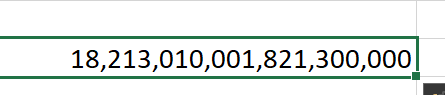
When the Get action is executed to download all assets in the folder, Orchestrator Manager uses Write Cell/Range to write the asset value. Excel Integration writing ignores the source format and causes the value to be parsed as a number as follows:
Is it possible for either:
- The template to be updated to have Text as the Cell Format by default, or
- Orchestrator Manager detects the Asset type from Orchestrator and set the cell format accordingly?
Scenario:
I have assets with type Text in an Orchestrator Folder, which contains a comma separated string consisting of 2 numbers.
When the Get action is executed to download all assets in the folder, Orchestrator Manager uses Write Cell/Range to write the asset value. Excel Integration writing ignores the source format and causes the value to be parsed as a number as follows:
Is it possible for either: