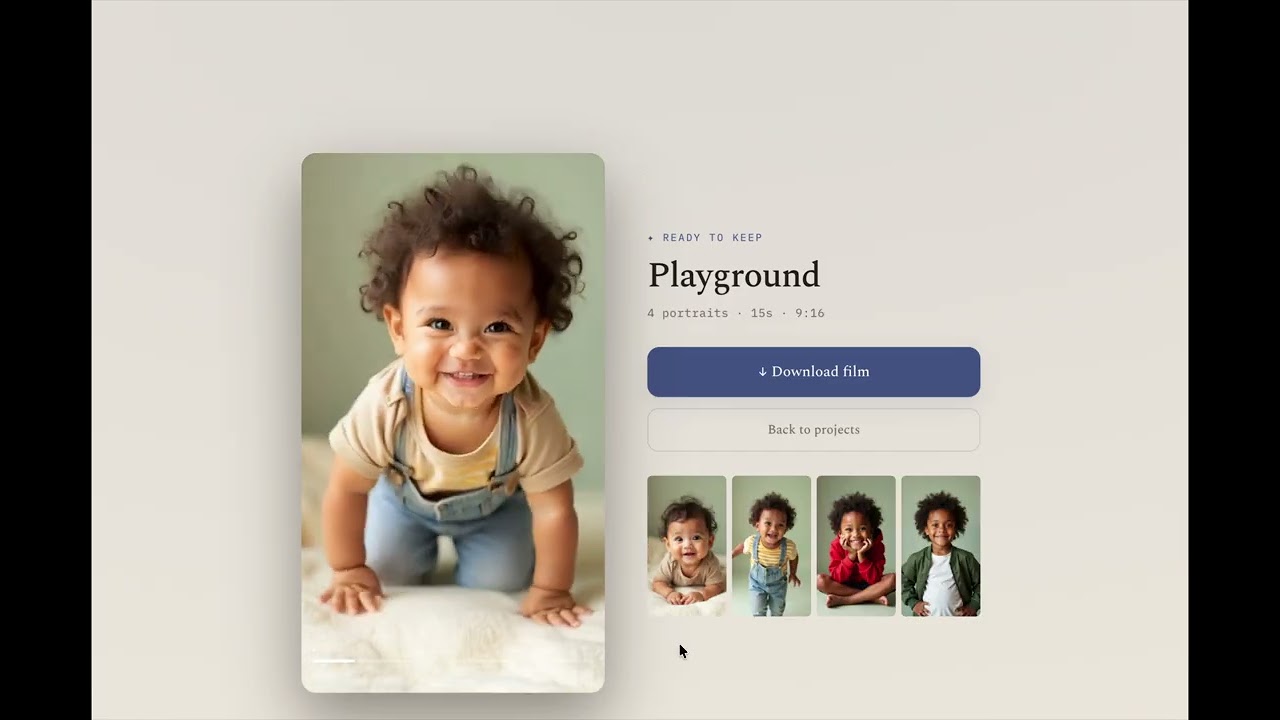
Upload 10–20 real photos of one person across their life, order them youngest → oldest, and get back one continuous "growing up" morph video. Each segment is anchored on two real photos (photo N as the start frame, photo N+1 as the end frame) generated through Kling O1 first-frame-last-frame on fal.ai — which is what keeps identity consistent across the whole film.
Single-user and self-hosted: there's no login — whoever runs it owns everything. Warm, photographic UI. The signature moment is the timeline filling in, segment by segment, as generation completes.
- Next.js 16 (App Router, TypeScript) + Tailwind v4
- PostgreSQL via Prisma 6
- pg-boss job queue (Postgres-backed — no Redis) + a separate worker process
- fal.ai Kling O1 via the queue + webhook API, behind a
VideoEngineinterface - S3-compatible object storage (AWS S3 / Cloudflare R2 / MinIO), or local disk in dev
- ffmpeg for stitching; sharp for photo normalization
- Node 22 (
.nvmrc→nvm use) - PostgreSQL 14+ (local or via
docker compose up) ffmpegon PATH
Runs the entire flow with a mock engine (fabricates real crossfade clips locally) and local-disk storage — no fal.ai key or S3 needed, and no cost.
nvm use                      # Node 22
npm install
cp .env.example .env.local   # then set FAL_MODE=mock and STORAGE_MODE=local

# Postgres: either `docker compose up -d postgres`, or a local server + this DB:
#   createdb lifelapse && psql -c "CREATE ROLE lifelapse LOGIN PASSWORD 'lifelapse' CREATEDB"
npm run db:migrate

# two processes:
npm run dev                  # web  → http://localhost:3000
npm run worker               # background worker (generation + stitch)
With FAL_MODE=mock and STORAGE_MODE=local, open the app, create a project,
drop in some photos, order them, hit Generate, and watch the timeline fill in
— entirely offline and free.
⚠️ Live mode makes paid API calls. Every segment is a fal.ai Kling O1 video generation — real motion, not the mock crossfade — at roughly $0.112/s (≈ $0.56 per 5s segment).VISION_MODE=liveadditionally calls hosted vision models per photo. Themock/localdefaults are completely free and offline. Review fal.ai pricing before enabling live mode. Your keys live in.env.local, which is gitignored — keep it that way.
Set these in .env.local (see .env.example for the full list):
FAL_MODE=live,FAL_KEY,FAL_WEBHOOK_SECRETVISION_MODE=live(real photo analysis + motion prompts) — optional;mockstill works liveSTORAGE_MODE=s3+S3_*(bucket, keys, region). fal fetches the photos over the public internet, so the store must be reachable from fal's servers.APP_URL= the public base URL fal can reach for webhooks (optional locally — see below)
Notes when switching to S3:
- The store must be internet-reachable.
url()mints presigned GET URLs, so a private bucket is fine — no public-read needed. Local disk / localhost MinIO will not work (fal can't reachlocalhost); the worker fails such segments with a clear message. - AWS S3: leave
S3_ENDPOINTblank (don't leave the MinIOlocalhost:9000value). Cloudflare R2: setS3_ENDPOINT=https://<account>.r2.cloudflarestorage.comandS3_FORCE_PATH_STYLE=1. - Webhooks: if
APP_URLislocalhost, fal can't POST the webhook — that's OK, thepoll-stuckpoller retrieves results (~1 min/segment). For instant results, exposeAPP_URLpublicly. - Restart both processes (
npm run devandnpm run worker) after editing.env.local— env is read once at startup. The worker prints its effectiveFAL_MODE/STORAGE_MODEand warns on misconfig. - Start a fresh project after switching to S3. Photos uploaded in local mode live on disk, not in the bucket, so re-generating an old project would fail to fetch them.
docker compose up -d also starts MinIO (S3-compatible) with a lifelapse
bucket — but MinIO on localhost is only reachable by your machine, not fal, so it's
for local S3-mode plumbing tests, not live generation.
| command | what |
|---|---|
npm run dev |
Next dev server |
npm run worker |
job worker (loads .env.local) |
npm run db:migrate |
Prisma migrate (dev) |
npm run db:studio |
Prisma Studio |
npm test |
unit tests (vitest) |
npm run build |
production build |
- Generate validates 2–20 photos and creates one
Segmentper consecutive pair, then enqueues agenerate-segmentjob each. generate-segment(worker): live → submits to fal with a webhook URL; mock → fabricates a crossfade clip locally and completes immediately./api/fal/webhook(live): secret-verified, downloads the output to storage, marks the segment complete. A fallback poller recovers missed webhooks.- When all segments complete,
stitch-projectconcatenates them with ffmpeg (-c copy, falling back to a uniform re-encode) into the final MP4. - Failed segments retry individually without redoing the chain.
Photos are normalized (center-crop or letterbox) to identical dimensions per the project aspect ratio, so segment outputs share dimensions and concat cleanly.
The UI is a faithful implementation of the design prototype in
design/Lifelapse.dc.html (Spectral + IBM Plex Mono, warm neutral palette, the
filling-timeline interaction). Design tokens live in src/app/globals.css.
- Video morphs by fal.ai running Kling O1 (first-frame-last-frame).
- Photo analysis + motion prompts by hosted vision models via fal.ai.
MIT © 2026 Ady Levy.