Note
This code (and documentation) are created with a great deal of AI assistance. However, this is a library that I needed and I didn't like the look-and-feel, nor the usage model, of the existing node-editing libraries. This library will be maintained, as it is needed for another (non-AI) project.
A Blender-style node editor for egui, with a typed graph you can walk.
Sockets are color-coded and typed: the editor refuses a drag between incompatible sockets, and so does the API, so a graph on disk is always well-typed. You describe your nodes as Rust structs and the rest is generated.
Try the demo in your browser →
[dependencies]
nodez = { version = "0.2", features = ["derive", "app"] }
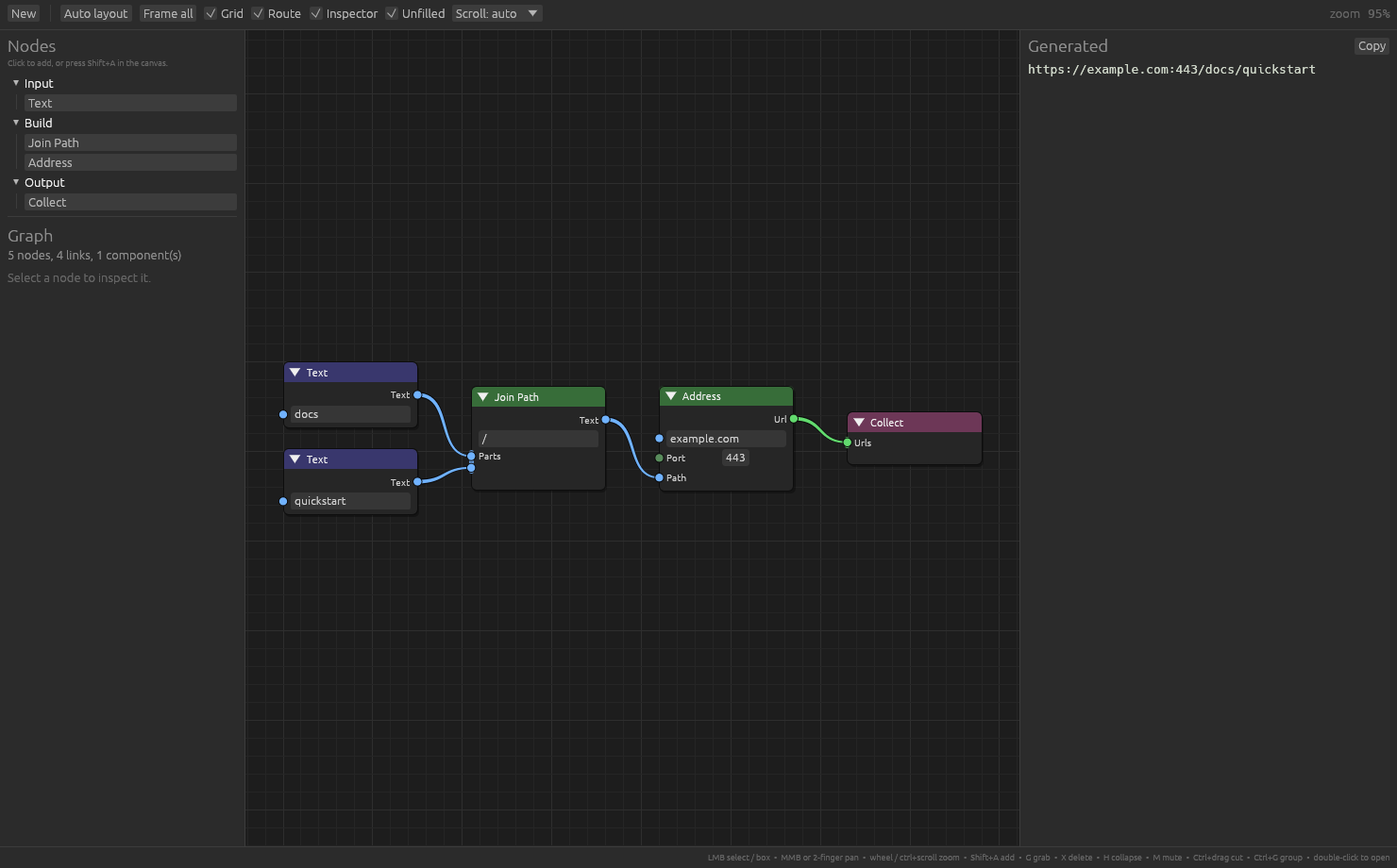
Four kinds of node that build URLs. This is a whole program:
use nodez::app::{EditorApp, Preview};
use nodez::{Evaluate, Fold, Graph, Multi, NodeError, NodeLibrary, NodeType, Payload, Rules,
            SocketType};

// 1. Values that travel along wires. String, i64, f64 and bool already are
//    wire types; anything else you declare. The color comes from the name.
#[derive(Clone, Debug, SocketType)]
struct Url(String);

// 2. Kinds of node. A field with #[input] is a socket, a bare field is a
//    parameter drawn in the body, and the field's type does the rest.
#[derive(Debug, NodeType)]
#[node(category = "Input", output = String)]
struct Text {
    #[input(hint = "text…")]
    value: String,
}

#[derive(Debug, NodeType)]
#[node(category = "Build", output = String, label = "Join Path")]
struct Join {
    #[param(default = "/")]
    separator: String,
    #[input]
    parts: Multi<String>,          // Multi: accepts any number of links
}

#[derive(Debug, NodeType)]
#[node(category = "Build", output = Url)]
struct Address {
    #[input(default = "example.com")]
    host: String,
    #[input(default = 443, min = 1, max = 65535)]
    port: i64,                     // i64 is editable, so it gets a drag box
    #[input]
    path: String,
}

#[derive(Debug, NodeType)]
#[node(category = "Output", produces = String)]
struct Collect {
    #[input]
    urls: Multi<Url>,              // Url has no editor, so this is link-only
}

// 3. What each kind does. A `Fold` names one way of walking the graph. It is
//    unrelated to a category, which only groups nodes in the menu.
struct Urls;
impl Fold for Urls {}

impl Evaluate<Urls> for Text {
    fn evaluate(&self) -> Result<String, NodeError> { Ok(self.value.clone()) }
}
impl Evaluate<Urls> for Join {
    fn evaluate(&self) -> Result<String, NodeError> {
        Ok(self.parts.iter().cloned().collect::<Vec<_>>().join(&self.separator))
    }
}
impl Evaluate<Urls> for Address {
    fn evaluate(&self) -> Result<Url, NodeError> {
        let scheme = if self.port == 443 { "https" } else { "http" };
        Ok(Url(format!("{scheme}://{}:{}/{}", self.host, self.port, self.path)))
    }
}
impl Evaluate<Urls> for Collect {
    fn evaluate(&self) -> Result<String, NodeError> {
        Ok(self.urls.iter().map(|u| u.0.as_str()).collect::<Vec<_>>().join("\n"))
    }
}

// 4. A window.
fn main() -> eframe::Result {
    let mut library = NodeLibrary::new();
    let mut rules = Rules::<Urls>::new();
    rules.register_all::<(Text, Join, Address, Collect)>(&mut library);

    EditorApp::new(library)
        .title("nodez quickstart")
        .preview(move |graph, library| Preview::text(run(graph, library, &rules)))
        .run()
}

fn run(graph: &Graph, library: &NodeLibrary, rules: &Rules<Urls>) -> String {
    let Some(target) = graph.nodes_of_template(library.id("collect").unwrap()).next()
    else { return "add a Collect node".to_owned() };
    match graph.evaluate::<Payload, NodeError>(library, target.id, |ctx| rules.run(&ctx)) {
        Ok(payload) => *payload.downcast::<String>().unwrap_or_default(),
        Err(e) => e.to_string(),
    }
}
cargo run -p nodez --features derive,app --example quickstart
Everything is optional; the second column is what you get if you say nothing.
#[derive(SocketType)] — a value that travels along a wire
#[socket(…)] |
default | |
|---|---|---|
color = "#RRGGBB" |
hashed from the name | the socket and the wires leaving it |
shape = "…" |
circle |
circle, diamond, diamond_dot, square |
widget = … |
none | text, int, float, checkbox, choice |
name = "…" |
the type's own name | what it registers and displays as |
description = "…" |
— | socket tooltip |
wildcard |
off | connects to every other type |
rename = "…" |
variant name, kebab-cased | on an enum variant: its spelling in the dropdown |
A type with a widget can be typed into when nothing is wired to it; one
without is link-only. choice wants a fieldless enum, the rest a one-field
tuple struct over String, i64, f64 or bool. Those four are wire types
already, so a field that is just a string or a number needs no wrapper.
#[derive(NodeType)] — a kind of node
#[node(…)] |
default | |
|---|---|---|
id = "…" |
struct name, snake_cased | what saved files refer to |
label = "…" |
struct name, title-cased | shown in the header and the menu |
category = "…" |
Misc |
menu grouping and header tint |
description = "…" |
— | tooltip in the add menu |
keywords = "a, b" |
— | extra terms the add-menu search matches |
width = … |
150.0 |
starting body width; rarely worth setting |
output = T |
none | an output socket carrying T, and Output = T |
produces = T |
() |
Output = T with no socket, for a sink |
output_name = "…" |
out |
renames the output socket |
header_color = "#RRGGBB" |
from the category | overrides the tint for this kind alone |
output and produces both fix the type your evaluate returns; only output
also puts a socket on the node. A node with nothing downstream — the root of a
document, say — uses produces. Giving both is a compile error, and so is
returning anything else from evaluate.
Fields
| you write | you get |
|---|---|
#[input] x: T |
a socket that must be wired |
#[input] x: Option<T> |
a link-only socket that may be wired |
#[input] x: Multi<T> |
a socket accepting any number of links, in order |
x: T (no attribute) |
a parameter, drawn in the body, never wired |
#[input(…)], #[param(…)] |
|
|---|---|
default = … |
what a new node starts with |
label = "…" |
the row's label; "" hides it |
hint = "…" |
placeholder shown in an empty text box |
description = "…" |
socket tooltip |
min = …, max = … |
clamp a numeric widget, per socket rather than per type |
hide_label |
parameters only: let the widget fill the row |
A Multi socket draws one attachment point per link plus an empty one below
them, so where you drop a wire decides where it lands in the order, and dragging
a link up or down reorders it. The order is stored per link, not inferred from
when it was made.
Option only says something on a link-only socket. An editable one always has a
value, whether or not anything is wired to it, so an Option<String> would
never be None; a debug assertion says so when a template is built.
Fold names one way of walking the graph. It is a marker type holding nothing:
struct Urls;
impl Fold for Urls {}
It exists so a node kind can be evaluated more than one way without having to
pick one — the real thing and a redacted preview, say. Rules<F> holds the
rules for one fold, and you can build several over the same library:
impl Evaluate<Urls>    for Address { .. }
impl Evaluate<Preview> for Address { .. }
A fold varies how each node computes, not what it produces: every node still yields whatever its output socket declares, because that is what the nodes downstream read back. If you only ever walk the graph one way — and most projects do — one marker type is all you will write, and it costs two lines.
category is a string you invent. It does three things, all cosmetic:
- groups nodes under a heading in the
Shift+Amenu and in the palette - gives every node in it the same header tint
- is matched by the add-menu search, so typing
buildfinds the whole group
Nothing in the library knows the names. Input, Build and Output in the
quickstart are only what that example chose, and they are unrelated to the fold
marker beside them. Categories appear in the menu in the order you register
them, and exist as soon as a node names one.
A node naming no category lands in Misc and takes a header color derived from
its own id, so uncategorised nodes stay distinguishable from each other.
LMB |
select; drag on empty canvas to box-select |
Shift+LMB |
add to the selection |
MMB drag, trackpad scroll |
pan |
Wheel, Ctrl+scroll, pinch |
zoom about the cursor |
Shift+A |
add-node search |
| Drag a wire into empty space | add-node search, filtered to what can take it |
| Drag off a wired input | pick the wire up and move it |
Ctrl+drag, double-click a wire |
cut wires |
G |
grab: the selection follows the pointer, Esc cancels |
Shift+D |
duplicate, keeping the wires between the copies |
X / Del |
delete the selection |
H / M |
collapse / mute |
Ctrl+Z |
undo the last move |
A / Alt+A |
select all / none |
Home / . |
frame everything / the selection |
| Double-click a header | rename |
RMB on a node |
context menu, including align and spacing |
Graph is a DAG, and everything below is on it.
nodes(), connections(), nodes_of_template() |
contents |
incoming(), outgoing(), links_into(), links_from() |
wires at a node or socket |
predecessors(), successors() |
immediate neighbors |
ancestors(), descendants(), walk() |
transitive walks, as iterators |
roots(), sinks(), isolated() |
ends of the graph |
topological_order(), dependency_order() |
evaluation order |
components(), depths(), find_cycle() |
shape |
evaluate(), evaluate_all() |
folds |
evaluate visits only what the target depends on; evaluate_all visits
everything. Both hand each node the results of everything upstream.
graph.connect(&library, (a, "out"), (b, "parts"))?;      // Ok
graph.connect(&library, (b, "out"), (a, "parts"))        // Err(WouldCycle)
graph.can_connect(&library, &from, &to)                   // Err: "Text cannot drive Int"
Graphs serialize with serde, and Graph::validate repairs one loaded against a
library that has since changed.
nodez::layered arranges a whole graph into columns — good for one built in
code, or for tidying up after a load. align and distribute work on a
handful of nodes instead, and are what the editor's RMB → Align menu calls.
Dependency fixes which column a node may be in, not which one it is in.
Taking depth at its word puts every source node in one tall first column, a
whole graph away from the one node each of them feeds. What layered picks
instead is the assignment that makes the wires as short as they can be in
total — solved exactly, by network simplex, not approached by sliding nodes
about — so an image node ends up beside the service that uses it. Heights are
settled separately and by eye: each node wants to be level with the average of
its neighbours, and each column is packed in that order, so a wire between two
columns is close to straight. sweeps says how many passes to spend on the
ordering and the heights; zero leaves nodes in id order with each column
centred.
nodez::align(&mut graph, editor.state.selection(), nodez::Align::Left, size_of);
nodez::distribute(&mut graph, ids, nodez::Axis::Y, nodez::Spacing::Even, size_of);
Spacing::Even equalizes the gaps and leaves the outermost two nodes where
they are; Spacing::Fixed(gap) stacks everything a set distance apart. Gaps go
between bounding boxes, so nodes of different heights come out evenly spaced
rather than evenly staggered. Both return the nodes that actually moved.
All three take a size_of closure so they can measure what the editor draws:
|graph, node| nodez::node_size(graph, library, node, style)Columns alone do not stop a wire from crossing whatever stands between its
ends, so route_links steers those around. Run it after layered — the
demo's Auto layout button does both:
nodez::layered(&mut graph, &LayoutOptions::default(), size_of)?;
nodez::route_links(&mut graph, &RouteOptions::default(), size_of, anchor_of)?;
anchor_of says where a wire attaches, which socket_anchor answers:
|graph, socket, kind, slot| {
    let node = graph.node(socket.node)?;
    nodez::socket_anchor(graph, library, node, style, kind, &socket.socket, slot)
}
slot is the link's order, which is what picks the attachment point on a
multi-input. Ignore it and every wire past the first is routed to the wrong
one.
A wire whose own curve already clears every node and goes over no other wire
is left alone, so simple graphs keep their plain noodles. Anything else is
given an orthogonal path, found by searching the grid of lines a clearance out
from every node's sides for the cheapest way through. Three things cost: the
ground the wire covers, each corner it turns (bend), and each wire already
drawn that it goes over (cross). The curve is priced in the same pixels, so
a wire keeps its noodle unless a route works out cheaper — which is what stops
a long diagonal being drawn straight across five other wires when dropping to
its socket's height first would cross two.
Every wire is routed twice: once against the wires before it, and again against the finished picture, so a wire that went the long way round to dodge three crossings is not left sitting in front of six that had not been placed yet.
Wires sharing a height are fanned apart across the run, and wires sharing a
channel each get their own line down it, as far as the channel allows. A
narrow channel crowds them rather than overflowing into the columns either
side, so widen column_gap if a graph needs more room than it has.
It writes Connection::waypoints, points the wire bends through. Those are
only how the wire is drawn: traversal, evaluation and the config you generate
see exactly what they would have seen unrouted. An unrouted graph serializes
without the field at all.
RouteOptions carries a copy of the wire shape (curvature, min_curve,
max_curve) so the router can judge where a wire really goes. If you change
those on EditorStyle, change them here too.
Routing is a choice, not the house style. Graph::clear_routing straightens
every wire again, and EditorApp carries the toggle for you:
EditorApp::new(library).routing(false) // plain noodlesThe editor's Route box flips it live, and while it is on the wires are re-routed as the graph changes, so moving a node does not leave its wires bent around where it used to be. Routing runs once an edit or a drag finishes, never while one is in flight.
clear_routing returns how many wires were carrying a bend, and clearing
waypoints on a single connection straightens just that one.
A wire narrows on its way to the input it feeds, so which end is which can be
read without following it. EditorStyle::wire_taper is how far its width
swings either side of wire_width — an amount rather than a switch, the way
wire_width is, and 0.6 by default.
Either side, not all of it below. A wire is two pixels across and taking a
fraction off two pixels is a difference nobody can see, so the near end is
fattened as much as the far end is thinned. That buys twice the contrast and
leaves wire_width meaning the average, as it did.
egui strokes one width at a time, so a wire that changes width cannot be a stroke: each one is a mesh of three quads per step, a core at full color with a band either side fading out, which is how egui's own tessellator keeps an edge from looking like stairs. Below a pixel the core stops shrinking and starts fading instead, or the thin end would turn from thin into blurry.
The color gradient from the output's type to the input's is still there, so direction is said twice.
An input that has to be wired and is not gets marked: the node's outline, a
halo behind the socket, and the row's label, all in EditorStyle's
missing_input. The socket's own fill is left alone — that color means its
data type, and it is the only thing that does.
Which inputs those are is read off the schema rather than declared. An input
with an inline editor has a value to fall back on, a Multi<T> may be empty,
and an Option<T> says outright that the node works without it. What is left
is an input with nowhere else to look, which is what SocketSpec::required
answers and what the mark is about.
graph.missing_inputs(&library)                        // every one, as SocketRefs
graph.is_input_missing(&library, node, "image")       // one of them
The editor and a generator can then disagree about nothing: the demo's
--print refuses the same graph the editor is already marking up. A muted node
is deliberately switched off rather than unfinished, so it is never marked.
EditorStyle::show_missing_inputs turns it off, and the demo's Unfilled box
flips it live.
A group is a graph used as a node — Blender's node groups, GNU Radio's hier blocks. It is a template, not a node, so it lives in the library rather than in the document: register it once and every graph that loads the library can use it, the way a hier block is installed into the block tree.
nodez::group::register_pads(&mut library);
library.register_group("audio_chain", "Audio Chain", "Flow", inside)?;
The interface is read off the inside. A group's inputs are the Group Input pads in it and its outputs are the Group Output pads, ordered down the canvas, each contributing the socket it is named after — so moving a pad moves the socket, and nothing about the interface is written down twice. A pad carries a wildcard socket, so the group's outer socket takes the type of whatever the pad is wired to.
Nothing downstream has to know any of this:
let flat = graph.flatten(&library); // every group node replaced by its interiorEvaluation, traversal and every generator go on seeing one flat graph — which
is what a hier block is once it runs and what a node group is once it renders.
The gnuradio example carries one, and its generator needed exactly that one
line.
A group that would contain itself is refused when it is registered, so nothing downstream has to guard against it.
Groups are written out as ordinary graph documents wrapped in what a graph cannot say about itself — what the group is called and where it belongs in the menu:
{ "id": "audio_chain", "label": "Audio Chain", "category": "Flow",
  "graph": { "nodes": { ... } } }
The sockets are deliberately not in there. They are read off the pads, and
writing them down as well would only give them somewhere to drift from. The
id is deliberately not the file's name either: saved graphs refer to a
template by id, so taking it from the filename would mean renaming a file
quietly unmade every document that used what was in it.
EditorApp::new(library).groups_dir("groups")   // read at startup, written by Ctrl+G
library.load_groups("groups")                  // or do it yourself
Reading a directory takes more than one pass. A group built from another has to be read second and nothing in a file says which, so they are read until a pass registers nothing; what is left is missing a template or stands in a circle with another file, and is reported rather than half-registered. A group short of a template is refused outright rather than read with those nodes quietly dropped.
In the editor, Ctrl+G makes a group of the selection and leaves one node in
its place, double-clicking a group node below its header opens what is inside,
and Escape comes back out. A breadcrumb in the toolbar says where you are and
takes you back. Leaving re-reads the interface off the pads, so adding a pad
while you are inside adds a socket to every instance.
Not Tab, which is what Blender uses and what this wanted to be: egui moves
focus when it sees a Tab, before any widget is asked about it, so a Tab pressed
over the canvas is spent before the canvas can hear it.
EditorApp is a window; NodeEditor is the canvas alone, for dropping into an
app you already have.
let response = self.editor.show(ui, &self.library, &mut self.graph);
if response.changed {
    self.regenerate();
}
response.actions reports what happened — NodeAdded, Connected,
InputChanged, ConnectionRejected(..) — and editor.state holds pan, zoom
and selection. EditorStyle holds every color and metric, defaulting to
Blender's dark theme; EditorStyle::light() is the other preset.
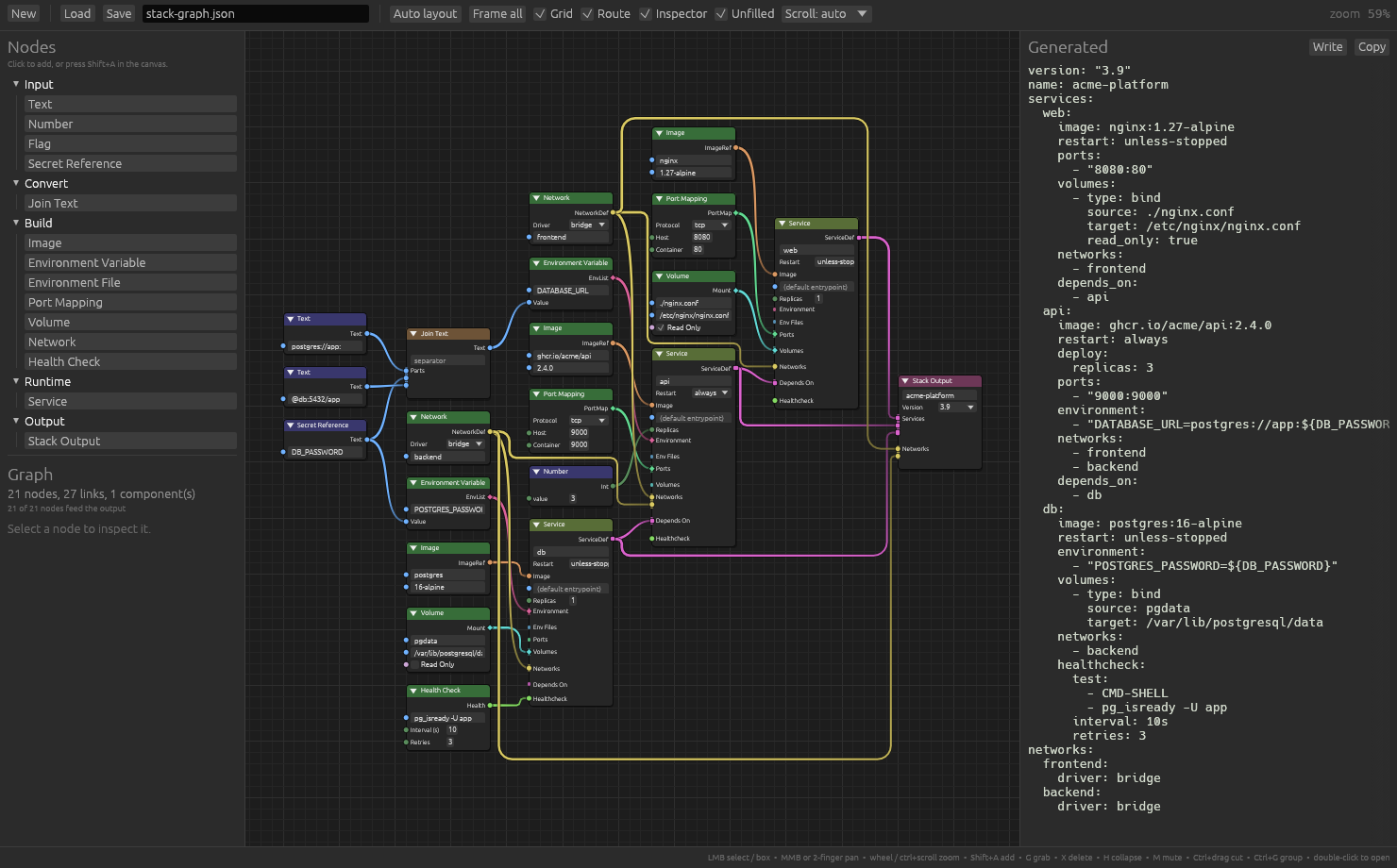
nodez-demo is the app in the first screenshot: fourteen node
kinds that generate a container-stack config file.
Its web build is the same program.
cargo run                  # the editor
cargo run -- --print       # generate the sample config headlessly
cd nodez-demo && trunk serve   # the editor, in a browser
Any of the editor examples builds for the browser the same way, from one shared page:
cd nodez && trunk serve examples/index.html --example gnuradio
EditorApp::run works in a browser unchanged: built for wasm32 it starts
on the page's <canvas id="nodez">, or on one made to fill the page. With no
disk there, Save and Load use the browser's local storage, groups are kept
there too, and the preview's Write downloads the file.
nodes.rs is the whole domain — wire types, node
kinds, and what each one emits.
Each is one file, and each generates code. Each also runs in a browser: blender_nodes, gnuradio, futuresdr.
cargo run -p nodez --features derive,app --example blender_nodes
cargo run -p nodez --features derive,app --example gnuradio
cargo run -p nodez --features derive,app --example futuresdr
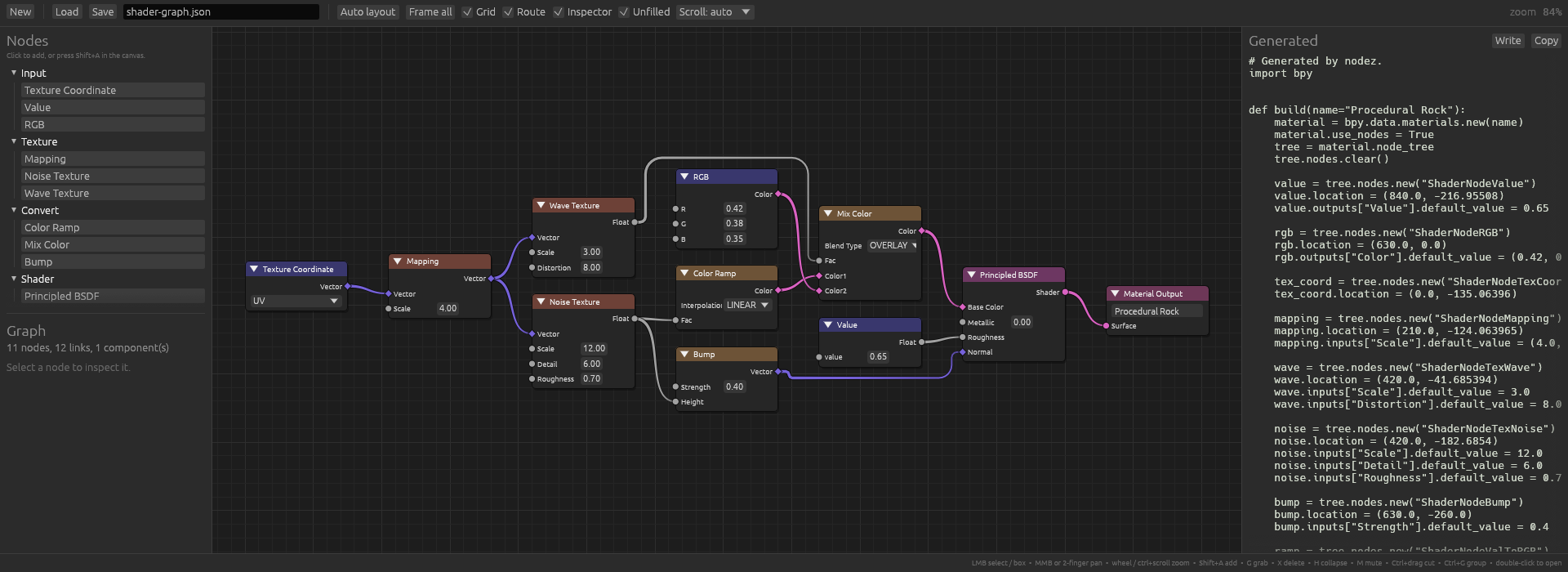
blender_nodes is a slice of Blender's
shader nodes — noise, ramps, a Principled BSDF — and writes the bpy script
that rebuilds the tree, the way Blender's Node-to-Python addons do. Node
positions go out with it, so the arrangement made here is the one Blender
opens with.
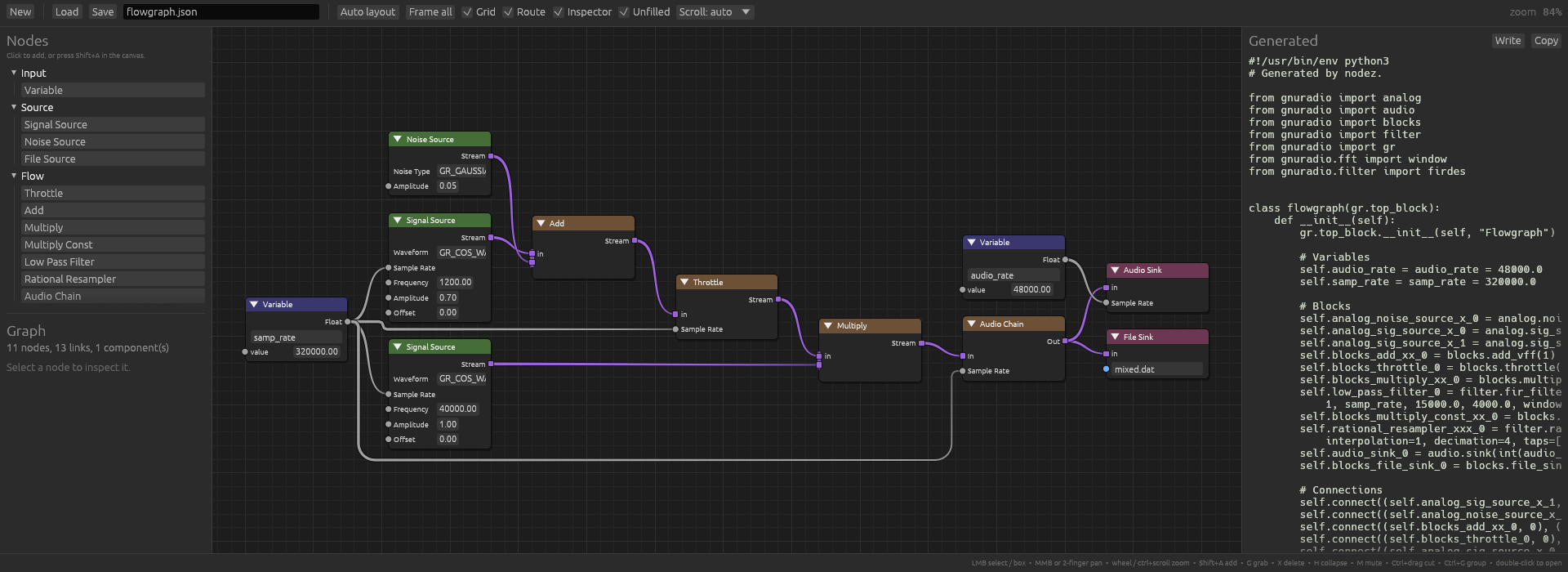
gnuradio is a slice of GNU Radio's blocks and
writes the top-block script GNU Radio Companion would. Its Variable block has
an ordinary number output and every block that needs a sample rate has an
ordinary number input, so wiring one to the other is all it takes for the
script to say samp_rate instead of 320000.0 — which is what a GRC variable
is, and the graph already knows it.
futuresdr is the companion to gnuradio:
the same kind of graph, emitting a Rust main against
FutureSDR instead of a Python top block. Worth
having as a pair, because it shows what changes when the target changes and
what does not — the graph, the node kinds and the walk over them are the same
shape, and one function differs.
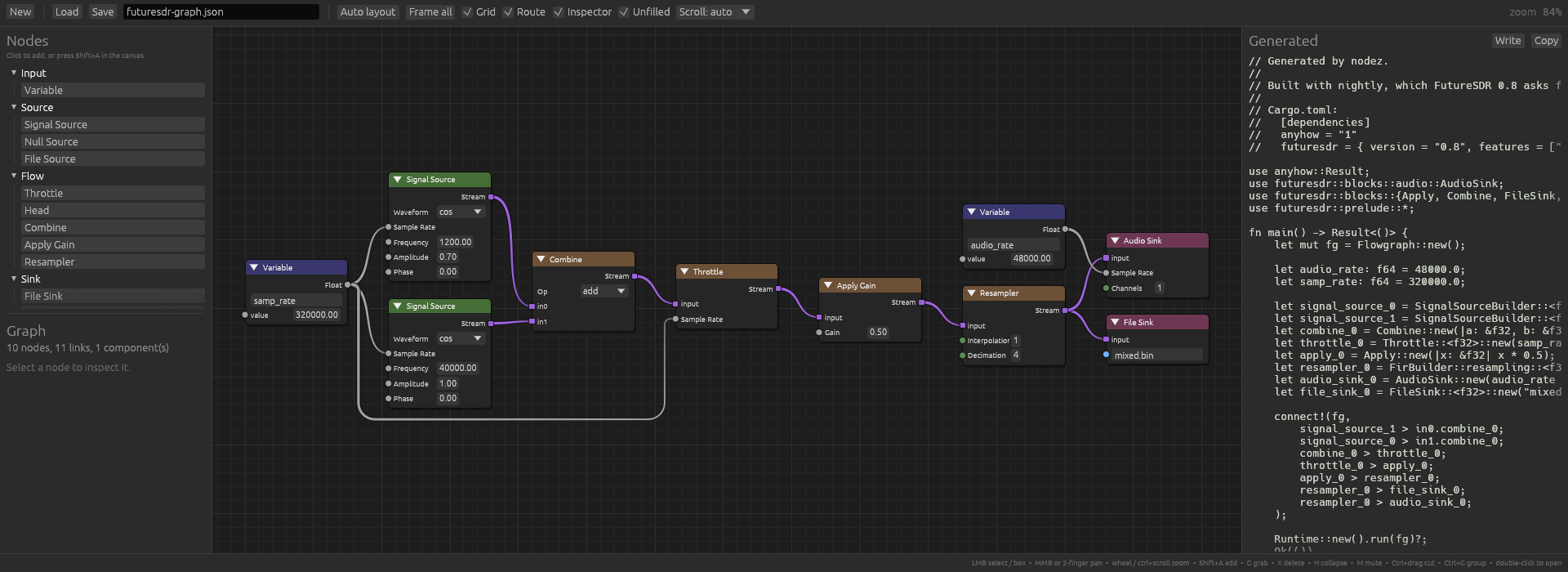
What that one function has to know more of: FutureSDR blocks are Rust values
with types, so each is a let with the sample type in the turbofish, and
wires are a connect! macro whose endpoints read input port, block, output
port — so a second input is in0.combine_0, not combine_0.in0. The sockets
in that example are named after FutureSDR's own ports, and the generator asks
the template how many stream inputs a block has rather than keeping a table of
which ones need naming.
All three add --print to generate without opening a window, and all three
differ from the quickstart in the same way: they walk the graph instead of
folding it. A shader tree and a flowgraph are the artifact, so what a
generator wants from them is every node and every link, not what they add up
to.
nodez/ |
the library: graph, traversal, editor widget, app window |
nodez-derive/ |
the derive macros |
nodez-demo/ |
the config-generator app |
MIT OR Apache-2.0