


Discover evidence of shadow AI agents across your organization and reconcile it against your inventory of approved agents.
It inspects nine surfaces: code repositories, identity providers, LLM gateway logs, low-code platforms, SaaS apps, cloud accounts, endpoints (developer workstations and host/runtime inventories), network logs, and running processes.
pipx install NexusShadowScan                  # or: pip install NexusShadowScan
pipx install "NexusShadowScan[cloud]"         # or this, for AWS/GCP/Azure/OCI scans
uvx --from NexusShadowScan shadowscan --help  # try it without installing
Requirements: CPython 3.11–3.14 (on 3.12, use 3.12.4 or later). CI validates
the hash-locked deployment install on Linux x86_64 only, and runs the test suite on
macOS for development use. Windows is not supported: only shadowscan --help and
shadowscan --version run there; every command, including its own --help,
refuses to run.
On PyPI, this page describes the release it was uploaded with. On GitHub's main
branch, it describes the current source, which can be ahead of the latest PyPI
release in commands, options, and supported Python versions. shadowscan --version
and shadowscan <command> --help show what you installed.
The distribution is NexusShadowScan; the command and Python package are
shadowscan. The unrelated shadowscan package on PyPI is not this project. The
cloud extra adds the AWS, GCP, Azure and OCI client libraries; the aws, gcp,
azure and oci extras add one provider's. Releases are uploaded through PyPI
trusted publishing and attested on GitHub, so you can check a download with
gh attestation verify. For a deployment, install a reviewed commit from the
hash-locks instead; both procedures are in the
installation guide.
No credentials or configuration are needed to scan a repository or this workstation:
shadowscan code .                               # a local repository
shadowscan code . --format html -o report.html  # the same, as an HTML report
shadowscan endpoint --list                      # files it would read; no scan
shadowscan endpoint                             # this workstation's AI clients
Exit codes are deterministic: 0 for a complete scan, 2 when a complete scan
reaches --fail-on, and 3 when the scan is incomplete
(all exit codes).
To see all nine surfaces without credentials, run the offline demo from a checkout
(the wheel does not include its sample data). 36 of 38 connectors ship fixtures,
synthetic sample exports of the source each connector reads, and the demo replays
them. To match a PyPI release rather than main, add --branch v<version> to the
clone:
git clone https://github.com/aisecnomad/Nexus-ShadowScan && cd Nexus-ShadowScan
python -m venv .venv && . .venv/bin/activate && pip install .
shadowscan scan -c examples/shadowscan.offline.yaml --format html -o report.html
shadowscan code tests/fixtures/sample_repo --inventory agent-card.yaml
The last command reconciles the bundled sample repository against
agent-card.yaml, an example inventory entry. Abridged terminal output of the
demo (--max-rows 4 keeps the four highest-risk rows, one line each; the full table
also shows owner, confidence and technologies):
$ shadowscan scan -c examples/shadowscan.offline.yaml --max-rows 4

╭──────────────────────────────── ShadowScan ────────────────────────────────╮
│ 133 findings  •  129 shadow (inventory: 4 registered agents)               │
│ critical 16  high 51  medium 65  low 1                                     │
│ surfaces: cloud 30, code 13, endpoint 18, gateway 11, identity 19, …       │
╰────────────────────────────────────────────────────────────────────────────╯
 CRITICAL 100  SHADOW  code     agent-config Claude Code configured in repository root
 CRITICAL 100  SHADOW  code     mcp-server   MCP configuration: .mcp.json
 CRITICAL  94  SHADOW  lowcode  agent        ServiceNow AI agent: Incident Triage Agent
 CRITICAL  91  SHADOW  endpoint agent-config OpenClaw configured on dev-laptop-07 (~dana)
To scan your own environment, list its connectors in a shadowscan.yaml (see the
configuration reference),
keep secrets in environment variables, and run:
shadowscan scan -c shadowscan.yaml --format sarif -o shadowscan.sarifThe quick start guide walks through each surface.
Agents are no longer only Python scripts.
They are Copilot Studio bots built by HR, n8n flows with an AI Agent node, OAuth grants to meeting note-takers,
Bedrock Agents provisioned by Terraform, MCP servers wired into every
developer's editor, service principals with Mail.ReadWrite acting on behalf of nobody, and JWTs carrying an act claim.
ShadowScan normalizes these observations into one finding model with evidence,
so investigators or auditors can ask: Who owns this AI agent? What can it do, and
is it in the inventory supplied for this scan?
| Observation | What it establishes | Next check |
|---|---|---|
| Source dependency, import, or configuration | A repository contains a potential integration. | Inspect executable code and deployment; comments, examples, and unused dependencies can mislead. |
| Cloud or SaaS resource | The collector observed a configured resource within its granted scope. | Check resource state and authenticated runtime telemetry before claiming execution. |
| Gateway event | The supplied log contains a request or tool-use signal. | Verify the log's origin, caller binding, and observation window before attributing it to a deployed agent. |
shadow: true |
No single explicit binding in the supplied inventory matched the finding. | Confirm the inventory's scope and freshness; an unmatched finding alone does not prove unauthorized use. |
The inventory is your list of approved agents, passed with --inventory: Agent
Capability Cards (agent-card.yaml; not A2A Agent Cards), agents.yaml lists,
CSV or SymBiote AgentBOM documents. The diagrams call it the agent registry.
Approved records of vendor registries you list under trusted_registries count
too. With neither, findings are not reconciled: shadow is null, not true.
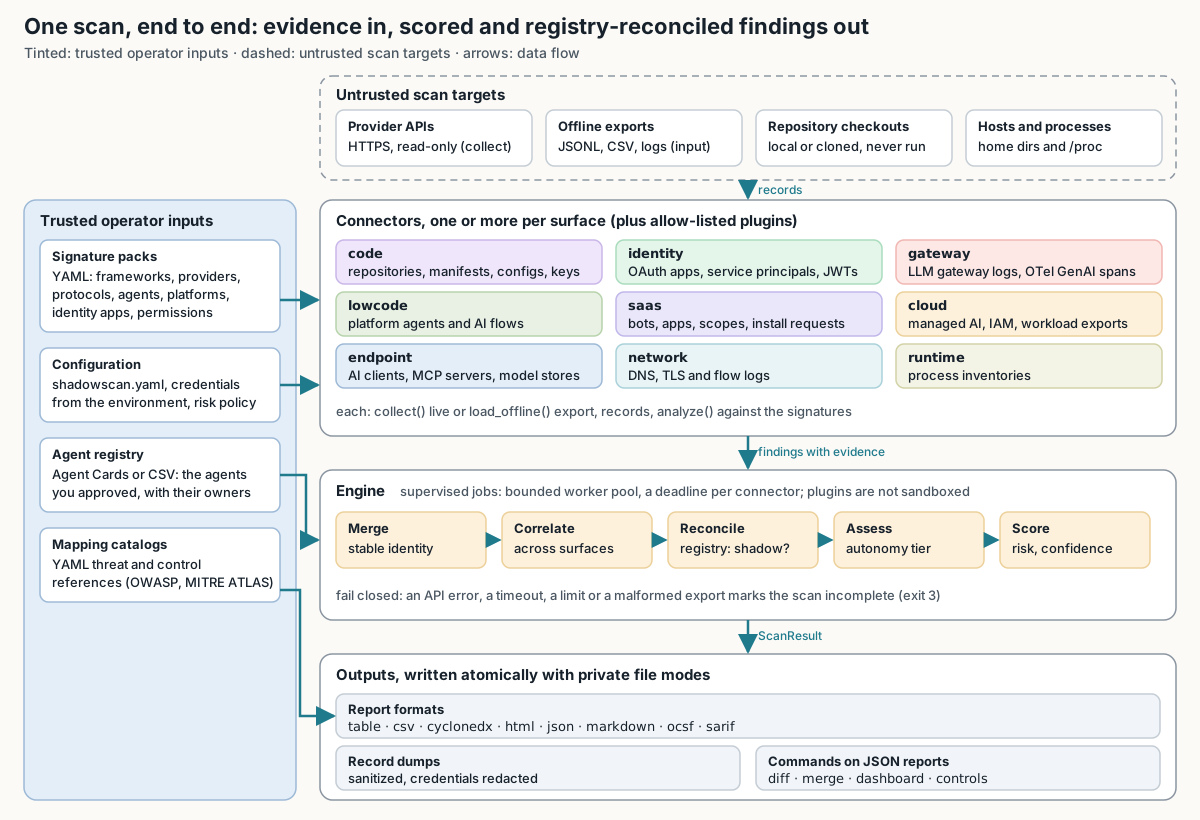
connectors ── live API or offline export ──► records
records ── analyze() with YAML signature packs ──► findings with evidence
findings ─► merge ─► correlate across surfaces ─► reconcile with inventory
         ─► classify autonomy ─► score risk ─► (opt-in) LLM triage
report ── table · json · sarif · csv · markdown · html · cyclonedx · ocsf
JSON reports ── diff · merge · dashboard · controls · inventory stubs
Most detection knowledge lives in YAML signature packs, and threat and control references in YAML mapping catalogs, so recognizing a new product is usually a data change rather than a code change.
Collection and analysis fail closed:
- An API error, a timeout, a refused page, an unparseable manifest or a malformed export marks the scan incomplete (exit 3) rather than producing a smaller report that looks clean.
- Only the opt-in LLM triage is advisory: its failures are warnings, and it never changes scores.
See architecture for the pipeline, the package layout, and the connector contract.
| Capability | Details |
|---|---|
| 38 connectors across 9 surfaces | Code, Identity, Gateway, Low-code, SaaS, Cloud, Endpoint, Network, Runtime |
| 233 signatures / 1133 signals | One signature per product or pattern (orchestrators, protocols, coding agents, platforms, model providers, AI SaaS apps, permission policies), each recognized by signals such as a package name, hostname, OAuth scope, or file path |
| Live and offline modes | 28 of the 38 connectors collect from a live API or the local host; the other 10 read only exports another tool produced (manifest dumps, gateway and network logs, OTel traces, endpoint and generic SaaS exports). All but the three code connectors can replay a saved export |
| 8 output formats | table · json · sarif · csv · markdown · html · cyclonedx · ocsf |
| Risk scoring | Additive, explainable 0-100 score with per-factor breakdown |
| Autonomy classification | L0 (chatbot) to L5 (fully autonomous), reported as a floor and a ceiling because a scan can rarely prove a capability absent |
| Inventory reconciliation | Agent Capability Cards, agents.yaml lists, CSV inventories, SymBiote AgentBOM documents, trusted vendor registries |
| Threat & control mappings | OWASP ASI, OWASP LLM, MITRE ATLAS, MAESTRO, NIST AI RMF, ISO/IEC 42001, EU AI Act, AIUC-1 |
| Fleet operations | Merge reports, dashboard, diff for drift detection, control evidence |
| CI/CD integration | GitHub Actions SARIF upload, deterministic exit codes, drift gating |
| Fail-closed design | Errors, timeouts and unbounded gaps produce exit 3 (incomplete), never a smaller clean report. Bounded gaps are budgeted (2% of entries by default, at most 100 per scan root) and always counted in the report |
| Credential safety | Known credential formats redacted before persistence; secret stores read for names and metadata only (Azure App Service settings are read and redacted) |
- Known credential formats, sensitive configuration fields, and credential-bearing URLs are redacted before findings or sanitized record exports are persisted. Redaction cannot identify every arbitrary secret; reports still contain security-sensitive inventory data, so treat them as confidential.
- Secret stores (AWS Secrets Manager and Systems Manager Parameter Store, Google Secret Manager, OCI Vault) are read for names and metadata only. By default the Azure collector also reads App Service application settings: that call returns plaintext values and needs
Microsoft.Web/sites/config/list/action, a Contributor-class permission that Reader lacks; the values are checked for credentials and redacted before persistence. Setinclude_app_settings: falseto skip the call and the permission. - JWTs are never persisted; findings reference a truncated hash.
- Scanned repositories, exports, and logs are parsed as data. ShadowScan never launches a discovered MCP server, runs a package manager to read a lockfile, or executes or unpickles a model file it finds.
- Built-in collectors inspect provider resources using read operations. Scope the audit identity to the documented read permissions. A third-party plugin runs only when allowlisted by exact name, with the scanner's privileges and no sandbox; review it separately.
- ShadowScan sends no telemetry. A scan connects only to the sources and credential endpoints its configuration names and, if you enable the opt-in LLM triage, to the model endpoint you choose, which receives redacted finding summaries (the redaction limits above apply).
shadowscan jwt --jwks-urlfetches the key set you name, andshadowscan mcp-registry snapshotreads the official MCP Registry unless--urlnames another.
See SECURITY.md and docs/production.md for deployment behavior, migration, and limits.
Run shadowscan --help or shadowscan <command> --help for the installed version.
| Task | Command |
|---|---|
| Local repository | shadowscan code . |
| Check local inputs | shadowscan code . --preflight |
| Only the changes since a base (Git 2.45+) | shadowscan code . --diff-base origin/main |
| Staged Git files (Git 2.45+) | shadowscan code --quick |
| GitHub repositories | shadowscan code --github-repo OWNER/REPO |
| This workstation's AI clients | shadowscan endpoint |
| Gateway logs | shadowscan gateway access.log litellm-spend.jsonl |
| JWTs: human, service or agent | shadowscan jwt --file tokens.txt --jwks-url https://idp.example.com/jwks.json |
| Every connector in a configuration | shadowscan scan -c shadowscan.yaml |
| Run one connector ad-hoc | shadowscan run cloud.aws --set regions=us-east-1 |
| Compare JSON reports | shadowscan diff baseline.json current.json |
| Combine reports from several scans | shadowscan merge team-a.json team-b.json -o fleet.json |
| Browse a JSON report | shadowscan triage report.json |
| Fleet dashboard | shadowscan dashboard report.json -o dashboard.html |
| Findings per governance control | shadowscan controls report.json |
| Validate the sanctioned inventory | shadowscan inventory check agent-card.yaml |
| Snapshot an MCP registry | shadowscan mcp-registry snapshot -o mcp-snapshot.json |
| Inspect detection signatures | shadowscan signatures list |
| Available connectors | shadowscan connectors |
Exit codes:
| Exit | Meaning |
|---|---|
| 0 | Complete for the declared scope and within the configured policy |
| 1 | Setup, configuration, input or output failure; no usable scan result |
| 2 | Complete scan reached --fail-on, or a requested drift threshold |
| 3 | Incomplete scan or comparison; inspect the report before relying on it |
A complete static scan does not prove that no agent runs. For exit 3, start with incomplete-scan troubleshooting; see scan semantics for the full rules.
In the three October 2026 ShadowBench runs below, ShadowScan had the highest headline score of the open-source tools tested, and in the two multi-surface runs it was the only tool that covered every surface. The maintainer built and scored all three with AI coding assistants (Claude, Codex, Grok, Google Antigravity, and others); read the caveats under the charts before comparing tools. Each report link opens a fixed commit of Nexus ShadowBench, where the benchmarks moved without being rerun or regraded.
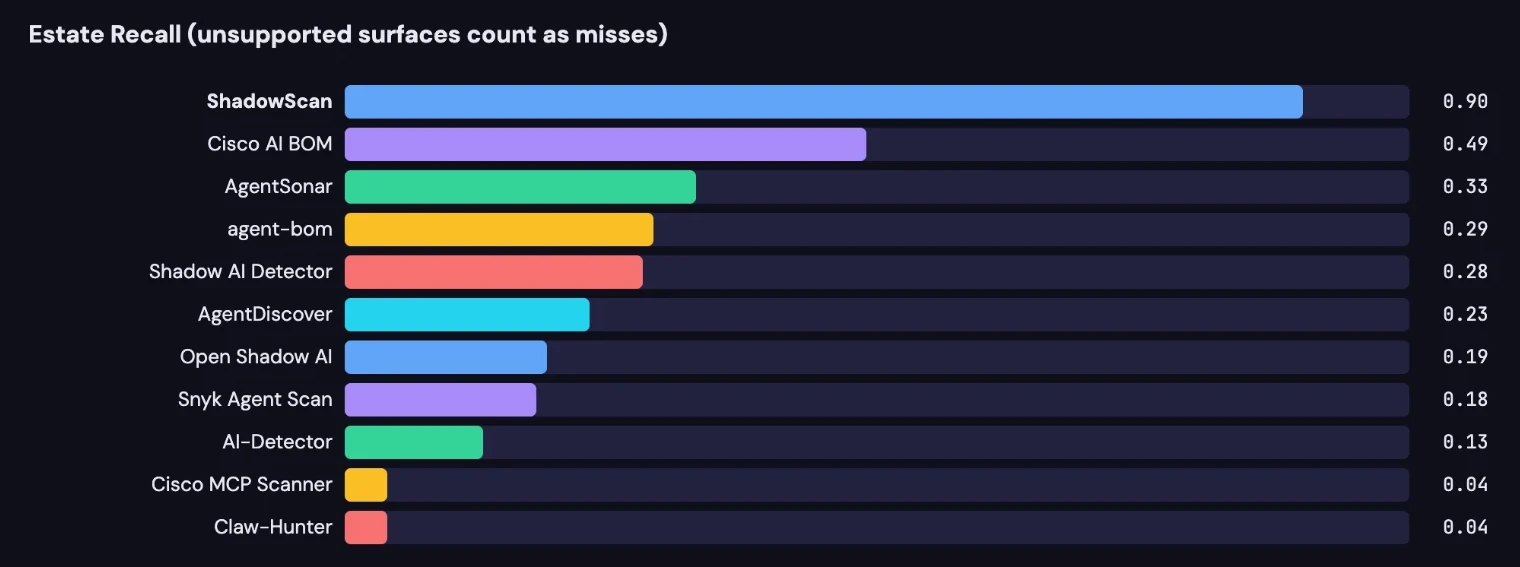
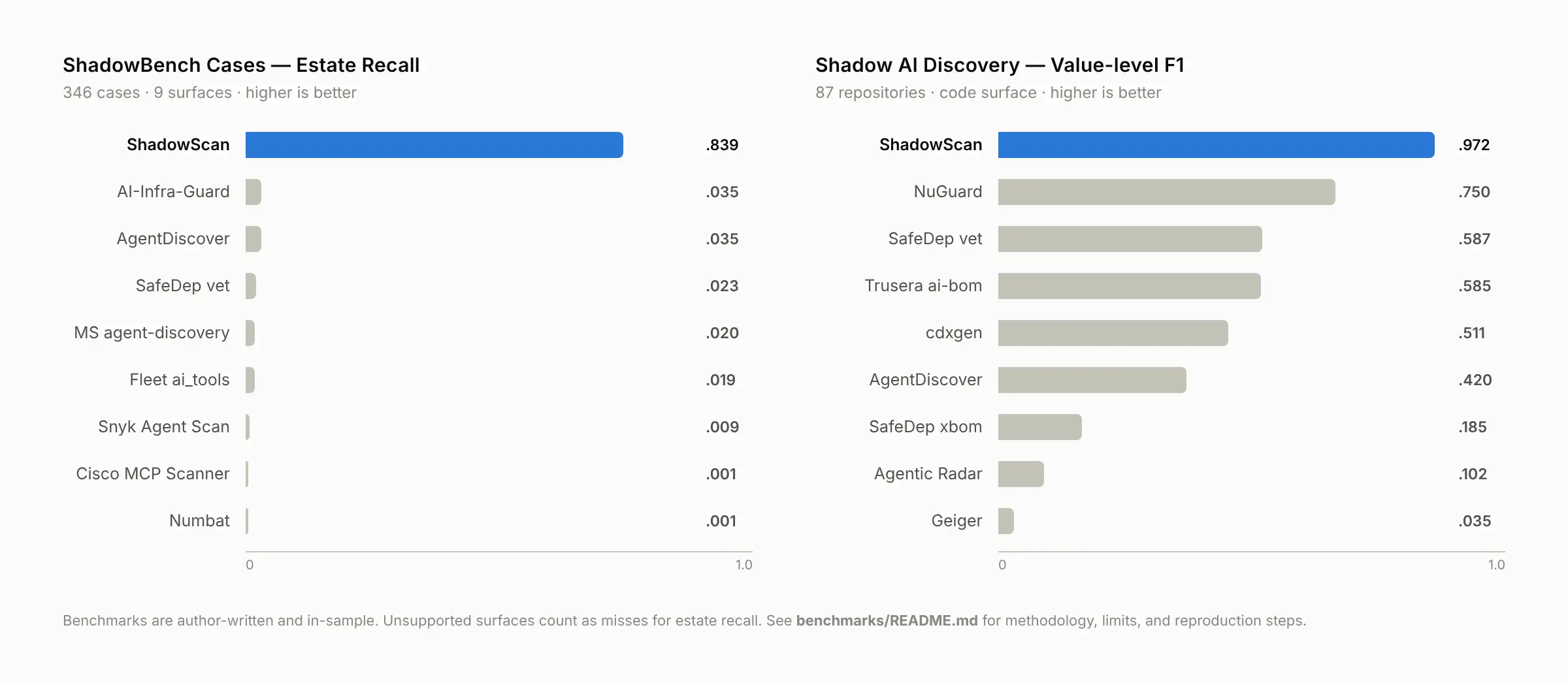
Estate recall is the share of all expected entities (in the head-to-head, positive cases) a tool found across every surface in the run, so it charges each tool for the surfaces it does not cover. In-scope value F1 counts only the fact categories a tool declares.
| Run | Inputs | ShadowScan | Next-best open-source tool |
|---|---|---|---|
| Head-to-head (tools pinned 2026-10-06) | 900 synthetic cases, 3 surfaces | Estate recall 0.90 (0.87–0.92) | Cisco AI BOM 0.49 (0.45–0.53) |
| ShadowBench cases (2026-10-11) | 346 cases, 738 entities, 9 surfaces | Estate recall 0.839 | AI-Infra-Guard, AgentDiscover 0.035 |
| Shadow AI discovery (2026-10-09) | 87 public repositories, code only | In-scope value F1 0.972 | NuGuard 0.750 |
How to read these numbers:
- They are evidence about the listed inputs, not independent review and not measured field accuracy or production precision; the same holds for the evaluation corpus, and any corpus used to tune detection is in-sample. The maintainer built every corpus, label, scorer, and tool adapter with AI coding assistants (Claude, Codex, Grok, Google Antigravity, and others); no label is independent human ground truth.
- The head-to-head was pre-registered, with ShadowScan's results committed before any other tool ran. The cases run was re-scored after the run with its results in view.
- The discovery result is in-sample: the 0.972 F1 was measured after tuning on that corpus. An earlier archived run recorded 0.909 against a different expected-fact universe (835 facts against 839), and labels and adapters also changed between the runs, so the two are not a controlled before-and-after comparison.
- Estate recall mostly measures coverage: test independently against the in-scope columns in each report, not solely against these headline numbers. On those columns, ShadowScan does not lead everywhere: in the cases run, AI-Infra-Guard's in-scope entity F1 (0.90, on the network surface only) is higher than ShadowScan's (0.82, on all nine). Several tools ran below full capability (offline, without the LLM classifiers, databases, or live-network layers some of them support), and these archived scores do not establish an independent product ranking.
- ShadowScan still has gaps. It found 70% of AI developer home directories in the head-to-head, its specificity on decoys in the cases run was 63%, and it marked 27 of its 326 scans in the cases run and 43 of 87 in the discovery run incomplete. In three real-world repository runs from 2026-10-08 (34, 41 and 326 public repositories), other tools scored higher, partly because those runs count ShadowScan's incomplete scans as misses.
See benchmark evidence for per-surface results and limits.
| Topic | Reference |
|---|---|
| Installation and first scan | Installation, quick start |
| Options and configuration | CLI reference, configuration |
| Examples, output and detection | Product guide, connector reference |
| Python integration | API reference |
| Benchmark protocols and limitations | Benchmark evidence |
| Production use and trust boundaries | Deployment, threat model |
Documentation links on this page open main, which can be newer than the version
you installed, and pages there can move. A PyPI release's documentation stays at
its tag, https://github.com/aisecnomad/Nexus-ShadowScan/tree/v<version>, where
<version> is what shadowscan --version prints; for a source install, read the
documentation of the commit you installed.
- Release state. Alpha; the package classifier is
Development Status :: 3 - Alpha. A version is published when it appears in the PyPI release history and as a release tag; a version number in the source is not evidence of publication, and commits onmainafter a release tag are unreleased. Confirm a version's publication and artifact identity there before installing it. Publication does not establish independent review or deployment acceptance. - Single maintainer, AI-assisted development. Apart from Dependabot updates and README edits carried from three pull requests opened by another GitHub account (#229, #275 and #313, credited as co-author), every commit up to this revision was written by a single maintainer or generated with an AI coding assistant (Claude, Codex, Grok, GitHub Copilot, Google Antigravity, Perplexity, Meta AI, etc.). The logs under archive/reviews/ are AI-assisted, not third-party reviews.
- Recommendation. Review the revision yourself or have it reviewed, then pin that full commit SHA as shown in Deployment install. Review state cannot be established from a checkout; verify it with the commands in merge gate and review status.
- Name. The repository was formerly
aisecnomad/Project-Nexusand briefly belonged to theHunzee-VCorganization; GitHub redirects the old links.
| I want to… | Start here |
|---|---|
| Ask a question or troubleshoot | Support guide |
| Report a bug or request a feature | Issue forms |
| Report a false positive or missed framework | Detection quality report |
| Make a first contribution | Contributor guide |
| Report a vulnerability privately | Security policy |
| Understand decisions, review and release requirements | Governance, Maintainers, Roadmap |
| Understand participation standards | Code of conduct |
| See what changed or cite the project | Release notes, Changelog, Engineering log, CITATION.cff |
Use synthetic, minimal examples in public reports. Scan results can contain credentials, personal data, and sensitive information even after redaction.