
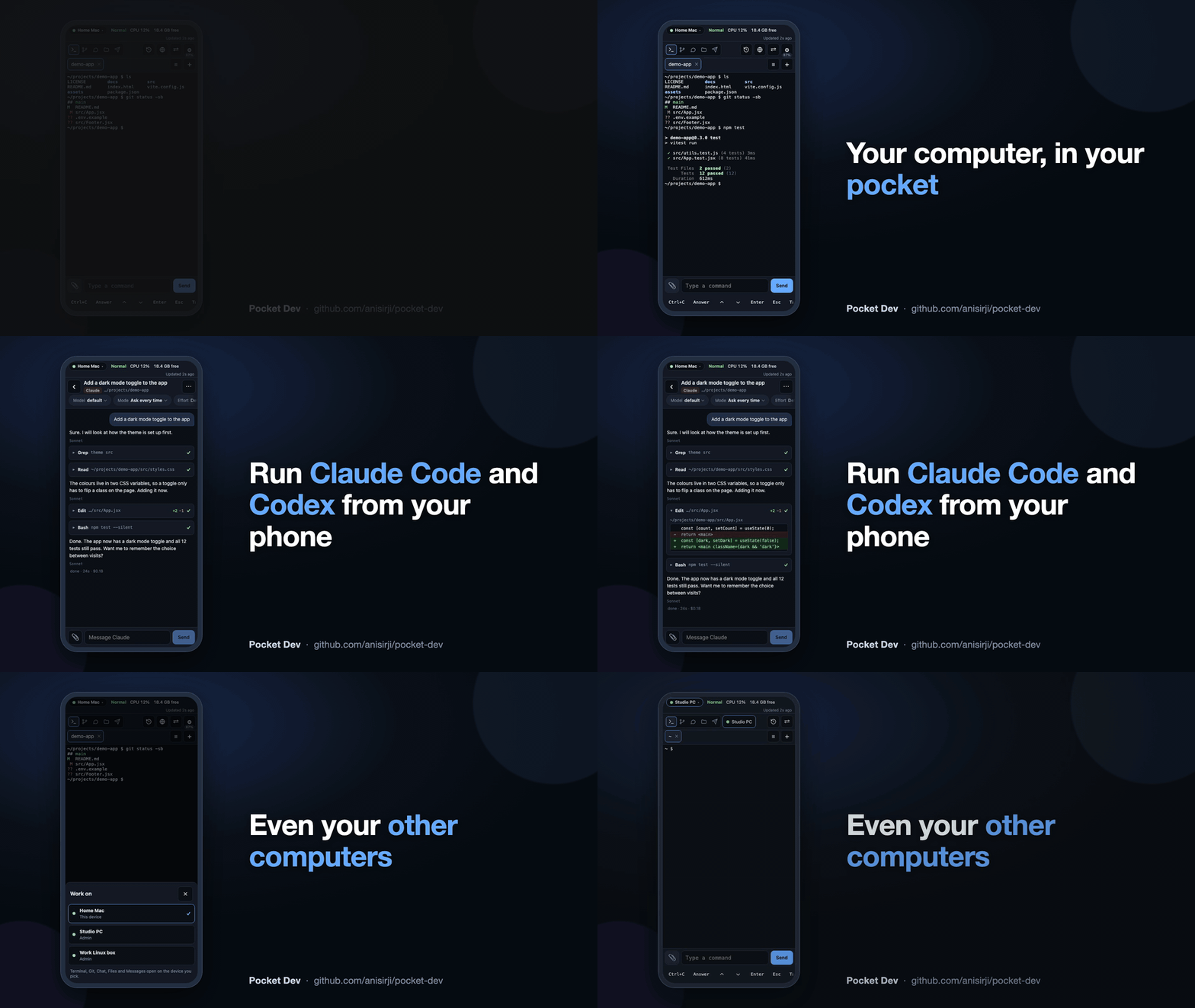
Control your computer from your phone's browser: terminals, Claude Code and Codex chats, Git, files and open apps. Runs on your own machine, nothing to install on the phone, no cloud account.



- Terminals on your computer that keep running when you close the page, with a compact key bar for phone keyboards and a strip that shows Claude Code's helper agents.
- Chat with Claude Code and Codex using your own logins, plus Antigravity and GitHub Copilot (experimental). Approval cards, permission modes and a message queue work from the phone.
- Switch the provider and the model in the same chat. The whole conversation goes with you.
- One Chats list, newest first: your Pocket Dev chats and the Claude Code, Codex, Antigravity and Copilot conversations on your computer, together.
- Continue between computer and phone. Open a computer conversation to read along live; send a message to continue it on the phone. Continue on computer takes it back.
- Copy any chat message with the icon under it, and see when each message was sent.
- Files: browse, upload (with Take photo on phones), download and zip. PDFs and text files open from Files and Messages.
- Git: see changes, commit and push.
- Messages between your devices, with photos, videos and documents.
- Open apps, health and power: see open apps, battery, CPU and temperature, and sleep or shut down.
- Several computers, one phone (rooms), with per-device permissions.
- Share one project with someone for 1 hour, 1 day or 7 days through a QR invitation.
- Internet access through a Cloudflare Tunnel: optional, off by default.
- Admin page with a Dock, Start menu or app menu tile, and self-update (
pocket-dev updateor the Admin Update button). - Private by design: runs on your own computer as your user, logs in with a password or a one-time QR code, needs no cloud account and nothing installed on the phone.
- Set up with AI: copyable prompts for your coding assistant, an agent setup guide and a reusable agent skill.
- New in 2.1.2: a copy icon under every chat message, the time on every message, documents (PDF and text) that open from Messages and Files, and a tidier code layout.
- One Chats list, newest first. Your Pocket Dev chats and recent computer conversations are mixed by when each was last active, so the conversation you are having on your computer right now sits at the top. The list refreshes by itself while open.
- Read along, then continue. Opening a conversation that is still open on your computer no longer closes it there. You can read along live. Sending a message continues it on the phone and closes the computer's copy gently, so Claude Code exits cleanly instead of showing an error in VS Code. Stop takes over at once.
- Windows hand-over: Pocket Dev finds and safely closes the program holding a conversation on Windows too.
- Take photo in the paperclip and Upload menus opens the camera directly, and Files opens Android's document picker.
- Set up with AI: copyable prompts, an agent setup guide and a reusable agent skill.
2.0 added four chat engines, provider and model switching in one chat, self-update and the Admin tile. Details: 2.1 release notes · 2.0 release notes.
Important
Important before you start
- You need Node.js 22 or newer (
node -v). - Your computer and phone must be on the same Wi-Fi.
- Type the package name exactly:
@anisirji/pocket-dev, with the@and with-g. - Your computer may ask about the firewall. Allow it on Private networks.
- A different npm package called
pocket-devcan take over the command. If you seeunknown command 'start'orEEXIST, runnpm uninstall -g pocket-dev, then install again. - The first
pocket-dev startopens a short guided setup. It asks before every change. Run it again any time withpocket-dev setup. - The install itself makes one change without asking:
npm install -gadds a Pocket Dev Admin shortcut with the Pocket Dev logo: a Dock tile on macOS, Desktop and Start menu shortcuts on Windows, an applications menu entry on Linux. Undo it withpocket-dev admin unpin. Skip it withPOCKET_DEV_NO_PIN=1ornpm install -g --ignore-scripts.npxand CI never add it.
You need Node.js 22 or newer (node -v to check) and a phone on the same Wi-Fi.
Want your coding assistant to set it up? Copy the AI setup prompt. Paste it into an assistant that can run commands on your own computer. The same page has a prompt for continuing your current project from your phone. Setup details for agents · Reusable agent skill.
npm install -g @anisirji/pocket-dev
pocket-dev start
- The first time,
pocket-dev startopens the guided setup. It shows each command before it runs it and asks first. Claude Code, Codex, GitHub Copilot and the GitHub CLI are installed or logged in only if you say yes. The Always on step shows one list of recommended changes (start at login, Keep awake) and asks once. - At the end it prints an address like
http://192.168.1.25:7777and a one-time QR code. If Pocket Dev now runs in the background, do not runpocket-dev startagain. If you do, it says it is already running and prints a fresh QR code. - On your phone, scan the QR code (or open the address and type the password).
Updating. The guided setup starts by checking for a newer version and asks Update now? [Y/n] (Enter means yes), so a new install is current from the first minute. Later, pocket-dev update does the same, and pocket-dev update --check only says whether one exists. When a newer version is on npm, the phone shows an update icon beside the Settings gear and a notice every time you open Pocket Dev, and the Admin page shows an Update button that installs it on the computer and restarts the background service. The computer also gets a desktop notification while an update is waiting (pocket-dev config set updateNotify false turns that off). Installing stays on the computer: the phone only tells you.
Privacy. The only thing Pocket Dev looks up online by itself is the newest version number: one plain request to the npm registry, at most every six hours, with nothing about you or your computer in it. Turn it off with pocket-dev config set updateCheck false or POCKET_DEV_NO_UPDATE_CHECK=1. Everything else stays on your computer, as before.
4. If your computer asks, allow Pocket Dev through the firewall.
The Admin page is one click away from the Dock, Start menu or applications menu (see the note above). pocket-dev admin pin --status shows where it is. A new login code any time: pocket-dev qr. The guide again: pocket-dev setup. Scripts and CI never get a question: without a terminal, pocket-dev start prints the status and the command, then starts. --no-setup (or POCKET_DEV_NO_SETUP=1) skips the guide.
Just trying it? npx -y @anisirji/pocket-dev start runs it once and installs nothing.
| You see | Do this |
|---|---|
unknown command 'start'. See 'main --help' or EEXIST ... pocket-dev.cmd |
A different npm package, pocket-dev, owns the command. Run npm uninstall -g pocket-dev, then npm install -g @anisirji/pocket-dev again. |
pocket-dev is not recognised after installing |
Close the terminal and open a new one. |
Install fails on node-pty |
Run pocket-dev doctor --fix. On macOS run xcode-select --install first. |
Version X is available (update icon on the phone, banner on the Admin page) |
Tap Update on the Admin page on your computer, or run pocket-dev update in a terminal there. |
| The phone cannot open the address | Same Wi-Fi? Firewall allowed? Port busy? Run pocket-dev doctor. |
More fixes: Troubleshooting.
- Set up with AI: copyable setup and project prompts, with an agent setup guide.
- Install, one page per system: Windows, macOS, Linux.
- Beginner install guide: with pictures, for Windows, Mac and Linux.
- Full guide: commands, configuration, rooms, internet access, security, limitations.
- Guided setup and reference.
- Ask a question or share a tip: GitHub Discussions
- Report a bug: open an issue and paste the output of
pocket-dev doctor - Source code: github.com/anisirji/pocket-dev
I built Pocket Dev because I wanted us to spend less time tied to a desk and more time living, without losing touch with our work.
If it makes your day a little freer, share it with three people you’d love to see escape the PC cage too. If they find it useful, invite them to share it with three more.
No pressure. Just something useful, passed from one person to another. ❤️
Let your AI help you set it up
Made by anisirji. Licence: ISC. If you use or build on this code, keep the copyright notice in LICENSE and please credit and link theani.me.