
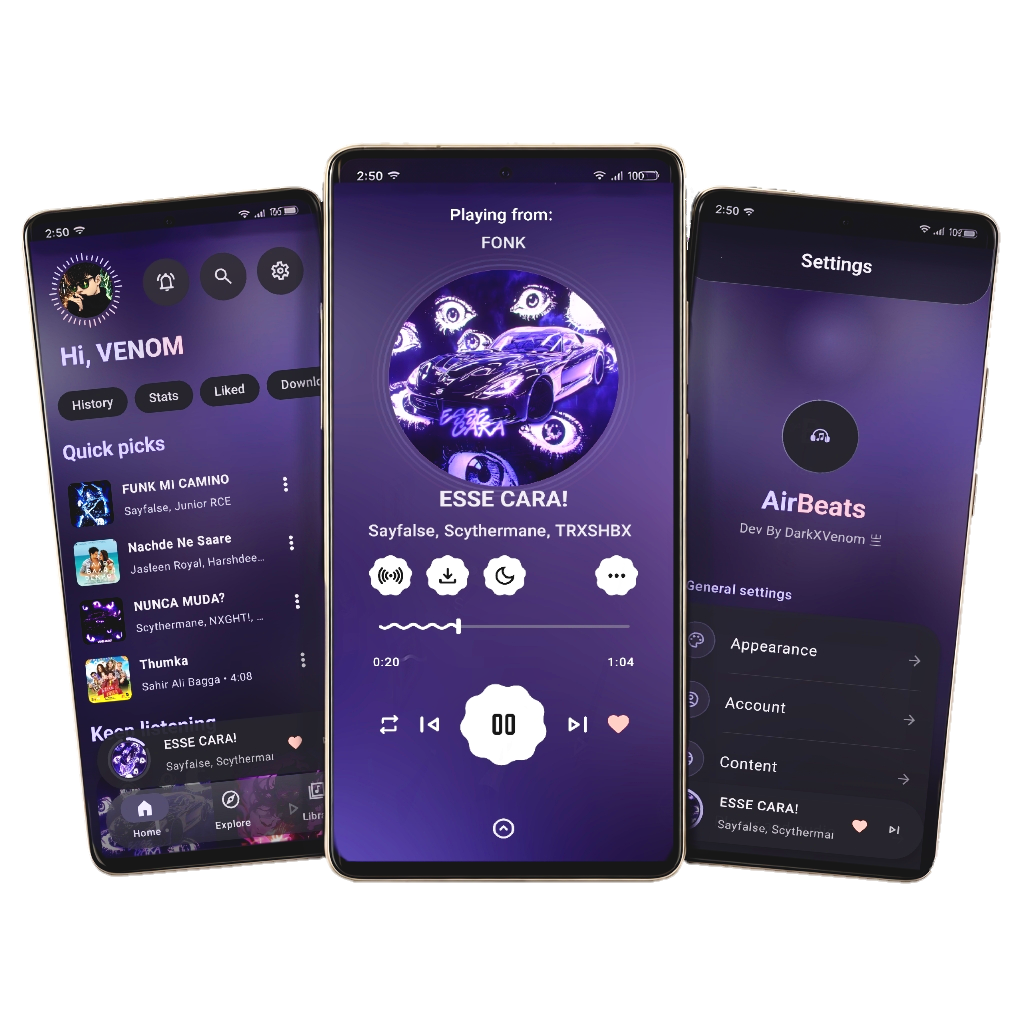
Experience Music Like Never Before on Android




AirBeats is an advanced, open-source music application built around a modern Material Design 3 experience.
It is designed to provide much more than basic music playback. AirBeats combines:
- 🎵 Music streaming
- 🎨 Deep UI customization
- 🎧 Advanced music playback
- 📝 Advanced lyrics
- 🤖 AI-powered features
- 🧠 Music recognition
- 📊 Personal and global listening statistics
- ☁️ Cloud backup and synchronization
- 🔄 Cross-device synchronization
- 🌐 Multiple music providers
- 💻 Cross-platform desktop integration
- 👥 Listen Together
- 📱 Android system integration
- 🌙 Always-On Display support
- 🏝️ Dynamic Island-style playback experience
- 🌍 Community translations
- 📰 In-app developer news
- 🐛 Automatic crash reporting
- 🌐 A connected AirBeats ecosystem
AirBeats is built to make the entire music experience customizable, connected, and community-driven.
-
🎵 YouTube Music Integration
- Access music through YouTube Music
- Search for songs, albums, artists and playlists
- Background playback
- Lock-screen playback controls
- Advanced playback controls
-
🎧 Multiple Music Providers
- YouTube / YouTube Music provider
- JioSaavn / Saavn provider
- Provider-based architecture designed to allow the ecosystem to grow
-
📥 Offline Music
- Download music for offline playback
- Local music support
- Offline playback without requiring continuous streaming
-
🔀 Advanced Playback
- Queue management
- Repeat
- Shuffle
- Crossfade
- Playback controls
- Bluetooth playback integration
- Resume playback support
AirBeats is designed around customization rather than forcing every user into the same interface.
AirBeats provides multiple home screen layouts so users can choose the experience that fits them.
- 🏠 Multiple home screen designs
- 🎨 Different content arrangements
- 🧩 Customizable sections
- 🔄 Flexible home experience
Choose between different navigation experiences instead of being locked to a single navigation design.
- Multiple navigation styles
- Custom navigation layouts
- Different navigation experiences
AirBeats includes a large collection of music player designs.
Users can customize how the Now Playing experience looks instead of being restricted to one player.
Player experiences include different layouts, visual styles, animations and information arrangements.
AirBeats provides dedicated lyrics experiences instead of treating lyrics as a simple text overlay.
- Multiple lyrics screen styles
- Synchronized lyrics
- Advanced lyrics presentation
- Word-level / synchronized lyric experiences where supported
- Lyrics customization
Customize the visual identity of AirBeats using font support throughout the application.
- Custom fonts
- Typography customization
- Multiple font experiences
- App-wide typography support
Built around a modern Material Design 3 interface with:
- Dynamic layouts
- Smooth animations
- Modern components
- Dark mode
- Responsive UI
- Modern player experiences
AirBeats integrates AI into the music experience.
AI-powered functionality can assist with music-related experiences, information, recommendations and notifications.
- AI-powered music experiences
- AI-assisted information
- AI-powered notifications
- AI integration designed to expand with future releases
AirBeats treats AI as part of the application ecosystem rather than as a separate external tool.
AirBeats includes music recognition functionality for identifying music.
Users can recognize songs and integrate the identified music into their AirBeats experience.
AirBeats turns listening activity into a connected statistics experience.
Track your listening activity, including information such as:
- Songs played
- Listening activity
- Listening history
- Personal statistics
- Weekly listening statistics
- Total listening statistics
AirBeats also provides global listening statistics and community-level statistics.
- 🌍 Global listening activity
- 📊 Global statistics
- 🏆 Listening leaderboards
- 📈 Community listening information
This allows AirBeats to become a connected music community rather than only a local music player.
AirBeats provides cloud-based synchronization to keep important music data available across supported devices.
Depending on the supported AirBeats ecosystem:
- Playlists
- Favorites
- Listening history
- Preferences
- Statistics
- Other supported application data
can be backed up and synchronized.
Your AirBeats configuration can be backed up to the cloud and restored when moving to another supported device.
AirBeats is designed to integrate deeply with Android.
Supported Android experiences include:
- 🔔 Media notifications
- 🎧 Lock-screen controls
- 📱 Android media controls
- 🚗 Android Auto
- 🏝️ Dynamic Island-style playback
- 🌙 Always-On Display
- 🔊 Bluetooth controls
- 📲 System playback integration
- ⚡ Modern Android UI behavior
AirBeats includes its own Dynamic Island-style music experience.
The interface provides an interactive playback surface for supported Android devices.
Features include:
- Current song information
- Playback controls
- Music artwork
- Interactive music controls
- Compact playback interface
Designed as an AirBeats-native experience, rather than simply copying a standard notification layout.
AirBeats provides a dedicated Always-On Display music experience.
Users can access important playback information and controls while the device is in an AOD-compatible state.
AirBeats supports Android Auto integration for compatible vehicles and Android devices.
This allows users to interact with supported music functionality while driving through the Android Auto interface.
AirBeats includes a connected Listen Together experience designed for synchronized listening between users and devices.
Users can listen to music together while maintaining synchronized playback.
The AirBeats ecosystem extends beyond Android.
Supported desktop ecosystem:
- 🪟 Windows
- 🍎 macOS
- 🐧 Linux
- 📱 Android
This allows supported AirBeats clients to participate in the same connected ecosystem.
AirBeats is designed around cross-platform communication rather than keeping every platform isolated.
Supported ecosystem functionality can connect:
Android ↔ Windows
Android ↔ macOS
Android ↔ Linux
Windows ↔ macOS
Windows ↔ Linux
and other supported AirBeats clients where the feature is available.
AirBeats isn't just for Android!
You can enjoy the AirBeats ecosystem on:
- 🪟 Windows
- 🍎 macOS
- 🐧 Linux
The desktop ecosystem provides YouTube Music integration and connects with the wider AirBeats experience.
Head over to our official desktop repository:
👉 https://github.com/d0x-dev/airbeats-desktop
AirBeats Desktop is officially available through the Snap Store:
sudo snap install airbeatsAirBeats is designed as an ecosystem rather than a collection of isolated applications.
Supported ecosystem functionality includes:
- ☁️ Cloud backup
- 🔄 Cloud synchronization
- 📱 Android synchronization
- 💻 Desktop synchronization
- 🎶 Listen Together
- 📊 Statistics synchronization
- 👤 Account-based data synchronization
- 🔗 Cross-platform connectivity
This allows AirBeats to provide a consistent experience across supported devices.
AirBeats includes data-saving functionality designed for users who want to reduce network consumption.
The data saver experience can help users control network usage while using AirBeats.
AirBeats includes developer/community news directly inside the application.
Users can stay informed about:
- 🆕 New AirBeats releases
- 🚀 New features
- 🛠️ Development updates
- 📢 Important announcements
- 📰 Developer news
This means users don't always need to leave the application to discover what's happening with AirBeats.
AirBeats includes an integrated crash-reporting system.
When supported, crash information can be submitted to help developers identify and fix problems.
This helps the development team:
- Detect crashes
- Investigate bugs
- Improve stability
- Identify problematic devices/configurations
- Improve future releases
Crash reporting is intended to make troubleshooting faster and improve application reliability.
AirBeats uses Crowdin to allow the community to help translate the application.
Translations can be contributed by users without requiring programming knowledge.
👉 https://crowdin.com/project/airbeats
Translation contributions are synchronized with the project repository.
AirBeats is supported by a community ecosystem.
Community channels provide:
- 💬 User discussion
- 🐛 Bug reports
- 💡 Feature suggestions
- 🛠️ Development discussion
- 📰 Updates
- 🚀 Release information
Users can join the AirBeats Telegram community for updates, discussion and support.
AirBeats also supports a development/nightly ecosystem for users who want to test newer builds and features before they become part of stable releases.
Nightly builds are intended for users who are comfortable testing newer development versions.
⚠️ Nightly builds may contain unfinished features, experimental changes or bugs.
AirBeats is designed with performance in mind.
The application focuses on:
- ⚡ Fast startup
- 🎞️ Smooth animations
- 📱 Responsive interfaces
- 🧠 Efficient playback
- 🔋 Reasonable resource usage
- 🌐 Efficient network usage
- 📦 Offline playback
- 📱 Compatibility across a wide range of Android devices
AirBeats is open source and designed with privacy in mind.
Your music experience should remain under your control.
The project source code is publicly available for inspection and contribution.
For cloud, authentication, crash-reporting and other network-enabled features, users should review the project's current privacy documentation and configuration.
AirBeats supports:
Android 6.0+
This provides compatibility with a wide range of Android devices.
| Link | Purpose |
|---|---|
| 🌍 Official Website | Learn more about AirBeats |
| 📥 Download APK | Get the latest version |
| 🏪 Official Store | Alternative download source |
| 💻 Desktop Repository | AirBeats Desktop |
| 🐙 GitHub Repository | Source code |
| 🌍 Crowdin | Translation |
| 💬 Telegram | Community / updates |

Darkboy - Full-Stack Android Developer

Venom - Creative Design Visionary
Ready to build AirBeats yourself?
Follow the setup instructions below.
| Requirement | Version |
|---|---|
| Java Development Kit (JDK) | 21 |
| Android Studio | Ladybug or newer |
| Git | Latest |
Important
google-services.json) and Google API Key are not included in the repository for security reasons. You must configure these manually to build the project successfully.
- Visit the Firebase Console.
- Create a new Firebase project or use an existing project.
- Select Add Android app.
- Register the application with:
Package name:
com.darkxvenom.airbeats
- Set the application nickname to:
AirBeats
- Download:
google-services.json
- Place it inside:
AirBeats/app/google-services.json
Open:
local.properties
Add:
google.api.key=YOUR_GOOGLE_API_KEY_HEREClone the repository:
git clone https://github.com/d0x-dev/AirBeats.gitNavigate into the project:
cd AirBeatsClean build files:
./gradlew cleanBuild the Debug APK:
./gradlew assembleDebugThe APK will be available at:
app/build/outputs/apk/debug/app-debug.apk
./gradlew assembleReleaseRequires a properly configured signing key.
./gradlew installDebug./gradlew testAirBeats is designed as a modular music ecosystem.
The project includes functionality around:
- Music providers
- Playback
- Lyrics
- Statistics
- Cloud services
- Synchronization
- UI customization
- Android system integration
- Desktop connectivity
- Listen Together
- Translation
- Crash reporting
- Community services
The modular approach allows AirBeats to evolve without restricting the application to a single music provider or a single platform.
We'd love your contributions!
Help us translate AirBeats into your language.
You don't need coding experience to help.
- Go to the Crowdin Project Page.
- Create a free account.
- Select your language.
- Start translating.
Translations are synchronized with the AirBeats repository.
-
Fork the repository.
-
Create a feature branch:
git checkout -b feature/amazing-feature- Commit your changes:
git commit -m "Add amazing feature"- Push your branch:
git push origin feature/amazing-feature- Open a Pull Request.
Have a question?
Open an issue:
👉 https://github.com/d0x-dev/AirBeats/issues
Found a bug?
👉 https://github.com/d0x-dev/AirBeats/issues/new
Have a feature suggestion?
Open an issue and describe your idea.
You can also join the AirBeats community through the project's available community channels.
Copyright © 2025 Darkboy & Venom
AirBeats is licensed under the:
GNU General Public License v3.0
See the LICENSE file for the complete license.
This program is free software: you can redistribute it and/or modify
it under the terms of the GNU General Public License as published by
the Free Software Foundation, either version 3 of the License.
AirBeats is built by developers and contributors who want to create a powerful, customizable and connected open-source music experience.
Android • Windows • macOS • Linux
⭐ If you love AirBeats, please consider giving the project a star on GitHub! ⭐
Made with ❤️ by the AirBeats Team