


Turn a large failing repository into a small, verified bug reproduction.
ReproMin is a repository-scale test-case reducer for repeatable Maven, Gradle, and Python failures. It removes files, manifest entries, source structure, and selected text only while the same failure still occurs.
Maintainer-run Gradle pilot: 854 -> 11 files, with the same failure reproduced in 5/5 fresh copies.
Run the self-contained demo to see a reduction complete in about 30 seconds. Already have a repeatable failure? Reduce it yourself. For a public, licensed Maven, Gradle, or Python case, reply in the pilot thread with its exact revision, reproduction command, and target failure signal. You do not need to install ReproMin or complete a run report first. A maintainer will check the fit and run a bounded first reduction.
With uv 0.13.4+, run the
published development release from GitHub without installing into your project
or system Python:
uvx --from "https://github.com/fly1d/repomin/releases/download/v0.1.0.dev15/repomin-0.1.0.dev15-py3-none-any.whl" \
  repomin demo ./repomin-demo
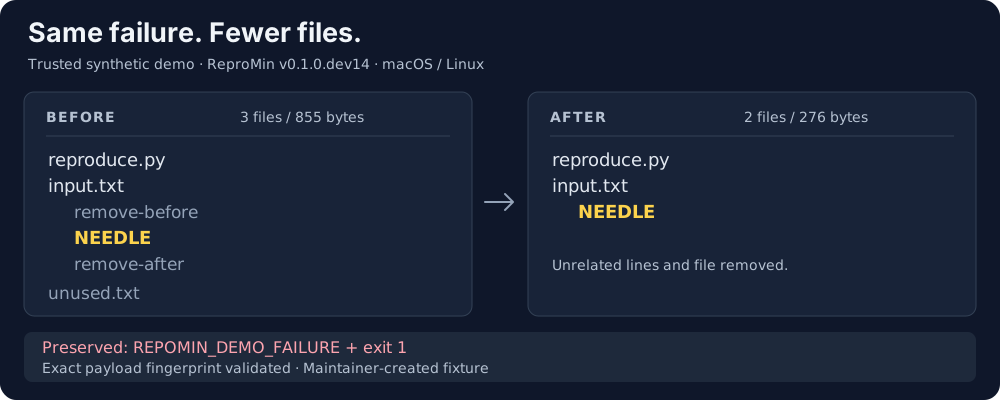
The trusted, network-free demo normally finishes in a few seconds. Its key output looks like this:
ReproMin demo completed.
Reduced: 3 files / 855 bytes -> 2 files / 276 bytes in 14 attempts.
Removed: unused.txt and two unrelated input lines.
Validated: exact payload fingerprint.
The demo validates the reduced payload and leaves it with an evidence report for inspection. To use your own repeatable failure, continue with the real-repository quick start. The PowerShell walkthrough provides a self-contained Windows tour; the Chinese quick start covers the same real-repository path in Chinese. For a failing CI job, start with the GitHub Action.
Project status: ReproMin is a pre-alpha feasibility build. Use it on a reproducible failure in a repository you trust. The default host backend runs your command directly and is not a sandbox.
Maintainer-run cases demonstrate the current technical scope:
| Pilot | Before | After | Fresh-copy evidence |
|---|---|---|---|
| Gradle #38843 | 854 files, 3.8 MB | 11 files, 87.9 KB | 5/5 replays + cold start |
| tsdown #979 | 14 files | 8 files | 3/3 replays |
| Aeron / Gradle #39424 | 1,733 files, 21.0 MB | 27 files, 166.7 KB | 2/2 replays + cold start + relocated replay |
Inspect the public tsdown reproduction.
It contains the eight payload files plus a README and .gitignore restored
for readers. The 27-file Aeron example
includes the payload, source provenance, and a native report with commands for
online setup and offline replay. The older Gradle #38843 case study records
the method and results without a downloadable payload.
These are feasibility results, not independent adoption or a promise that every repository will shrink by the same amount.
Use ReproMin when a bug already repeats but the repository is too large to share, review, or keep as a regression fixture. It produces a smaller payload, a human-readable receipt, and a machine-readable report that can be validated or replayed.
| Your goal | Start with |
|---|---|
| Find the commit that introduced a regression | git bisect |
| Capture the runtime environment and dependencies | A container or ReproZip |
| Minimize source or compiler inputs | C-Reduce, C-Vise, Perses, or Shrink Ray |
| Reduce multi-file inputs with an interestingness test | C-Vise's directory workflow |
| Reduce Maven/Gradle/Python projects with build-manifest edits and validated replay evidence | ReproMin (pre-alpha) |
Directory reduction is also available in other tools. ReproMin's current focus is the build/test workflow and its exported evidence; no comparative performance or output-size advantage has been established.
ReproMin treats your build, test, or reproduction command as the authority. It does not diagnose the root cause or prove that the remaining code is correct.
ReproMin requires Python 3.9+ and has no runtime dependencies. For the pip installation below, use maintained Python 3.11+ and pip 26.2.2+; see the installer advisory. For an older project interpreter, use the separate tool environment in the quick start. First run the reproduction command yourself and identify a marker that is specific to the target failure. Then, using the project's working virtual environment, install the current pre-alpha release, run a bounded reduction, and validate the exported evidence:
python -m pip install \
  "https://github.com/fly1d/repomin/releases/download/v0.1.0.dev15/repomin-0.1.0.dev15-py3-none-any.whl"

repomin reduce . \
  --command 'python -m pytest -q tests/test_checkout.py' \
  --match 'AssertionError: checkout total mismatch' \
  --exit-code 1 \
  --max-attempts 25 \
  --max-duration 300 \
  --semantic-reducer none \
  --output ../checkout-repro
Reduction checks the failure in two fresh copies before trying edits; a failed baseline stops the run. To check readiness separately before a reduction, use the optional Doctor. After reduction finishes, validate the result:
repomin report validate ../checkout-repro.repomin/report.json \
  --payload ../checkout-repro \
  --format markdown
Keep the project environment active throughout this example; installing
ReproMin does not install its test dependencies. Fresh copies exclude .venv
and venv, so use an activated environment or an absolute project interpreter,
rather than a relative .venv/bin/python command. The
quick start
shows how to retain the project interpreter when installing ReproMin separately.
An editable install can still import the original project from a fresh copy. Make the reproduction command check the tested package's source on every run; preserving the interpreter does not ensure it tests the candidate.
ReproMin itself prepares candidates in temporary copies and does not write into
the source tree. On the host backend, however, your reproduction command still
runs with your account and can modify any resource it can access.
Do not use a generic marker such as FAILED, error, or only a test filename:
an unrelated failure could satisfy it. The example requires both a distinctive
failure message and its exact exit code. Before reducing, confirm that the
target repeats and that setup errors or other failures do not emit the same
marker. The
quick start
explains the complete real-repository workflow and the available exception and
process signatures; use the
Doctor guide for
failed checks and the
replay guide before
executing an exported command.
For a repeatable CI failure, the GitHub Action can upload the reduced payload and validated report as workflow artifacts.
| Layer | Coverage |
|---|---|
| Repository tree | Files and directories in any trusted local repository |
| Build manifests | Maven, Gradle, Python, Pipenv, Node, Composer, MSBuild, Bundler, Cargo, and Go |
| Source structure | Native Java and Python reducers |
| Selected text | Explicit UTF-8 files reduced by line |
| Custom semantic edits | Optional OpenAI-compatible HTTP integration; every edit still passes the oracle |
Other languages still benefit from repository, manifest, and explicit text reduction. Start with the nearest ecosystem example.
The host backend runs the supplied command with your user account. It is not a sandbox. Only run repositories and commands you trust. Docker can reduce access when configured carefully, but it is not a complete security boundary. Read SECURITY.md before handling third-party code.
The Markdown validation summary is path-free and allow-listed, but it does not make the payload or full report safe to publish. Review every shared artifact.
Documentation, Chinese quick start, Q&A, Share a result, Contribute, Starter tasks, Support
Apache-2.0 licensed. See LICENSE.