Unity Compute Shader와 GPU Instancing을 활용해 대규모 Boids 군집 시뮬레이션을 실시간으로 구동하는 프로젝트입니다. CPU 중심 구현에서 발생하는 병목(개체 수 증가 시 프레임 하락)을 GPU 병렬 처리로 완화하는 데 초점을 맞췄습니다.
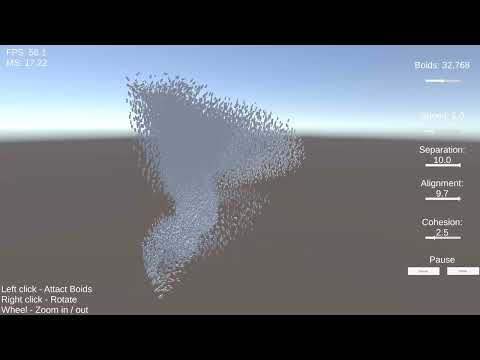
- 영상: https://www.youtube.com/watch?v=zoZexSNFHc8
- 실행 씬:
Assets/Scenes/Main.unity
- 목표: 수천~수만 개 에이전트를 실시간으로 업데이트하고 인터랙티브하게 제어
- 제약: 시뮬레이션 계산 + 렌더링 + 입력 반영을 프레임 단위로 동시에 처리
- 해결 방향
- Boids 핵심 계산을 Compute Shader로 이동
- 보이드 상태를 GPU 메모리에 유지해 CPU-GPU 왕복 최소화
DrawMeshInstancedIndirect로 대량 인스턴스 렌더링 오버헤드 완화
- CPU per-instance 업데이트를 제거해 개체 수 증가에 유리
- 시뮬레이션과 렌더링을 GPU 중심으로 일관되게 구성
- 입력 상호작용이 있어도 일관된 GPU 파이프라인 유지
- 이웃 탐색은 본질적으로
O(n^2)성격 - 보이드 수 증가에 따라 GPU 연산량이 급격히 증가
- 우클릭 입력이 카메라 회전과 겹칠 수 있음
- Uniform Grid / Spatial Hash로 이웃 후보군 축소
- Compute 단계 분리(해시 생성/정렬/근접 탐색)
- LOD 기반 원거리 저비용 렌더링
- 벤치마크 CSV 시각화 및 기기별 결과 비교
- 이슈: 개체 수 증가 시 CPU 루프 기반 구현에서 프레임 하락
- 대응: Boid 상태를
ComputeBuffer로 전환하고 GPU에서 힘 계산/적분 수행 - 이슈: 인스턴스 수 증가에 따른 CPU Draw Call 오버헤드
- 대응:
DrawMeshInstancedIndirect도입으로 드로우 호출 수 고정 - 이슈: 파라미터 변경 즉시 반영 시 버퍼 재할당 타이밍 문제
- 대응: Boid 수 변경은
Reset시점에 반영하도록 분리
Large-scale boid flocking simulation built with Unity Compute Shaders and GPU indirect instancing.
- Video: https://www.youtube.com/watch?v=zoZexSNFHc8
- Scene:
Assets/Scenes/Main.unity
- Two-pass GPU simulation:
ForceCS+IntegrateCS - GPU-driven rendering via
DrawMeshInstancedIndirect - Real-time controls: boid count, speed, behavior weights, pause/reset
- Interactive mouse attract/repel behavior
- Open the project with Unity
6000.2.6f2. - Open
Assets/Scenes/Main.unity. - Press Play.
Add BoidBenchmarkRunner to the GameObject that owns GPUBoids, enter Play
Mode, and run Run Boid Benchmark from the component context menu. The
runner sweeps 1,024 to 16,384 boids after a warm-up and writes a CSV file to
Application.persistentDataPath.
The CSV places theoretical N² pair checks next to median/p95 frame time and
available CPU/GPU frame timings. GPU timing support depends on the graphics API
and platform; a zero value means Unity did not expose that sample. Run a player
build with VSync disabled for comparable measurements.