Object detection without a model. Point it at an image, get back labeled bounding boxes - powered by Gemini.


An open-source project by Hebula Labs
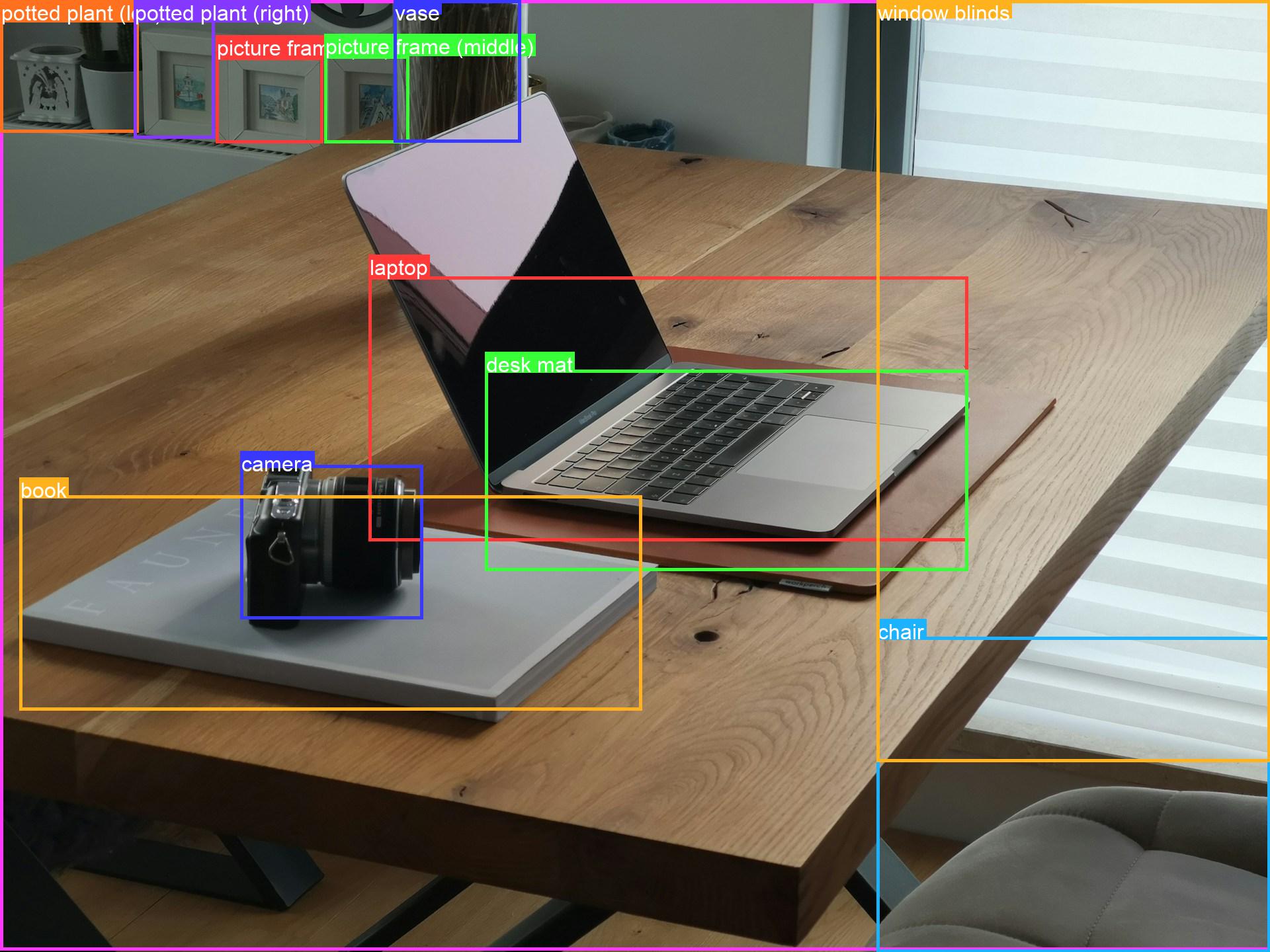
One call. No training, no weights, no GPU - just a file path and an API key.
No dataset. No fine-tuning. No pip install torch. You give Prompt2Box a local
image; it asks Gemini's spatial model what's in it and hands you back a clean
list of items, each with a label and a pixel-space bounding box - ready
to draw, crop, or feed into the rest of your pipeline.
from prompt2box import detect

result = detect("desk.jpg")
result.labels                 # ['laptop', 'camera', 'book', 'vase', 'chair', ...]
result.save_annotated("out.jpg")Not on PyPI yet - install from source:
git clone https://github.com/hebula-labs/Prompt2Box && cd Prompt2Box
pip install .
Python 3.10 or newer, on Linux, macOS, or Windows.
You need a Gemini API key - get one at aistudio.google.com/apikey:
export GEMINI_API_KEY="AIza..."     # or drop it in a .env file
prompt2box desk.jpg
Heads up: if AI Studio only hands you an
AQ.-prefixed key, it won't work with the Developer API yet (Google is mid-migration). Either create anAIza…key in the Cloud Console, or use Vertex AI (see Authentication below).
Library - one call:
from prompt2box import detect

result = detect("desk.jpg")
for d in result:
    print(d.label, d.box)          # 'laptop' (560, 420, 1480, 820)
Library - reusable client (close it, or use with):
from prompt2box import Detector

with Detector(model="gemini-2.5-flash") as det:
    for path in images:
        print(det.detect(path, classes=["car", "truck", "bus"]).labels)

    results = det.detect_batch(images, max_workers=4)   # concurrent
CLI:
prompt2box desk.jpg                       # JSON to stdout + desk_boxed.jpg
prompt2box desk.jpg -c laptop camera book # only these labels
prompt2box desk.jpg -p "only the plants"  # free-form instruction
prompt2box desk.jpg --refine              # drop whole-image / duplicate boxes
prompt2box desk.jpg --no-image | jq -r '.[].label'
python -m prompt2box desk.jpg # same thing, no entry point neededGemini's spatial mode returns boxes as [ymin, xmin, ymax, xmax] on a 0-1000
grid. Prompt2Box requests exactly that via a JSON response_schema (so the
output is structurally guaranteed), maps the numbers back to your image's real
pixels, and wraps them in ergonomic objects.
image ──► Gemini (response_schema) ──► 0-1000 boxes ──► pixel boxes ──► DetectionResult
                                                                        ├─ .objects        list[Detection]
                                                                        ├─ .refine()        drop junk boxes
                                                                        ├─ .save_annotated() draw + save
                                                                        └─ .to_json()
A DetectionResult is a list of Detections with batteries included:
result = detect("street.jpg")

len(result)                            # how many items
result.labels                          # ['car', 'car', 'pedestrian']
result[0]                              # first Detection
result[:3]                             # a sub-result (still list-like)
result.filter("car")                   # only car-ish labels
result.refine()                        # drop whole-image catch-alls + duplicates
result.to_json()                       # JSON string
result.save_annotated("out.jpg")       # boxes + labels on a copy
result.annotated_image()               # → PIL.Image (in-memory)
d = result[0]
d.label # "car"
d.box # (x_min, y_min, x_max, y_max) ← Pillow crop order
d.width, d.height, d.area, d.center # derived geometry
d.crop("street.jpg", "car.jpg") # save just this boxLLM detections have predictable junk - a box that's basically the whole frame,
the same object returned twice, tiny specks. refine() removes them
deterministically (no extra API call) and tells you why each was dropped:
clean = detect("scene.jpg").refine()
clean.dropped     # [(Detection(label='background', ...), 'covers 98% of image')]

from prompt2box import RefineConfig
detect("scene.jpg", refine=RefineConfig(max_area_frac=0.6, drop_labels=("watermark",)))| Backend | How | Notes |
|---|---|---|
| Developer API (default) | export GEMINI_API_KEY="AIza..." |
Free tier. .env in the working dir is read automatically. AQ. keys don't work yet. |
| Vertex AI | prompt2box img.jpg --vertex |
No API key - uses your gcloud login. Needs a billing-enabled GCP project. |
# Vertex AI (one-time)
gcloud auth application-default login
export GOOGLE_CLOUD_PROJECT="your-project-id"
prompt2box desk.jpg --vertexdetect("desk.jpg", vertexai=True, project="your-project-id")Prompt2Box never writes your key to disk or logs it. Prefer the environment
variable or a .env file over --api-key, which can end up in shell history.
See SECURITY.md for more.
prompt2box IMAGE [options]
| Flag | Description |
|---|---|
-o, --output |
Annotated image path (default <image>_boxed.<ext>; unsupported formats → .png) |
--no-image |
Don't write an annotated image |
-j, --json-out |
Also write detections JSON to a file |
-m, --model |
Gemini model id (default gemini-2.5-flash; try gemini-2.5-pro for hard scenes) |
-p, --prompt |
Free-form instruction |
-c, --classes |
Restrict to labels, e.g. -c cat dog |
--refine |
Drop whole-image and duplicate boxes |
--max-size |
Downscale longest edge before upload (default 1536) |
--vertex / --project / --location |
Use Vertex AI |
--api-key |
Override GEMINI_API_KEY |
-v, --verbose |
Verbose logging to stderr |
--version |
Print the installed version |
JSON goes to stdout, status lines to stderr - pipe cleanly.
Exit codes: 0 success, 1 detection failed (API, auth, or parse error),
2 usage or input error (missing key, missing image).
[
  { "label": "laptop", "x_min": 560, "y_min": 420, "x_max": 1480, "y_max": 820,
    "box_normalized": [292, 292, 569, 771] },
  { "label": "camera", "x_min": 360, "y_min": 660, "x_max": 640, "y_max": 920,
    "box_normalized": [458, 188, 639, 333] }
]
x_min, y_min, x_max, y_max- absolute pixels, origin top-left.box_normalized- Gemini's ordered[ymin, xmin, ymax, xmax]on the 0-1000 scale.
Prompt2Box is an LLM detector, with the tradeoffs that implies:
- Boxes are approximate and won't be pixel-tight - this is not a YOLO/Detectron replacement.
- Non-deterministic - the same image can give slightly different boxes run to run.
- Cost & latency - each call is billed and takes a few seconds; not for real-time or high volume.
Where it shines: zero setup, open-vocabulary labels (detect "the rusty
bicycle", not a fixed class list), and quick prototyping. Need precision or
speed? Use a trained detector. Want to measure it yourself? There's an IoU
harness in eval/.
Why are some boxes loose or huge?
That's the LLM being approximate. Run --refine to drop whole-image catch-alls
and duplicates, or try -m gemini-2.5-pro on cluttered scenes.
My API key starts with AQ. and gives a 401.
Google is migrating key formats and AQ. keys aren't accepted by the Developer
API yet. Use an AIza… key (Cloud Console) or --vertex.
--vertex fails with No module named 'OpenSSL'.
Your environment enforces certificate-based access (context-aware access / mTLS),
which makes google-auth reach for pyOpenSSL. Install the optional auth extra:
pip install pyopenssl. It's not a Prompt2Box dependency - only some enterprise
networks need it.
Does it run offline? No - it calls Gemini. The test suite runs fully offline (the client is faked).
Which model should I use? Can I use Claude / Llama / other models?
Any Gemini vision model works - gemini-2.5-flash (default) is fast and
cheap, gemini-2.5-pro is more accurate on busy images, and newer Gemini
versions work too. Set it with -m or model=.
Non-Gemini models (Claude, Llama, Mistral on Vertex) are not supported for
detection: the normalized box_2d output is a Gemini-trained capability, so
other models don't return usable boxes. Pass one and you'll get a warning.
Is it on PyPI? Not yet - install from source (above).
Prompt2Box is pre-1.0. The public API (detect, Detector, Detection,
DetectionResult, RefineConfig) is stable in spirit, but minor releases may
still change signatures. Every user-visible change is recorded in
CHANGELOG.md, and releases follow
Semantic Versioning.
pip install -e ".[dev]"
pre-commit install          # optional: runs ruff on each commit
pytest                      # no key or network needed
ruff check . && ruff format --check .
mypy
The suite injects a fake client, so it's fully offline. A real-API smoke test in
tests/test_integration.py runs only when credentials are present. CI runs
ruff, mypy, and pytest on Python 3.10-3.13 (Linux), plus macOS and Windows, and
builds and smoke-installs the wheel on every push. Runnable examples live in
examples/.
- Contributing guide - dev setup, quality gate, and how to get a change merged.
- Code of Conduct - we follow the Contributor Covenant.
- Security policy - how to report a vulnerability privately.
- Issues - bugs and feature requests, via the provided templates.
MIT - see LICENSE. Demo images derive from Unsplash; see docs/CREDITS.md.
Maintained by Hebula Labs. To cite Prompt2Box in academic work, use the metadata in CITATION.cff or the "Cite this repository" button on GitHub.