


TOTP authentication for Python, the command line, and automation.
pyauthenticator provides a lightweight way to manage and generate time-based one-time passwords (TOTP) from scripts, Python applications, command-line workflows, and MCP clients.
It is particularly useful when a service requires two-factor authentication but does not provide application-specific passwords, API tokens, or another authentication mechanism suitable for automation.
Once an account has been imported from its authenticator QR code, generating a code is as simple as:
pyauthenticator githubor from Python:
from pyauthenticator import get_two_factor_code

code = get_two_factor_code("github")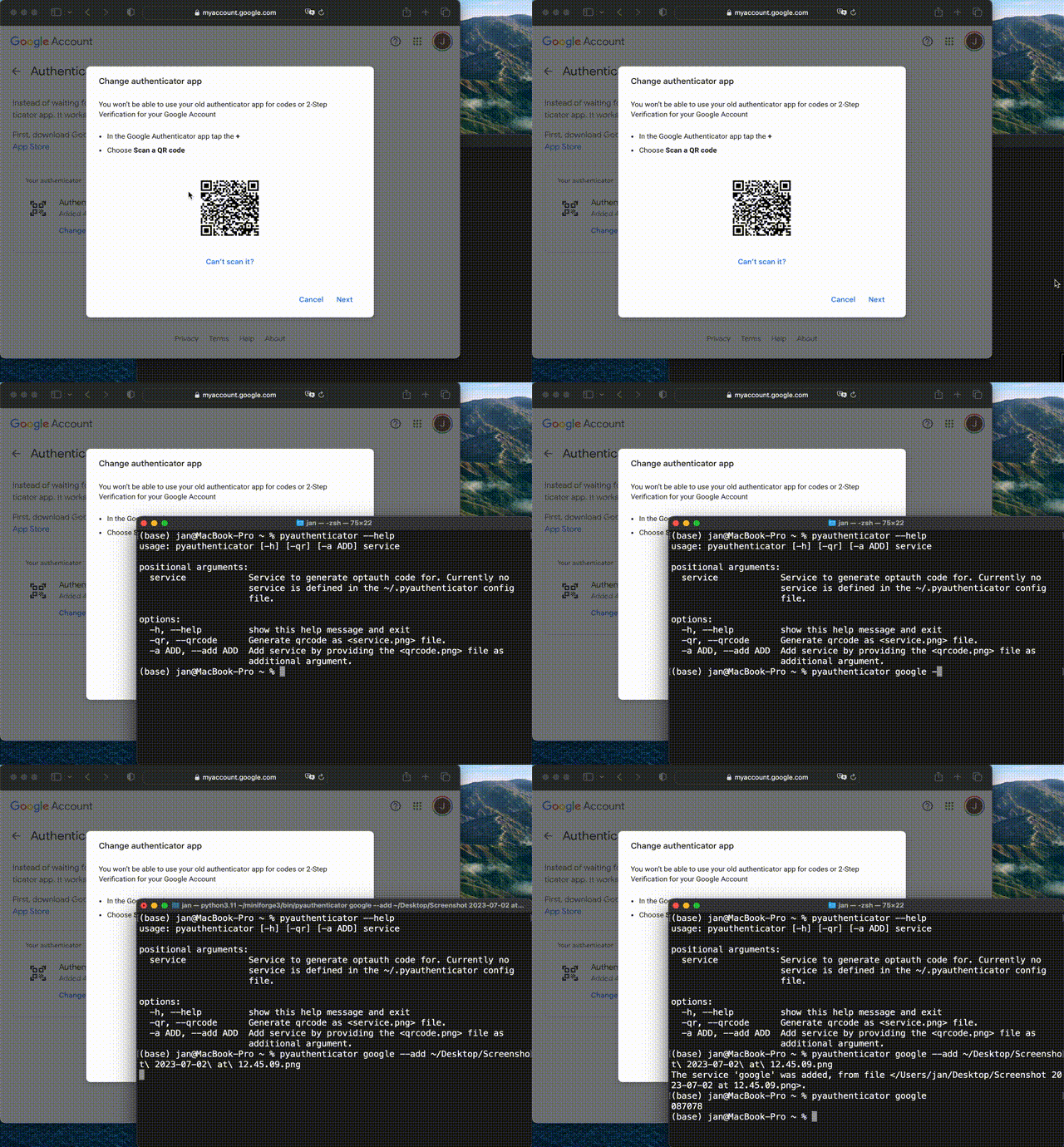
Libraries such as PyOTP provide the underlying HOTP/TOTP algorithms for Python applications. pyauthenticator builds on PyOTP and focuses instead on managing and consuming TOTP credentials for automation.
| PyOTP | pyauthenticator | |
|---|---|---|
| Generate TOTP/HOTP codes | ✅ | ✅ |
| Verify OTP codes | ✅ | — |
Parse otpauth:// URIs |
✅ | ✅ |
| Manage named accounts | — | ✅ |
| Import authenticator QR codes | — | ✅ |
| Persistent local credential store | — | ✅ |
| Command-line interface | — | ✅ |
| High-level Python interface | — | ✅ |
| MCP server | — | ✅ |
| Primary use case | Implement OTP authentication | Use existing TOTP credentials in automation |
In short:
- Use PyOTP when implementing OTP authentication inside an application.
- Use pyauthenticator when you already have TOTP credentials and want to access them conveniently from Python, the shell, SSH automation, or other tools.
Install pyauthenticator from conda-forge:
conda install -c conda-forge pyauthenticatoror from PyPI:
pip install pyauthenticatorSave the QR code normally shown when configuring an authenticator application.
For example, if the QR code is stored as:
~/Desktop/github-qrcode.png
add it as the service github:
pyauthenticator github --add ~/Desktop/github-qrcode.pngpyauthenticator extracts the otpauth:// credential from the QR code and stores it locally.
After adding the service:
pyauthenticator githubreturns the current authentication code:
087078
pyauthenticator works with services using standard TOTP authentication, not only Google accounts.
Display the available options with:
pyauthenticator --helpExample output:
usage: pyauthenticator [-h] [-qr] [-a ADD] service

positional arguments:
  service            Service to generate optauth code for. Currently no
                     service is defined in the ~/.pyauthenticator config file.

options:
  -h, --help         show this help message and exit
  -qr, --qrcode      Generate qrcode as <service.png> file.
  -a ADD, --add ADD  Add service by providing the <qrcode.png> file as
                     additional argument.
For example:
pyauthenticator google --add ~/Desktop/google-qrcode.pngpyauthenticator googleThe QR code associated with a configured service can be generated with:
pyauthenticator google --qrcodeIf a service name is mistyped, pyauthenticator lists the configured services and suggests alternatives:
pyauthenticator googelFor example:
The service "googel" does not exist.

The config file ~/.pyauthenticator contains the following services:
  * google

Choose one of these or add a new service using:
  pyauthenticator --add <qr-code.png> <servicename>
The command-line interface makes TOTP codes directly available to shell scripts and other programs.
For example:
TOKEN="$(pyauthenticator github)"The resulting value can then be passed to another process which requires a TOTP code.
This makes pyauthenticator useful for workflows such as:
- shell scripts,
- SSH authentication helpers,
- automated command-line applications,
- Python workflows,
- developer tools,
- MCP-compatible agents.
Whenever possible, dedicated API tokens, application passwords, SSH keys, OAuth credentials, or other machine-oriented authentication mechanisms should be preferred. pyauthenticator is intended for situations where a service requires TOTP authentication and no more suitable automation interface is available.
The same functionality is available through Python:
from pyauthenticator import get_two_factor_code

code = get_two_factor_code("github")
This allows existing Python applications and workflows to access services protected by TOTP authentication without reimplementing credential loading or OTP generation.
Configured services are stored in:
~/.pyauthenticator
The configuration uses JSON. A configured service contains the otpauth:// URI extracted from the corresponding QR code.
For example:
{
  "google": "otpauth://totp/Google:<username>?secret=<secret>&issuer=Google"
}
The URI contains the TOTP secret required to generate authentication codes.
The TOTP secret stored by pyauthenticator is an authentication credential. Anyone who can obtain this secret can generate the same one-time passwords.
The local ~/.pyauthenticator configuration should therefore be treated like other sensitive credential files.
Using TOTP from an automated process also changes the traditional security model of two-factor authentication: the password and second-factor secret may ultimately become accessible from the same machine.
For automated access, prefer mechanisms explicitly designed for machine authentication whenever the target service provides them, such as:
- API tokens,
- application-specific passwords,
- SSH keys,
- OAuth credentials,
- service accounts.
pyauthenticator is intended primarily for services where TOTP authentication is required and no suitable machine-oriented alternative exists.
Because automating two-factor authentication can conflict with the security policies of the organization operating the target service — for example institutional computing centres — confirm that this use is permitted before automating TOTP entry with pyauthenticator.
pyauthenticator also provides an MCP server for MCP-compatible hosts on Python 3.10+.
Install the optional MCP dependency with:
pip install "pyauthenticator[mcp]"The server is exposed through:
pyauthenticator-mcpThe MCP server uses the same ~/.pyauthenticator configuration as the command-line and Python interfaces. Services added through one interface are therefore immediately available through the others.
An MCP-compatible host can launch the server using a configuration such as:
{
  "mcpServers": {
    "pyauthenticator": {
      "command": "/absolute/path/to/pyauthenticator-mcp"
    }
  }
}
Using an absolute path is recommended because desktop applications commonly start MCP servers without loading the environment configuration of an interactive shell.
If pyauthenticator-mcp is installed inside a conda environment or virtual environment, find the executable with:
which pyauthenticator-mcpand use the resulting path in the MCP configuration.
Claude Desktop stores its MCP configuration in claude_desktop_config.json.
Typical locations are:
- macOS:
~/Library/Application Support/Claude/claude_desktop_config.json - Windows:
%APPDATA%\Claude\claude_desktop_config.json - Linux:
~/.config/Claude/claude_desktop_config.json
In Claude Desktop, the configuration can also be accessed through Settings → Developer → Edit Config.
Only add or modify the mcpServers entry needed for pyauthenticator; leave unrelated settings unchanged.
For example:
{
  "mcpServers": {
    "pyauthenticator": {
      "command": "/Users/<you>/mambaforge/bin/pyauthenticator-mcp"
    }
  },
  "preferences": {
    "...": "..."
  }
}| Tool | Arguments | Description |
|---|---|---|
get_code |
service: str |
Generate a two-factor authentication code for a configured service. |
list_services |
– | List configured service names. |
add_service |
service: str, qrcode_path: Optional[str], qrcode_base64: Optional[str] |
Add a service from a QR-code file or base64-encoded PNG. |
remove_service |
service: str |
Remove a configured service. |
get_qrcode |
service: str |
Return the QR code for a configured service as an MCP image. |
get_code, remove_service, and get_qrcode report the currently configured services when the requested service does not exist, mirroring the command-line behavior.
pyauthenticator is intended as a small bridge between TOTP authentication and automation.
Typical applications include:
pyauthenticator myserviceOTP="$(pyauthenticator myservice)"See Using TOTP codes in shell scripts and CLI workflows for more examples.
from pyauthenticator import get_two_factor_code

otp = get_two_factor_code("myservice")
See Generating TOTP codes from Python for more examples.
pyauthenticator can be combined with SSH_ASKPASS when an SSH login requires a password followed by a TOTP code.
See Automating SSH logins that require a password and a TOTP code for a complete, working example.
ssh invokes the program configured as SSH_ASKPASS whenever it needs to request input, passing the prompt text as an argument. Setting SSH_ASKPASS_REQUIRE=force makes ssh use this program even when run from an interactive terminal.
For example, ~/.bashrc or ~/.zshrc could contain:
export SSH_ASKPASS="$HOME/.ssh/askpass-helper.sh"
export SSH_ASKPASS_REQUIRE=force
and ~/.ssh/askpass-helper.sh (marked executable with chmod +x) could dispatch based on the prompt text:
#!/usr/bin/env bash
set -euo pipefail

PROMPT="${1:-}"

case "$PROMPT" in
    *"'s password:"*)
        # Retrieve the password from a secure credential store,
        # e.g. the macOS keychain via `security find-generic-password`.
        echo "<password>"
        ;;

    *"Your OTP:"*)
        # Generate the current TOTP code for the "myservice" account.
        exec pyauthenticator myservice
        ;;

    *)
        echo "Unexpected SSH prompt: $PROMPT" >&2
        exit 1
        ;;
esac
The exact prompt text (Your OTP: in this example) depends on the SSH server and PAM configuration of the target system and may need to be adjusted.
Note: Automating two-factor prompts like this removes the human-in-the-loop step that two-factor authentication is meant to provide, and some computing centres and organizations explicitly prohibit it. Only use this approach when it is consistent with the security policies of the systems and organizations you connect to — check with the relevant administrators first. The same caution applies to any automated use of
pyauthenticatorbeyond this specific example.
The optional MCP server exposes configured TOTP credentials to MCP-compatible applications while retaining the same local credential store used by the CLI and Python interfaces.
See Giving an MCP agent (e.g. Claude) access to TOTP codes for a complete setup and example.
Questions, bug reports, feature requests, and integration examples are welcome through the GitHub issue tracker.
Contributions that improve automation workflows, integrations, platform support, documentation, or credential handling are particularly welcome.
pyauthenticator is licensed under the BSD-3-Clause license.