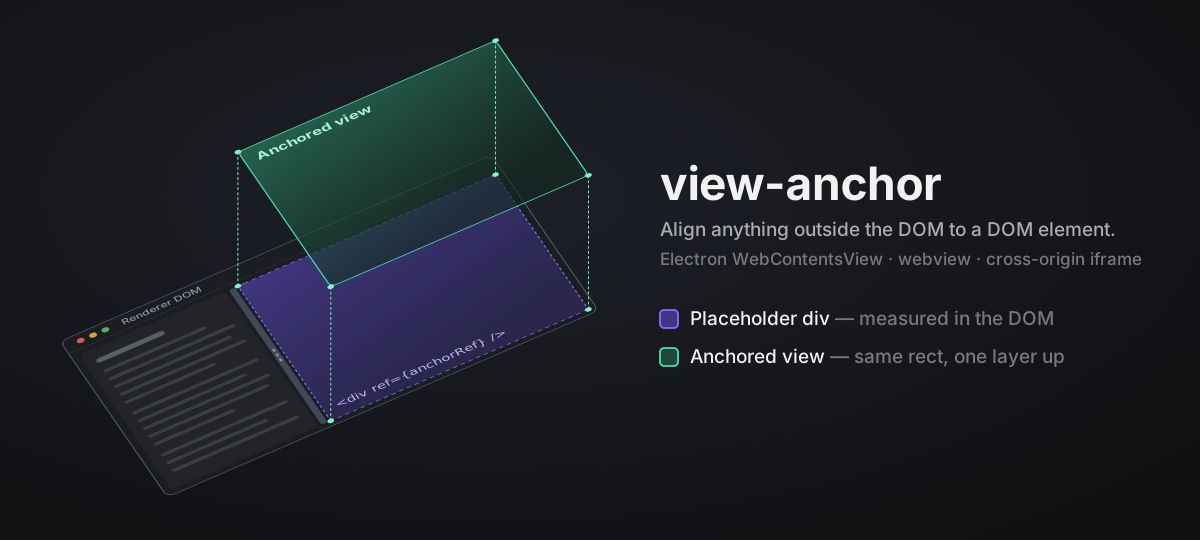
Keep an external surface aligned to a DOM element.
view-anchormeasures the element and synchronously gives your code the current geometry whenever it changes.



🎮 Live demo: 3D interactive demo runs the real core in your browser. Drag the splitters, scroll the page, and click its buttons directly in the tilted scene: surface A follows its placeholder, and surface B reports its content height back so the page resizes its placeholder.
Some surfaces are positioned by application code rather than by CSS — a canvas, a video overlay, an embedded document, or anything you can position from a rectangle. DOM layout moves placeholder elements, but cannot move those external surfaces.
Point view-anchor at a placeholder element. It measures it on creation, on ResizeObserver notifications, and on window resize, then calls your publish function. Your function applies, stores, or sends that value however your application already does.
The core has no dependency on a host runtime, React, or a layout library, and uses only ResizeObserver, requestAnimationFrame, and getBoundingClientRect. React support lives in a separate view-anchor/react entry.
publish is a synchronous function that the library calls with one of these plain values:
createViewAnchorcallspublish({ visible: true, bounds })while shown, whereboundsis{ x, y, width, height }in CSS pixels fromgetBoundingClientRect(), orpublish({ visible: false })while hidden. The explicitvisibleflag distinguishes a visible-but-zero-sized element from one that is hidden or unmounted.createSizeAnchorcallspublish({ axis, extent }), whereaxisisblock(height) orinline(width), andextentis the target's rounded, non-negative border-box size on that axis in CSS pixels (padding and border included; content-box only where the browser does not report a border box).
Return false only when the value was not accepted; a later measurement may retry it. Return true or nothing after accepting or queueing it. A hidden anchor measures nothing, so a rejected { visible: false } is not retried on its own: call update() again to resend it. useViewAnchor does this for you on unmount.
Geometry updates fire on every resize and, when following a drag, on every animation frame.
- Synchronous delivery. Measurement and publish happen inside the same
ResizeObservercallback. No timers, no extra frame of lag. - Dedupe by default. A
Placementidentical to the last accepted one is not passed topublishagain; setdedupe: falseto receive every measurement. - Frame following on demand.
followGeometrypollsrequestAnimationFrameduring a scroll burst, a splitter drag, or an explicitpulse(), then stops once the rectangle settles. Idle cost is zero; hidden or invalid targets are capped at 30 frames. - O(1) generation changes. In the protocol layer, moving an anchor to a new generation or clearing it does not touch other anchors.
- Latest-wins batching. Messages queued in the same task are merged in a microtask; the newest placement and size for each anchor are sent separately.
- Release on disposal. Disposed handles stop observing and release their target and callback references, even when the caller keeps the handle.
- Tree-shakeable core. Functions are separate exports with
sideEffects: false; the complete core export is under 3 KB gzipped.
See the performance report for a comparison with 0.2.2 and export sizes.
pnpm add view-anchor
# or
npm install view-anchor
React is an optional peer dependency, needed only if you import from view-anchor/react. The root entry (view-anchor) and view-anchor/protocol have no React dependency and load without it installed.
import { createViewAnchor } from 'view-anchor'

const publish = (placement) => {
  if (placement.visible) applyBounds(placement.bounds)
  else hideSurface()
}

const handle = createViewAnchor(target, {
  visible: true,
  publish,
  followScroll: true, // re-measure on scroll (window capture fallback + ancestor listeners)
  followGeometry: true, // poll animation frames during scrolls / pulse(), stop when steady
  treatZeroAreaAsHidden: true, // zero-area or display:none target → { visible: false }
  dedupe: true, // default; set false to receive every measurement, even unchanged ones
})

// update() applies new options; omitted fields reset to defaults (e.g. omitting
// followScroll resets it to false).
handle.update({ visible: true, publish, followScroll: true, followGeometry: true })
// pulse() opens frame-following for a limited duration; use it to track animation
// after a move no observer sees. For splitter drags, call pulse() after each
// pointermove that changes layout; a single pointerdown pulse stops once steady.
handle.pulse()
handle.dispose() // stop observing; never publishes again
Set visible: false to collapse the surface. The core publishes { visible: false } and stops observing. Your publish function decides whether that removes, hides, or retains the external surface.
createViewAnchor, createSizeAnchor, and createGeometryBatcher accept signal. Aborting it is equivalent to dispose(); an already-aborted signal does not measure, publish, or install listeners.
const controller = new AbortController()
const handle = createViewAnchor(target, { visible: true, publish, signal: controller.signal })

controller.abort() // same cleanup as handle.dispose()import { useViewAnchor, useSizeAnchor } from 'view-anchor/react'
function DebugPanel({ visible }: { visible: boolean }) {
const ref = useViewAnchor({
visible,
publish: publishPanelPlacement,
followScroll: true,
followGeometry: true,
})
// The external surface follows this placeholder. Hiding or unmounting it
// sends { visible: false }, without deciding how the surface is stored.
return <div ref={ref} className="h-full w-full" />
}
function ContentSizer() {
const ref = useSizeAnchor({
axis: 'block', // report height; use 'inline' for width
publish: updatePlaceholderHeight,
})
// The ref attaches to the element whose content size drives the host placeholder.
return <div ref={ref}>{/* dynamic content */}</div>
}For a splitter controlled by React, call ref.pulse() after each active pointer move updates the layout. The useViewAnchor ref remains a callback ref; its pulse() method forwards to the current handle and does nothing when detached or when followGeometry is off. A single pulse on pointerdown does not keep following through a pause.
Both hooks survive React 18 and 19 StrictMode double-mounting without publishing stale frames. They use update() semantics: an omitted option resets to its default, not the previous value. An omitted treatZeroAreaAsHidden, followScroll, or followGeometry counts as false; an omitted dedupe resets to true.
Sometimes the hosted surface's size should come from its own content, for example a toolbar rendered by downstream code. Run createSizeAnchor inside the hosted document. It reports the content size back so a DOM placeholder in the host can grow to match:
import { createSizeAnchor } from 'view-anchor'

const publish = (size) => {
  updatePlaceholderSize(size)
}

const handle = createSizeAnchor(contentWrapper, {
  axis: 'block', // one axis per size anchor: block = height, inline = width
  publish,
})

handle.update({ publish }) // apply new options and report the current size again; an omitted dedupe resets to true
handle.dispose() // stop observing; never reports again
The target must shrink to fit its content on the owned axis. If the host sets that size instead, the two sides keep reacting to each other and never settle. See docs/bidirectional-design.md.
The core hands you plain Bounds, Placement, and SizeMeasurement values. If an application passes them through an asynchronous or untrusted channel, it usually needs validation and ordering. The optional view-anchor/protocol entry adds versioned message envelopes, bounded decoding, a per-anchor sequence guard that drops stale messages, and a microtask batcher:
import {
  createGeometryBatcher,
  createPlacementMessagePublisher,
  decodeGeometryWireValue,
} from 'view-anchor/protocol'

// `sendGeometryBatch` is supplied by your application.
const batcher = createGeometryBatcher(sendGeometryBatch)
const publish = createPlacementMessagePublisher(
  { anchorId: 'editor', generation: 3 },
  batcher.publish,
)

// receiving side
const decoded = decodeGeometryWireValue(received, { maxMessages: 100 })
if (decoded.ok) {
  /* check the sender, then apply only newer messages */
}- Keep one publisher per
{ anchorId, generation }. The batcher andcreateGeometrySequenceGuardremember the highest sequence number for each message kind per anchor. A publisher rebuilt for the same address restarts at sequence 1 and its messages are dropped as stale. In React, hold it inuseMemooruseRef. Bumpgenerationwhen you really want a fresh start. - A synchronous publisher returns
falseto say "not accepted". The core then retries the same geometry on the next trigger (a rejected{ visible: false }waits for the nextupdate()). A batching publisher returnstrueonce queued and owns any later retries.
The full contract is in docs/protocol.md.
| Export | Kind | Purpose |
|---|---|---|
createViewAnchor(target, opts) |
function | Publish a Placement, with opt-in followScroll / followGeometry / treatZeroAreaAsHidden / dedupe, and pulse(). |
measurePlacement(target) |
function | Pure measurement: wraps the target rect as { visible: true, bounds }. |
createSizeAnchor(target, opts) |
function | Call publish({ axis, extent }) with one content-size axis. |
useViewAnchor(opts) from view-anchor/react |
hook | React adapter for createViewAnchor, returning a ref callback for a placeholder element. |
useSizeAnchor(opts) from view-anchor/react |
hook | React adapter for createSizeAnchor, returning a ref callback for a content element. |
Bounds |
type | { x, y, width, height } in CSS pixels. |
Placement |
type | { visible: true; bounds } | { visible: false }. |
Publisher<T> / PublishResult |
type | Signature of the publish callback and its return value (void | boolean). |
ViewAnchorOptions / ViewAnchorHandle |
type | Options and handle for createViewAnchor. Handle includes update(), pulse(), and dispose(). |
UseViewAnchorOptions / ViewAnchorRef from view-anchor/react |
type | Options and callback ref for useViewAnchor; the ref also has pulse(). |
UseSizeAnchorOptions / SizeAnchorRef from view-anchor/react |
type | Options and ref shape for useSizeAnchor. |
SizeAxis / SizeMeasurement |
type | Axis and payload types for the reverse direction. |
SizeAnchorOptions / SizeAnchorHandle |
type | Options and handle for createSizeAnchor. Handle includes update() and dispose(). |
view-anchor/protocol |
functions + types | Versioned messages, strict decoding, sequence guards, message publishers, and microtask batching. |
Within 1.x, view-anchor does not remove or rename any public export from ., view-anchor/react, or view-anchor/protocol, and does not change the default behavior for input that is already valid. Minor releases add functionality; patch releases fix bugs. An interface slated for removal is deprecated first and only removed in 2.0.
- docs/mechanism.md: how the forward direction works. Synchronous publishing, default dedup and
dedupe: false, thePlacement/ visibility / unmount contract, StrictMode behaviour. Includes the interactive 3D demo at docs/index.html. - docs/bidirectional-design.md: running both directions at once. Why the forward path is synchronous while the reverse path uses animation frames, single-axis ownership, and where the trust boundary sits.
- docs/protocol.md: message envelopes, validation, ordering, batching, and what happens on failure.
- docs/performance-report.md: performance summary and export sizes.
Before submitting, run pnpm lint, pnpm format:check, pnpm check-types, pnpm test, and pnpm build. pnpm benchmark prints the data used to update the performance report.
Changes that affect a published version must include a Changeset. Run pnpm changeset, select the version bump, and describe the user-visible change. Merging into main opens a version PR; merging that PR publishes the package.
MIT © lbb00