



Monitor and control Google Family Link from Home Assistant: screen time, device lock, bedtime and school time schedules, daily limits, communication restrictions, app blocking, time bonuses, and optional GPS location. Multiple children and multiple devices are supported out of the box.
Disclaimer. This integration uses unofficial, reverse-engineered Google Family Link endpoints. There is no official API: Google can change or break things at any time, and using this integration may violate Google's Terms of Service and could result in account suspension. Use at your own risk. This project is not affiliated with, endorsed by, or connected to Google LLC.
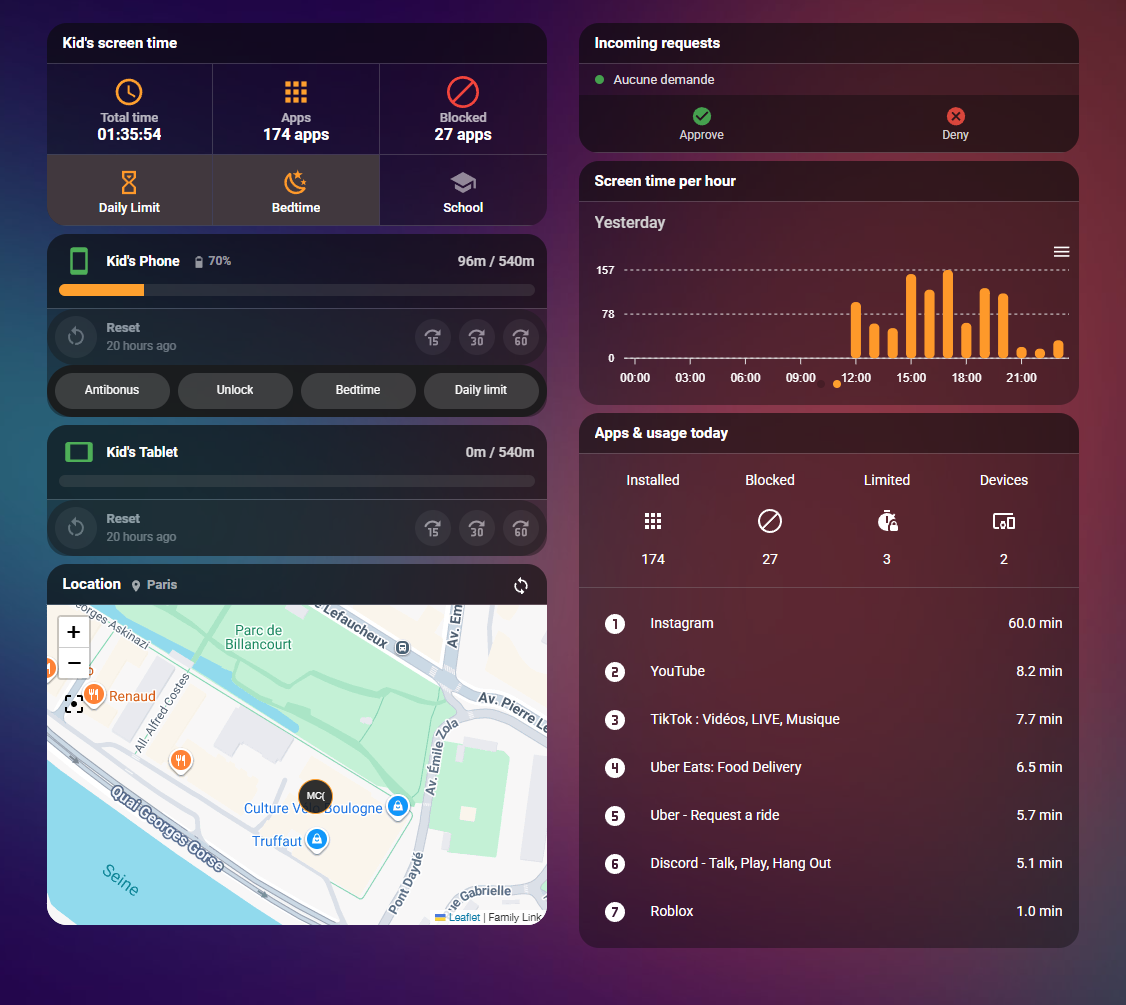
An example Lovelace dashboard built from this integration. The YAML and setup instructions are in
examples/.
The project ships two components that work together. The integration (custom_components/familylink/) polls Google's Family Link endpoints (every 60 seconds by default) and exposes entities and services. The auth service (familylink-playwright/) is a separate container running Chromium via Playwright: it performs the interactive Google login (2FA included) and hands the resulting session cookies to the integration, because Home Assistant's own container cannot run a browser. On Home Assistant OS / Supervised it installs as an add-on; everywhere else it runs as a standalone Docker container. When the Google session expires, you log in again in the auth service's web UI and the integration picks up the fresh cookies automatically.
The endpoints and payload shapes the integration relies on are documented in GOOGLE_FAMILY_LINK_API_ANALYSIS.md.
| Area | What you can do |
|---|---|
| Device control | Lock and unlock devices, ring a device to locate it, see exactly why a device is currently blocked |
| Time management | Toggle bedtime, school time and daily limits, edit the weekly bedtime schedule or post a today-only override, add 15/30/60 minute bonuses |
| Screen time monitoring | Daily screen time per child, remaining time per device (bonuses included), top 10 apps, per-app usage breakdown |
| App management | Block or unblock apps, per-app daily limits (blocked, limited, unrestricted or "unlimited time"), one-call school mode that blocks everything except an essentials whitelist |
| Location (opt-in) | GPS device tracker with saved places and address, battery level of the source device, on-demand refresh |
| Strict mode (opt-in) | Home Assistant reverts what is changed from the Family Link side: bonuses are cancelled, a device unlocked with no time left is locked again, bedtime and the daily limit are switched back on. One switch per child, rules chosen in the options |
| Robustness | Cached data on transient API errors, automatic session refresh, persistent notification when re-authentication is needed |
Translations: English, French, Hebrew.
The auth service must be running before you configure the integration.
-
Set up authentication.
-
Home Assistant OS / Supervised: add this repository as an add-on repository, install and start the Google Family Link Auth add-on, then complete the Google login through its web UI.
-
Home Assistant Core / Container (no Supervisor): run the standalone auth container instead. See DOCKER_STANDALONE.md.
-
-
Install the integration via HACS (recommended) or manually.
-
Add it: Settings > Devices & Services > Add Integration > search for "Family Link". Auto-detect finds the add-on by itself; standalone users choose manual URL configuration and enter the container's URL.


The full walkthrough (prerequisites, both auth routes, configuration options, re-authentication) is in INSTALL.md.
Each child appears as a hub device named <child> (Family Link), with every physical device attached to it. <child> and <device> below stand for the slugified child and device names.
| Entity | Scope | Shows / does |
|---|---|---|
sensor.<child>_daily_screen_time |
Child | Today's screen time in minutes, per-app breakdown in attributes |
sensor.<child>_screen_time_formatted |
Child | The same value as HH:MM:SS text |
sensor.<child>_installed_apps, _blocked_apps, _apps_with_time_limits, _apps_without_limits, _always_allowed_apps |
Child | App counts, with the matching app lists in attributes |
sensor.<child>_top_app_1 to _top_app_10 |
Child | Today's most-used apps, usage in minutes |
sensor.<child>_device_count |
Child | Number of supervised devices |
sensor.<child>_child_info |
Child | Profile: name, email, birthday, age band |
sensor.<child>_battery_level |
Child (GPS opt-in) | Battery of the device providing the location |
device_tracker.<child>_family_link |
Child (GPS opt-in) | GPS location: zone, saved place, address, battery |
switch.<child>_bedtime, _school_time, _daily_limit |
Child | Toggle restrictions. State reflects today's effective setting (weekly rule merged with same-day overrides); the school time switch also exposes school_time_enabled_weekly and school_time_scheduled_today attributes |
select.<child>_allowed_calls_texts |
Child | Choose who can call and text the child: anyone, only contacts you add, or contacts you add and limited groups |
switch.<child>_strict_mode |
Child | Strict mode on or off for this child (see below). Attributes: rules in force, last corrective action, count |
number.<child>_<weekday>_limit |
Child | Screen time quota of that weekday in minutes, as the weekly limits screen of the app shows it (the weekly value, or today's override when Google applies one; see the source and applied_override attributes). Setting it writes the weekly quota of that weekday, as the weekly limits screen of the app does; today's entity also posts today's override on every device so the change applies at once |
time.<child>_<weekday>_bedtime_start, _bedtime_end |
Child | Start and end of that weekday's bedtime in the weekly schedule. Setting one rewrites the slot (the other bound is kept) |
sensor.<device>_screen_time_remaining |
Device | Remaining minutes today, accounting for bonuses and used time |
sensor.<device>_next_restriction |
Device | Next upcoming restriction as text, window timestamps in attributes |
sensor.<device>_daily_limit |
Device | Configured daily quota in minutes |
sensor.<device>_active_bonus |
Device | Active bonus minutes (0 when none) |
binary_sensor.<device>_bedtime_active, _school_time_active |
Device | Currently inside the bedtime / school time window |
binary_sensor.<device>_daily_limit_reached |
Device | Daily limit used up (ignores bonus time) |
switch.<device> |
Device | Device usability: ON means usable, OFF means manually locked, bedtime active, or daily limit reached. An active bonus overrides bedtime and daily-limit restrictions, but not a manual lock. The restriction_reason attribute tells you why |
button.<device>_15min, _30min, _60min, _reset_bonus |
Device | Add or cancel a time bonus |
button.<device>_ring |
Device | Ring the device to locate it |
GPS entities are only created when location tracking is enabled in the integration options (off by default; each location poll may notify the child's device).
Why it exists. There is a gap on Google's side that many children know how to use: from the Family Link app or the Google interface, a supervised child can give themselves a time bonus, lift the lock of a device that has no time left, or switch bedtime and the daily limit off. Parents were closing it with a set of automations that watched the entities and reverted the change. Strict mode does this natively.
What it does. With strict mode on, Home Assistant becomes the single point of control. After every refresh the integration compares what Google reports with what Home Assistant wants and reverts the difference, overriding the Family Link settings:
Warning. While strict mode is on, manage Family Link from Home Assistant only. Changes made in the Family Link app or on the Google interface are undone at the next refresh, whoever made them. Turn the child's Strict Mode switch off to hand control back to Google. With the option off (the default), nothing changes: the integration behaves exactly as before, the switch is just there, off.
The child's Home Assistant account. Strict mode closes the Google side, not the Home Assistant side. A child who has a Home Assistant user can find these entities and give themselves a bonus or switch a restriction off, and any user or long-lived token can call the
familylink.*actions. Give the child a non-admin user, keep the Family Link entities out of the dashboards they see, and consider ha-rbac to hide entities per user.
| Rule | What is reverted |
|---|---|
| Time bonuses: those added from Family Link are cancelled | Any active bonus on a device is cancelled (bonuses given from Home Assistant are kept) |
| Device lock: locking and unlocking reserved to Home Assistant | A device you locked from Home Assistant and unlocked on the Google side is locked again, and the reverse. Without a Home Assistant decision, an unlock done on the Google side that bypasses an active bedtime, school time or reached daily limit is locked again, and strict mode lifts that lock itself when the restriction ends, as Google's schedule would have done. A bonus given from Home Assistant suspends the relock for its duration, then the lock is put back |
| Bedtime: switching on and off reserved to Home Assistant | Bedtime switched on or off on the Google side is put back to the state chosen in Home Assistant |
| Daily limit: switching on and off reserved to Home Assistant | Same for the daily limit |
| School time: switching on and off reserved to Home Assistant | Same for school time. Nothing is forced on: if you keep Google's school time off and drive school hours from Home Assistant, it simply stays off |
| Bedtime hours and weekly quotas: values reserved to Home Assistant | The weekly bedtime hours (seven days) and the daily quota are put back to the values chosen in Home Assistant (set_bedtime, set_daily_limit, the number and time entities). Hours are rewritten in the weekly schedule. For the quota, the reference is the weekly value of each weekday when strict mode starts (or what Home Assistant set since): a weekday changed in the app's weekly screen is written back, and the minutes applied today are put back with today's override |
Enable it with the Strict mode option of the integration (default for every child, rules to apply) and toggle it per child with switch.<child>_strict_mode. The option and the switches mirror each other: changing the option applies to every child at once (no reload), and toggling a switch writes the option back once every child agrees. Nothing is switched on by force. When strict mode starts (and again at the first refresh of each day), the state in force becomes the reference; only Home Assistant can change it afterwards. What you change from Home Assistant is the parent's decision and stays in force for the day: a bonus given with the buttons or the add_time_bonus action is kept for its duration, a device you unlock is not locked again, bedtime, the daily limit or school time you switch off are not switched back on. The bedtime, daily limit and school time references are the parent's standing choice and are kept until Home Assistant changes them or strict mode is switched on again; a lock or unlock done from Home Assistant is a decision for the day and expires at midnight. All of it is remembered across restarts. Turning the Strict Mode switch off hands control back to Google. The decisions in force are visible in the ha_decisions_today and ha_device_decisions_today attributes of the switch. Each corrective action is logged, kept in the switch attributes and fired as a familylink_strict_mode_action event (child_id, child_name, device_id, device_name, action, reason, success, plus day, minutes, start, end and observed when the action carries them, so a notification can be worded in your language) for your own notifications. A given action is not repeated within 90 seconds, so a change Google refuses does not turn into a request storm.
| Service | Purpose |
|---|---|
familylink.block_app / familylink.unblock_app |
Block or unblock a single app by package name |
familylink.set_app_daily_limit |
Per-app daily limit: minutes, blocked, limit off, or unlimited time |
familylink.block_device_for_school |
Block every app except an essentials whitelist (dialer, messages, settings, maps, ...) plus your own additions |
familylink.unblock_all_apps |
Unblock every hidden app |
familylink.add_time_bonus |
Add 1 to 1440 bonus minutes to a device |
familylink.set_daily_limit |
Set today's quota on a device, or a weekday's weekly quota with day (0 disables the device for the day) |
familylink.enable_daily_limit / familylink.disable_daily_limit |
Toggle the daily screen time limit |
familylink.enable_bedtime / familylink.disable_bedtime |
Toggle bedtime, effective tonight (weekly toggle plus a same-day override) |
familylink.set_bedtime |
Edit the recurring weekly bedtime for a day, or post a today-only override (scope: today) |
familylink.enable_school_time / familylink.disable_school_time |
Toggle school time |
familylink.refresh_location |
Force a fresh GPS fix (uses more battery than the regular polling) |
familylink.ring_device |
Make a device ring so it can be found |
familylink.set_update_interval |
Change the polling interval until the next restart (e.g. slower at night) |
Targeting: every service accepts an optional entity_id or explicit child_id / device_id. Without a target, the app and location services apply to all supervised children, while the time services fall back to the first supervised child. Full field reference, defaults and examples: SERVICES.md.
Setup and authentication problems (no entities, 403 on the cookie endpoint, session expired) are covered in INSTALL.md; add-on specifics (web UI, VNC) in familylink-playwright/DOCS.md, including its Security section: the browser view shows a live Google session, unmap port 6080 and stop the add-on when you are not authenticating.
All notable changes are tracked in CHANGELOG.md and published on GitHub Releases.
Contributions are welcome: fork the repository, create a feature branch, make your changes with clear commit messages, run the Home Assistant test suite documented in tests/README.md, test user-facing changes against a disposable Home Assistant instance, and open a pull request.
This integration is free and maintained in my spare time. If it helped you or saved you time, you can buy me a beer:

- Developed by @noiwid
- Based on the original work by @tducret (Python package documenting Family Link API endpoints)
- Inspired by @Vortitron's HAFamilyLink repository
- noVNC integration inspired by @jnctech's fork
- Home Assistant community for integration examples and best practices
- Reverse engineering insights from browser DevTools analysis
This project is licensed under the MIT License. See the LICENSE file for details.
This is an unofficial integration, not affiliated with, endorsed by, or connected to Google LLC. All product names, logos, and brands are property of their respective owners.