




A full-featured Home Assistant custom integration for Microsoft Family Safety. Monitor screen time, manage app restrictions, lock accounts, control web filtering, and adjust daily limits — all from your Home Assistant dashboard.
Authentication is native: you sign in to Microsoft from Home Assistant itself. The Playwright auth add-on is no longer required and is kept only as a legacy fallback.
Supported platforms: Windows, Xbox, Mobile
Domain:
microsoft_family_safety| IoT Class: Cloud Polling | Languages: English, French, German
This integration uses unofficial, undocumented APIs for Microsoft Family Safety. It is not approved, endorsed, or supported by Microsoft. Microsoft may modify or disable the underlying APIs at any time. Use at your own risk and in compliance with Microsoft's terms of service.
If you are upgrading from a version that used the Playwright auth add-on, read this before you upgrade.
Native authentication requires a new config entry. When you remove the old integration entry and add it again, Home Assistant generates fresh entity IDs, and the new ones include the device name as a prefix:
| Before | After |
|---|---|
number.firstname_sunday_limit |
number.firstname_lastname_family_safety_firstname_sunday_limit |
switch.firstname_lock |
switch.firstname_family_safety_firstname_lock |
button.firstname_approve_request |
button.firstname_family_safety_firstname_approve_request |
This breaks dashboards, automations, scripts and templates that reference the old IDs. After migrating:
- Go to Settings > Devices & Services > Entities and check for entities marked restored / unavailable — those are the old IDs.
- Either rename the new entities back to the old IDs (Entities > entity > Settings > Entity ID), which is the fastest way to keep existing YAML working, or update every reference.
- Search your config for the old IDs:
Don't forget dashboard YAML, automations, scripts, scenes and template sensors. The example dashboard in
grep -rn "switch\.<name>_lock\|number\.<name>_.*_limit\|time\.<name>_" config/examples/dashboard.yamlalready uses the prefixed IDs.
Note the device-name prefix is not identical across platforms: sensors, numbers and time entities are prefixed with first name + surname, while switches and buttons are prefixed with the first name only.
The Playwright auth add-on is now a legacy fallback. New installations should not install it. Existing installations keep working unchanged — see Legacy add-on mode.
The integration authenticates natively inside Home Assistant and talks to both Microsoft backends itself. No add-on, no browser automation, and no separate container are needed in the normal case.
Microsoft Family Safety has two distinct APIs, each with its own authentication. The integration uses both:
| API | Base URL | Auth Method | Capabilities |
|---|---|---|---|
| Mobile API | mobileaggregator.family.microsoft.com |
OAuth Bearer token (from a refresh token) | Family roster, devices, app list, screen time usage, web restrictions, content restrictions. Block/unblock apps, approve/deny requests. |
| Web API (private) | account.microsoft.com/family/api/ |
Microsoft session cookies + a __RequestVerificationToken antiforgery token |
Read/write screen time schedules (daily limits, allowed intervals), app time limits, web filtering, content ratings, purchase controls. |
Screen time schedule modifications only work through the web API — the mobile API's schedule and device-override endpoints were removed or changed by Microsoft and return HTTP 400.
You sign in once, in your normal browser, through a short-lived reverse proxy that Home Assistant mounts inside its own HTTP server. Two things happen behind that single sign-in:
Step 1 — Family web session. The proxy serves the regular account.microsoft.com sign-in. Answer Yes to "Stay signed in?": that answer is what makes Microsoft issue persistent session cookies (valid for about a year), so the Family session no longer has to be renewed every few hours. (Before 2.0.4 the flow signed in through the mobile app's OAuth page instead, which never asks the question, and sessions expired after about 7 hours.) Once you are signed in, the same tab is redirected a few times so the Family dashboard can be loaded and its __RequestVerificationToken read. This part may take up to about 60 seconds; Home Assistant shows a waiting screen.
Step 2 — mobile refresh token. With the cookies from step 1, Home Assistant completes the mobile OAuth authorization server-side: Microsoft answers with a single redirect carrying the authorization code, with no second sign-in page. That code becomes the refresh token used for the mobile API. Should Microsoft ever require an interactive step here, the flow falls back to finishing it in your browser.
The browser part of step 1 is required and cannot be removed: a cold-start, purely server-side bootstrap is impossible because Microsoft gates the Family dashboard behind an interactive prompt=none OAuth hop.
Once the Family session is established, Home Assistant calls the private web API directly over HTTP from the integration. Screen time reads and writes are ordinary HTTPS requests:
POST /family/api//st/day-allow— daily allowancePOST /family/api//st/day-allow-int— allowed 30-minute intervals
Locking an account is 14 requests (7 days × allowance + intervals) and completes in seconds, rather than the ~15-30 s per operation the browser-based add-on needed.
Poll loop (default every 5 min)
  ├─ Mobile API   → roster, devices, apps, screen time usage, content restrictions
  └─ Web API      → screen time schedule (daily limits + allowed intervals)

Service call / entity write
  ├─ Mobile API   → block/unblock app, approve/deny request
  └─ Web API      → screen time limits & intervals, app limits, websites,
                    age rating, ask-to-buy
The familysafety-playwright/ add-on is still supported. An entry runs in legacy mode when it has no natively captured web session — that is, existing entries created before native auth, and new entries where an auth URL was typed in. Since 2.0.8 an add-on that is merely installed no longer forces legacy mode, and reauthenticating a legacy entry (from the notification, Repairs or Reconfigure) moves it to the native sign-in for good: its add-on URL and key are cleared and the add-on is no longer used.
In legacy mode, screen time reads and writes are routed through the add-on's authenticated Chromium session, exactly as before. The add-on remains useful when:
- you already have a working add-on setup and don't want to re-authenticate and rename entities;
- your Home Assistant instance is not reachable over HTTPS and you don't want to enable the local-HTTP option (see Security & limitations);
- native authentication fails on your account for any reason.
Legacy and native mode are mutually exclusive per config entry; there is no automatic downgrade from native to add-on at runtime.
| Category | What you can do |
|---|---|
| Native authentication | Sign in to Microsoft directly from Home Assistant — no add-on, no container, no copy-pasted redirect URL |
| Account Lock | Lock/unlock a child's entire account with a single switch |
| Screen time monitoring | Track daily usage per child and per device |
| Screen time policies | Adjust daily allowances and allowed time intervals per day — directly from the UI |
| App management | Block/unblock apps, set per-app time limits and windows |
| Web filtering | Block/unblock domains, toggle content filtering, set PEGI age ratings |
| Purchase controls | Enable/disable ask-to-buy via service call |
| Request handling | Approve or deny pending screen time requests from HA |
| Connection diagnostics | A dedicated sensor reports whether the mobile API and the web session are healthy |
| Optimistic updates | UI values update instantly when changing limits or intervals (reverts on failure) |
- Home Assistant 2024.1.0 or newer, running on any installation type (OS, Supervised, Container, Core)
- A Home Assistant URL reachable from your browser over HTTPS. If your instance is HTTP-only on the local network, see
allow_insecure_http_auth - A Microsoft parent account with at least one child in the Family Safety group
No add-on and no Docker container are required.
- Open HACS in Home Assistant
- Go to Integrations and click the three-dot menu in the top right
- Select Custom repositories
- Add
https://github.com/noiwid/HAFamilySafetywith category Integration - Search for Microsoft Family Safety in HACS and click Download
- Restart Home Assistant
- Download the latest release from GitHub Releases
- Copy the
custom_components/microsoft_family_safetyfolder into yourconfig/custom_components/directory - Restart Home Assistant
- Go to Settings > Devices & Services > Add Integration
- Search for Microsoft Family Safety
- Set the update interval and the monitored platforms (Windows, Xbox, Mobile), then click Submit
- Home Assistant shows an Open website button. Click it: a browser window opens on the Microsoft sign-in page, served through Home Assistant's temporary authentication proxy
- Sign in with your Microsoft parent account (the family organizer, not a child account) and complete MFA if prompted. When Microsoft asks "Stay signed in?", answer Yes: this is what keeps the session valid for about a year instead of about 7 hours
- Keep the window open and be patient. After the visible sign-in finishes, Home Assistant completes the Family session in the background and fetches the mobile token from the same sign-in. The waiting screen can sit for up to about a minute without visibly updating, and the tab may briefly redirect again — this is normal. Do not click Open website again and do not close the dialog; wait for it to switch to the completion screen on its own
- When both steps complete, the window closes itself and Home Assistant shows Microsoft Family Safety sign-in completed. Click Continue
- The integration discovers all child accounts and devices automatically. Screen-time entities can read
unknownfor up to one update interval (5 minutes by default) while the first data pull completes; that is expected
The old flow — copy an auth URL, sign in, paste the redirect URL back — is gone in the normal case. It survives only as a fallback for legacy add-on users on HTTP-only instances.
Settings > Devices & Services > Microsoft Family Safety > Configure:
| Option | Range / Format | Default | Notes |
|---|---|---|---|
| Update interval (seconds) | 30 – 3600 | 300 (5 min) | |
| Monitored platforms | Windows / Xbox / Mobile | Windows | |
| Allow insecure local HTTP authentication (testing only) | on / off | off | See below |
| Legacy auth add-on URL (optional) | http://HOST:8098 |
(empty) | Legacy mode only |
| Legacy add-on API key (optional) | string | (empty) | Legacy mode only |
Native authentication proxies your Microsoft credentials through Home Assistant, so it requires an HTTPS Home Assistant URL by default. If your instance is only reachable over plain HTTP on your LAN, you can tick Allow insecure local HTTP authentication (testing only).
This option is deliberately narrow:
- it is accepted only for
localhost,homeassistant,*.local, or a private / loopback / link-local IP address — a public HTTP URL is rejected with "Insecure HTTP authentication is allowed only through localhost, .local, or a private/local IP address"; - while it is active, your Microsoft password and session data travel unencrypted across your local network, and a WARNING is written to the Home Assistant log for every sign-in.
Use it for testing, or on a network you fully trust. Setting up HTTPS is the better answer.
Microsoft sessions expire. The account page session lapses about once a day; since 2.0.6 the integration completes Microsoft's silent sign-in on its own (the same "Continue" step a browser performs), so you should not be asked to sign in again as long as the "Stay signed in?" cookies are valid. When the login itself is gone, Home Assistant raises a repair / reauthentication prompt and a persistent notification. That also covers the case where Microsoft has dropped the Family session while the account page still answers: after two consecutive updates in that state the connection sensor reports degraded with reauth_recommended: true and the reauthentication flow is started for you. You can also start it yourself at any time with the microsoft_family_safety.request_reauth service (handy from a dashboard button). Re-authenticating runs the same sign-in and renews both the Family web session and the mobile refresh token.
Reauthentication must use the same Microsoft account — signing in with a different one aborts with "A different Microsoft account was used".
Only needed if you deliberately want legacy mode.
- In Home Assistant, go to Settings > Add-ons > Add-on Store
- Three-dot menu (top right) > Repositories, add
https://github.com/noiwid/HAFamilySafety - Install and start Microsoft Family Safety Auth
- Open the add-on Web UI (port 8098), click Start Authentication and sign in via the noVNC interface (port 6081)
- Add the integration; when the add-on is detected the flow completes without the native web-session phase
For HA Core / Container, or to keep the browser service off your Home Assistant box, the same service runs as a plain Docker container — see familysafety-playwright/README.standalone.md — and you set the Legacy auth add-on URL option to http://YOUR_SERVER_IP:8098.
| Option | Default | Description |
|---|---|---|
log_level |
info |
Logging verbosity (trace, debug, info, warning, error) |
auth_timeout |
300 |
Seconds to wait for user to complete authentication (60-600) |
session_duration |
86400 |
Session validity in seconds (1h-7d) |
language |
(auto) | Browser locale (e.g., fr-FR, en-US) |
timezone |
(auto) | Browser timezone (e.g., Europe/Paris) |
vnc_password |
familysafety |
Password for the noVNC interface |
api_key |
(auto) | Only needed when Home Assistant runs on another host |
The integration creates two types of HA devices, plus one integration-level diagnostic entity:
| Device Type | Name Example | Manufacturer | Model |
|---|---|---|---|
| Child account | Firstname Lastname (Family Safety) | Microsoft | Family Safety Account |
| Physical device | DESKTOP-EXAMPLE | From API | From API |
Physical devices are linked to their parent child account via via_device.
Entity IDs are prefixed with the device name. A "Sunday Limit" number on the device Firstname Lastname (Family Safety) becomes
number.firstname_lastname_family_safety_firstname_sunday_limit. Switch and button entities use a device named with the first name only, so they are prefixed differently. See Breaking changes. The tables below use{prefix}for that device-name prefix.
For one child with no per-app switches, an account with Windows monitoring enabled produces roughly:
| Platform | Count | What |
|---|---|---|
sensor |
6 – 7 | Screen Time, Account Info, Applications, Pending Requests, Web Filter, Screen Time Policy (+ Balance when the account exposes one) |
switch |
2 + platforms + apps | Account Lock, Screen Time Limits, one Platform Lock per monitored platform, one per application |
button |
2 | Approve Request, Deny Request |
number |
7 | one daily limit per day |
time |
14 | 7 start + 7 end |
Plus 2 sensors per physical device (screen time, info) and 1 connection sensor per config entry.
A typical single-child setup with a full app list lands around 85-90 entities.
| Entity | Entity ID | State | Key Attributes |
|---|---|---|---|
| Screen Time | sensor.{prefix}_screen_time |
Minutes used today | formatted_time, hours, minutes, average_screentime, date, raw_microsoft_minutes, last_api_poll, update_interval_seconds |
| Account Info | sensor.{prefix}_account_info |
Full name | user_id, first_name, surname, profile_picture, device_count |
| Applications | sensor.{prefix}_applications |
App count | blocked_count, applications |
| Balance | sensor.{prefix}_balance |
Account balance | (monetary sensor, only if available) |
| Pending Requests | sensor.{prefix}_pending_requests |
Request count | requests |
| Web Filter | sensor.{prefix}_web_filter |
enabled / disabled / unknown | blockedSites, allowedSites, contentRatingAge, content_settings, max_age_rating, acquisition_policy |
| Screen Time Policy | sensor.{prefix}_screen_time_policy |
enabled / disabled / unknown | monday_allowance … sunday_allowance, *_allowed_intervals, daily_restrictions |
| Entity | Entity ID | State | Key Attributes |
|---|---|---|---|
| Device Screen Time | sensor.{device}_screen_time |
Minutes used today | — |
| Device Info | sensor.{device}_info |
Device name | model, OS, last_seen |
| Entity | Entity ID | State | Key Attributes |
|---|---|---|---|
| Connection | sensor.microsoft_family_safety_connection |
connected / degraded / disconnected | mobile_api, web_session, web_api, family_context, screentime_policy_source, native_web_auth, reauth_required, reauth_recommended, last_update_success |
degraded means the mobile API works but the Family web session does not — screen time schedules will read as unknown and writes will fail until you re-authenticate. When that state persists for two consecutive updates, reauth_recommended turns true, a notification is raised and the reauthentication flow is started automatically. Only a real login redirect, an expired account session or that two-update condition triggers reauthentication; a single rejected request does not, to avoid loops on a merely stale token. This is a diagnostic entity; enable it in the entity list if it is hidden.
| Entity | Entity ID | Behavior |
|---|---|---|
| Account Lock | switch.{prefix}_lock |
ON = account locked (all screen time set to 0). Saves quotas before locking, restores on unlock. Persists across restarts. Attribute has_saved_policy shows whether a restore point exists. |
| Screen Time Limits | switch.{prefix}_screen_time_limits |
OFF = limits disabled (all days set to 24 h). ON = restore the saved schedule. Uses the same save/restore machinery as the lock. |
| App Block | switch.{prefix}_app_{appname} |
ON = app blocked. One switch per application. |
| Platform Lock (deprecated) | switch.{prefix}_{platform}_lock |
ON = platform locked. Prefer Account Lock — per-platform lock relies on a Microsoft API that is unreliable. For Windows the integration tries a web-API time override first, then falls back to the mobile API. |
| Entity | Entity ID | Action |
|---|---|---|
| Approve Request | button.{prefix}_approve_request |
Approves the oldest pending screen time request (+1 hour) |
| Deny Request | button.{prefix}_deny_request |
Denies the oldest pending request |
| Entity | Entity ID | Range | Step |
|---|---|---|---|
| Daily Limit | number.{prefix}_{day}_limit |
0 – 1440 minutes | 15 min |
One entity per day of the week (Sunday through Saturday). Adjustable directly from the UI with optimistic updates — values reflect immediately.
| Entity | Entity ID | Description |
|---|---|---|
| Interval Start | time.{prefix}_{day}_start |
Start of the allowed screen time window |
| Interval End | time.{prefix}_{day}_end |
End of the allowed screen time window |
One start/end pair per day of the week, editable from the UI with optimistic updates.
The
time.*_endentities are now populated. They existed before but stayedunknownon many accounts because the end of the allowed window was not parsed from Microsoft's response. Interval parsing now reads thetimelinearray and the last allowed interval, so both ends of the window are correct. Microsoft's24:00:00end-of-day value is clamped to23:59.
The integration exposes 18 services, split between the pyfamilysafety library and the web API, plus one to start the sign-in flow on demand.
# Lock a child account (sets all screen time to 0, saves current policy)
service: microsoft_family_safety.lock_account
data:
  account_id: "1055519684390826"
# Unlock a child account (restores saved policy)
service: microsoft_family_safety.unlock_account
data:
account_id: "1055519684390826"# Lock a single platform (deprecated — prefer lock_account, see Switches)
service: microsoft_family_safety.lock_platform
data:
account_id: "1055519684390826"
platform: "Windows"
duration_hours: 24# Unlock a single platform
service: microsoft_family_safety.unlock_platform
data:
account_id: "1055519684390826"
platform: "Windows"# Block an application
service: microsoft_family_safety.block_app
data:
account_id: "1055519684390826"
app_id: "app-uuid"# Unblock an application
service: microsoft_family_safety.unblock_app
data:
account_id: "1055519684390826"
app_id: "app-uuid"# Set a per-app daily time limit with allowed window
service: microsoft_family_safety.set_app_time_limit
data:
account_id: "1055519684390826"
app_id: "app-uuid"
app_name: "Minecraft"
platform: "windows"
hours: 1
minutes: 30
start_time: "08:00:00"
end_time: "20:00:00"# Remove a per-app time limit
service: microsoft_family_safety.remove_app_time_limit
data:
account_id: "1055519684390826"
app_id: "app-uuid"
app_name: "Minecraft"
platform: "windows"# Set daily screen time allowance
service: microsoft_family_safety.set_screentime_limit
data:
account_id: "1055519684390826"
day_of_week: 1 # 0=Sunday, 6=Saturday
hours: 2
minutes: 0# Set allowed time window (30-min precision)
service: microsoft_family_safety.set_screentime_intervals
data:
account_id: "1055519684390826"
day_of_week: 1
start_hour: 8
start_minute: 0
end_hour: 20
end_minute: 30# Approve a pending screen time request (+N minutes)
service: microsoft_family_safety.approve_request
data:
request_id: "request-uuid"
extension_minutes: 60# Deny a pending request
service: microsoft_family_safety.deny_request
data:
request_id: "request-uuid"# Block a website
service: microsoft_family_safety.block_website
data:
account_id: "1055519684390826"
website: "example.com"# Remove a blocked website
service: microsoft_family_safety.remove_website
data:
account_id: "1055519684390826"
website: "example.com"# Toggle web content filtering
service: microsoft_family_safety.toggle_web_filter
data:
account_id: "1055519684390826"
enabled: true# Set age rating (PEGI 3-20, or 21 for unrestricted)
service: microsoft_family_safety.set_age_rating
data:
account_id: "1055519684390826"
age: 12# Enable or disable ask-to-buy
service: microsoft_family_safety.set_acquisition_policy
data:
account_id: "1055519684390826"
require_approval: trueStarts the Microsoft sign-in flow immediately, without waiting for the integration to detect an expired session. Useful behind a dashboard button (the example card's connection pill opens the integration page for the same purpose). No fields.
service: microsoft_family_safety.request_reauthThe examples below use short placeholder entity IDs (
switch.firstname_lock). Your actual IDs include the device-name prefix — e.g.switch.firstname_family_safety_firstname_lock. Copy the real IDs from Developer Tools > States, or rename the entities to the short form. See Breaking changes.
automation:
  - alias: "Lock account at 21:00"
    trigger:
      - platform: time
        at: "21:00:00"
    condition:
      - condition: time
        weekday: [sun, mon, tue, wed, thu]
    action:
      - action: switch.turn_on
        target:
          entity_id: switch.firstname_lock

  - alias: "Unlock account at 07:00"
    trigger:
      - platform: time
        at: "07:00:00"
    action:
      - action: switch.turn_off
        target:
entity_id: switch.firstname_lockautomation:
- alias: "Screen time limit alert"
trigger:
- platform: numeric_state
entity_id: sensor.firstname_screen_time
above: 120
action:
- action: notify.mobile_app_your_phone
data:
title: "Screen Time Alert"
message: >
{{ state_attr('sensor.firstname_screen_time', 'formatted_time') }}
of screen time used today.automation:
- alias: "Set weekday screen time limits"
trigger:
- platform: time
at: "00:05:00"
condition:
- condition: time
weekday: [mon, tue, wed, thu, fri]
action:
- action: microsoft_family_safety.set_screentime_limit
data:
account_id: "1055519684390826"
day_of_week: "{{ now().weekday() }}"
hours: 1
minutes: 30automation:
- alias: "Anti-bypass watchdog"
trigger:
- trigger: state
entity_id: switch.firstname_lock
to: "off"
condition:
- condition: time
after: "21:00:00"
before: "07:00:00"
action:
- action: switch.turn_on
target:
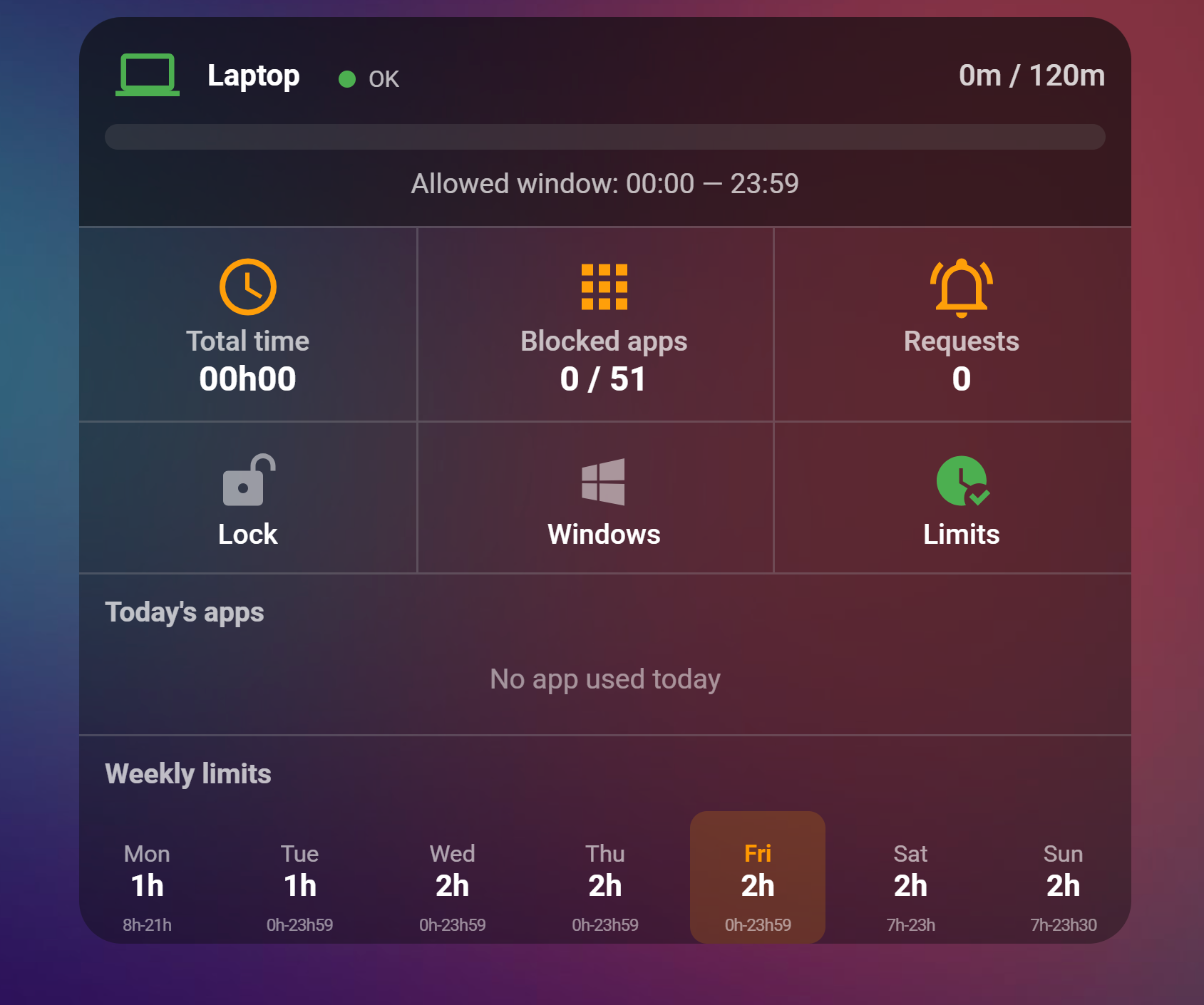
entity_id: switch.firstname_lockA clean per-child panel is available as a decluttering-card template, so you drop one card per child and only change a few variables. It includes:
- A header with the day's progress bar and allowed window, plus a clickable connection-health pill (opens the integration to re-authenticate)
- Screen time used, blocked-app count, pending-request count
- Approve/deny buttons that appear when a request is pending
- Lock, Windows-lock and screen-time-limits switches
- Today's top apps, and the weekly limits grid (tap to edit the limit, hold to edit the window)
Two files:
examples/family-safety-card.yaml— thefs_childtemplate only.examples/dashboard.yaml— a full example view instantiating it with placeholder entities.
Required HACS frontend cards: decluttering-card, button-card, vertical-stack-in-card, card-mod, mushroom
Paste the decluttering_templates: block into your dashboard (a dashboard has exactly one such key — merge, do not duplicate), then add one custom:decluttering-card per child, filling child, lock and title. Entity IDs carry the device-name prefix; look them up under Settings → Devices & Services → Entities. See the comments at the top of each file.
To add more children, add one custom:decluttering-card block per child in the same view; the shared template updates every card at once.
Home Assistant's built-in security_filter middleware rejects URLs whose query string looks like a file-injection attempt, using the pattern [a-zA-Z0-9_]=/([a-z0-9_.]//?)+. Some of Microsoft's silent-SSO redirects carry parameters such as epctrc=/w/..., which match that pattern, and the request is refused before the integration ever sees it.
The integration ships a narrowly scoped workaround: for the authentication proxy routes only (/auth/microsoft_family_safety/proxy/*), the security filter reports no match, so those requests get through. Every other endpoint keeps the filter unchanged.
This problem is intermittent — it depends on which OAuth path Microsoft chooses for a given sign-in. If you still hit a 400 during authentication, retry the flow; check the Home Assistant log for security_filter entries, and open an issue with the (redacted) URL.
Microsoft's sign-in page links some of its own pages with an explicit port (login.microsoftonline.com:443), and versions before 2.0.4 rejected that host. Update to 2.0.4 or later; the port is ignored now. If you still see it, the host in the address bar after __ms_host__/ is outside live.com, microsoft.com and microsoftonline.com, which the proxy deliberately refuses.
- The waiting screen after the visible sign-in can legitimately sit for up to about a minute without updating. Keep the Microsoft window open, do not click Open website again and do not close the dialog while it is running.
- The authentication proxy expires 10 minutes after it is created. If you took longer, start the flow again.
- On a phone (Home Assistant app or mobile browser) the Microsoft page opens in a separate browser. Once it shows Authentication completed, close it and switch back to Home Assistant: since 2.0.9 the dialog picks up the result within a few seconds of coming back. Before 2.0.9 it could stay stuck because Android pauses the app while the sign-in runs; signing in from a desktop browser avoids that on older versions.
- If Home Assistant aborts with "Native web authentication could not be loaded" or "The browser authentication flow expired", simply restart the flow.
Your Home Assistant URL is not HTTPS. Either configure HTTPS (recommended), or enable Allow insecure local HTTP authentication (testing only) — which only works for local hostnames and private IP addresses. See Insecure local HTTP authentication.
- Check the Connection sensor.
degradedmeans the mobile API works but the Family web session does not. - The most common cause is an expired Microsoft session. Home Assistant raises a reauthentication prompt and a persistent notification — complete it.
- After a network or timeout error on the schedule endpoint, the integration backs off for 30 minutes before retrying. If a fix seems to have no effect, you may be inside that window; reload the integration to clear it.
- Versions before 2.0.3 could stay in this state indefinitely without ever asking you to re-authenticate: a rejected Family request left the captured session marked valid, so the check that detects an expired login never ran again. If you are on an older version and the schedule has been
unknownfor days while the mobile sensors keep updating, update and reload; the reauthentication prompt will appear.
- Writes need a valid Family web session. If reads are also
unknown, fix authentication first. - Writes go to the private web API directly and normally complete in under a second each; a lock is 14 requests.
- A partial failure raises an error naming how many of the 7 weekdays were updated, and keeps the saved restore point so you can safely retry.
- Lock refuses to run with "current schedule unreadable and no saved policy exists" — this is the safety guard from issue #23. It prevents wiping a child's real schedule when the current one cannot be read and there is nothing to restore from. The message tells you which case you are in: an expired session (re-authenticate), or a timeout / network error / active backoff (retry in a few minutes).
- Unlock refuses to run with "no saved schedule to restore" — the restore point is gone, typically because
.storage/microsoft_family_safety.saved_screentimewas deleted. The integration will not invent a schedule; set the daily limits again from Home Assistant or at account.microsoft.com/family. Before 2.0.3 it wrote a 2 h/day, 07:00-22:00 default here, which silently replaced the real schedule. - Lock is account-wide — it affects all platforms simultaneously.
- Lock and unlock stop at the first network failure rather than waiting out a timeout for each of the seven days, and keep the saved schedule so the operation can be retried.
Microsoft's mobile API sometimes answers Family.UnableToFindTargetResource / RosterError (HTTP 404) for one child, typically when a reset or decommissioned device is still listed in the family, or when a school/work (Entra ID) account is enrolled on the child's device. Since 2.0.7 the integration keeps running: the affected child keeps empty values for the data Microsoft refuses (devices, screen-time usage, apps, lockable platforms or spending), everything else loads normally, and a persistent notification plus the roster_errors attribute of the Connection sensor tell you which member and which data are affected. Removing the stale device at https://account.microsoft.com/family clears it when that is possible; a school-managed device usually cannot be removed, in which case the degraded data for that child is expected.
- Make sure the add-on is started (green icon in the Add-ons page).
- The integration resolves the add-on hostname dynamically via the Supervisor API; on HA Core/Container set the Legacy auth add-on URL option manually.
- If the session is dead (redirect to a marketing page), the simplest fix since 2.0.8 is to reauthenticate the entry from Home Assistant: it switches the entry to the native sign-in (answer Yes to "Stay signed in?"). Re-authenticating via the noVNC interface still works if you want to stay on the add-on.
- Add-on writes take ~20-30 s each because the browser must reach the family dashboard first.
logger:
  default: info
  logs:
    custom_components.microsoft_family_safety: debug
    pyfamilysafety: debug
Useful markers: family_token_present, exported_cookies, bootstrap_attempts during sign-in; Microsoft Family context requires browser authentication when the Family session needs re-establishing.
Native authentication trades some of the add-on's isolation for simplicity. Be aware of the following before enabling it:
- Credentials are stored in clear text. Microsoft session cookies, the Family antiforgery token and the OAuth refresh token are persisted in the config entry and in
.storage/unencrypted. The legacy add-on encrypted its cookie file with Fernet; the native path does not. Anyone with read access to your Home Assistant configuration directory (including backups) can extract a usable Microsoft session. Protect and encrypt your backups accordingly. - The authentication proxy endpoint is unauthenticated.
/auth/microsoft_family_safety/proxy/{token}and its callback are registered without Home Assistant authentication — the only protection is a 24-byte random token in the URL. The flow is scoped: the proxy only forwards tolive.com,microsoft.comandmicrosoftonline.com, it exists for at most 10 minutes, and it is destroyed when the flow finishes. Still, while a flow is live, anyone who can reach your Home Assistant HTTP interface and guess the token would be proxied to Microsoft. - The Microsoft login page is served from your Home Assistant origin. Because the sign-in is proxied, the address bar shows your Home Assistant URL rather than
login.live.com, so you cannot verify the Microsoft certificate visually. Only start the flow from Home Assistant itself. - HTTP mode is genuinely insecure. With
allow_insecure_http_authenabled, your Microsoft password crosses the local network unencrypted. It is restricted to local/private addresses and logs a warning, but it remains a testing option, not a deployment mode. - The security filter workaround. The bypass is scoped to the proxy routes and leaves the filter in place for every other request. It is nonetheless a modification of Home Assistant's request handling — see Troubleshooting.
- Unofficial API — Microsoft provides no public API for Family Safety. This integration relies on reverse-engineered endpoints that may change or break at any time.
- Renewal depends on the Microsoft-account cookies. The integration captures Microsoft's cookie rotations, re-fetches the antiforgery token when it goes stale and, since 2.0.6, completes the daily silent sign-in of the account page by itself. It cannot recover from a revoked or expired Microsoft login (password change, security review, cookies past their date); Home Assistant will prompt you then. With "Stay signed in?" answered Yes, the captured cookies are valid for about a year.
- Akamai bot-manager cookies are deliberately discarded. Microsoft fronts
account.microsoft.comwith Akamai, whosebm_sv/ak_bmsccookies are tied to the browser that obtained them. Replaying them from Home Assistant made Microsoft stop answering entirely (the request hung until the timeout, then the connection was reset), which hid an expired session behind timeouts and backoffs. They are dropped wherever cookies are captured, loaded or saved. - A browser is still required to sign in. The Family web session can only be established interactively, because Microsoft gates the Family dashboard behind an interactive OAuth hop. The mobile token is then fetched server-side, and only falls back to the browser if Microsoft demands another interactive step. There is no fully headless sign-in.
- Entity IDs changed — see Breaking changes.
- Per-platform lock is unreliable — Microsoft removed the
override_deviceendpoint. Account Lock is the recommended replacement, but it locks all platforms at once. - Legacy add-on mode is serialized — the add-on uses a single browser instance with a lock, so concurrent requests are queued.
Microsoft Family Safety exposes two distinct APIs. This integration uses both, each for specific capabilities.
Authentication: OAuth Bearer token (acquired via pyfamilysafety)
Used for read operations and app management. Token-based, no browser session required.
| Method | Endpoint | Description | Used by |
|---|---|---|---|
| GET | /v1/WebRestrictions/{childId} |
Web filter settings & blocked sites | sensor.web_filter |
| GET | /v1/ContentRestrictions/{childId} |
Age rating & ask-to-buy state | sensor.web_filter attributes |
| GET | /v1/DeviceLimits/{childId}/overrides |
Active device overrides | switch.lock |
| PATCH | /v4/devicelimits/schedules/{childId} |
Broken (400 error) | |
| POST | /v1/devicelimits/{childId}/overrides |
Broken (Microsoft removed) |
The mobile API's schedule and device override endpoints no longer work reliably. All screen time writes now go through the web API.
Authentication: Microsoft session cookies + the __RequestVerificationToken antiforgery token, read from the authenticated Family dashboard and sent as a header of the same name. All requests require the headers X-AMC-JsonMode: CamelCase, X-Requested-With: XMLHttpRequest, a plausible Referer, and — for writes — Content-Type: application/json and Origin: https://account.microsoft.com. Some endpoints additionally require a per-child X-JwtFamilyRelationshipToken, harvested from the roster or landing-page feed.
Only the token named
__RequestVerificationTokenworks. The genericcanary/apiCanaryvalues look similar but belong to a different antiforgery context and produce HTTP 401.
In native mode these calls are issued directly by Home Assistant over HTTP (httpx), with no browser and no add-on, once the Family session has been established. In legacy add-on mode they are executed from inside the add-on's authenticated Chromium session instead.
| Endpoint | Query Params | Description | Used by |
|---|---|---|---|
/family/api/roster |
— | Family members list | Coordinator, relationship tokens |
/family/api/st |
childId |
Screen time policy (per-device, Windows) — tried first | sensor.screen_time_policy, number.*_limit, time.*_start/end |
/family/api/landing-page-feeds |
memberIdList |
Dashboard feed; fallback source for the weekday schedule, and source of relationship tokens | sensor.screen_time_policy, number.*_limit, time.*_start/end |
/family/windows/home/direct, /family/home |
— | Family dashboard pages, scraped for __RequestVerificationToken |
Session bootstrap |
/account |
— | Session health probe | sensor.*_connection |
/family/api/screen-time-global |
childId |
Global screen time toggle | — |
/family/api/screen-time-xbox |
childId |
Xbox screen time policy | — |
/family/api/device-limits/get-devices |
childId |
Connected devices list | — |
/family/api/app-limits/get-all-app-policies-v3 |
childId |
All app policies | switch.app_* |
/family/api/app-limits/get-app-time-extension-requests |
memberIdList |
Pending extension requests | sensor.pending_requests, button.approve/deny |
/family/api/recent-activity/report-v3 |
childId, isPreviousWeek, timeZone |
Activity report | sensor.screen_time |
/family/api/settings/web-browsing |
childId |
Web filter settings | sensor.web_filter |
| Method | Endpoint | Body | Description |
|---|---|---|---|
| POST | /family/api//st/day-allow |
{childId, dayOfWeek, timeSpanDays, timeSpanHours, timeSpanMinutes} |
Set daily screen time allowance |
| POST | /family/api//st/day-allow-int |
{childId, dayOfWeek, allowedIntervals: [48 booleans]} |
Set allowed time intervals (30-min slots) |
| POST | /family/api/app-limits/set-custom-app-policy-v3 |
{childId, appPolicy: {...}, platform} |
Block/unblock/limit an app |
| POST | /family/api/settings/block-website |
{childId, website} |
Block a website |
| DELETE | /family/api/settings/remove-website |
?childId=&website= |
Remove a blocked/allowed website |
| POST | /family/api/settings/web-browsing-toggle |
{childId, isEnabled} |
Toggle web content filtering |
| PUT | /family/api/settings/update-content-settings |
{childId, contentRatingAge} |
Set age rating (3-20, 21=unrestricted) |
| POST | /family/api/ps/set-acquisition-policy |
{childId, policy} |
Set ask-to-buy (freeOnly / unrestricted) |
GET /family/api/st?childId={childId} returns:
{
  "userId": "1055519684390826",
  "isEnabled": true,
  "dailyRestrictions": {
    "monday": {
      "dayOfWeek": "monday",
      "allowance": "01:00:00",
      "allowedIntervals": [
        {
          "begin": "PT7H",
          "beginTimeSpan": "07:00:00",
          "end": "PT23H",
          "endTimeSpan": "23:00:00"
        }
      ],
      "timeline": [false, false, ..., true, true, ..., false, false]
    }
  }
}allowance: daily limit asHH:MM:SSallowedIntervals[].beginTimeSpan/endTimeSpan: window boundaries asHH:MM:SStimeline: 48 booleans representing 30-min slots (index 0 = 00:00, index 14 = 07:00)
Registered by the integration only while a sign-in flow is running, and destroyed when it finishes or after 10 minutes. Both routes are served without Home Assistant authentication; the random per-flow token in the URL is the only guard. See Security & limitations.
| Method | Endpoint | Description |
|---|---|---|
| any | /auth/microsoft_family_safety/proxy/{token}[/{path}] |
Reverse proxy to Microsoft sign-in (restricted to live.com, microsoft.com, microsoftonline.com) |
| GET | /auth/microsoft_family_safety/callback?flow_id= |
Hands the captured result back to the config flow |
The addon exposes a local HTTP API that proxies requests through the authenticated browser session. It is not used in native mode.
| Method | Endpoint | Description |
|---|---|---|
| GET | /api/health |
Health check |
| POST | /api/auth/start |
Start authentication session |
| GET | /api/auth/status/{session_id} |
Check auth session status |
| GET | /api/cookies/check |
Check cookie freshness |
| GET | /api/cookies |
Get stored cookies |
| DELETE | /api/cookies |
Delete stored cookies |
| GET | /api/screentime?childId= |
Fetch screen time via browser |
| POST | /api/screentime/set-allowance |
Set daily allowance via browser |
| POST | /api/screentime/set-intervals |
Set time intervals via browser |
| Action | Web API | Mobile API | Status |
|---|---|---|---|
| View family roster | GET | — | Working |
| View screen time usage | — | GET | Working |
| Read screen time schedule | GET | — | Working (direct from HA) |
| Set daily screen time allowance | POST | Working (web only) | |
| Set allowed time intervals | POST | Working (web only) | |
| Block/unblock an app | POST | POST | Working |
| Set per-app time limits | POST | — | Working |
| Block/allow a website | POST/DELETE | — | Working |
| Toggle web filtering | POST | — | Working |
| Set content age rating | PUT | — | Working |
| Set ask-to-buy policy | POST | — | Working |
| Lock device (instant) | N/A | Broken (Microsoft removed) | |
| Lock account (workaround) | POST x14 | — | Working (sets all quotas to 0) |
Contributions are welcome!
- Fork the repository
- Create a feature branch (
git checkout -b feature/my-feature) - Commit your changes and open a pull request
Areas where help is especially appreciated:
- Microsoft API endpoint documentation and analysis
- Encrypting the stored Microsoft cookies and tokens at rest
- Additional language translations
- Testing native authentication across different Family Safety account configurations and Home Assistant setups
- pantherale0 — original ha-familysafety integration and pyfamilysafety library
- The Home Assistant community for feedback and testing
This project is licensed under the MIT License.
When reporting an issue, please include: HA version, integration version, whether you use native or legacy add-on authentication (the Connection sensor's native_web_auth attribute tells you), the add-on version if applicable, debug logs, and steps to reproduce.