This is the backend for a collaborative event management platform built using Node.js, Express.js, and MongoDB, following a monolith architecture. It enables users to create, manage, and set number of participate in events updates.
- 📅 Event management: Create, update, delete, and view events
- 🔗 RESTful APIs for events, users and Auth
- 🐳 Docker support for development and production
- 📚 OpenAPI documentation with Swagger
- 🏗️ Monolith architecture for scalability
- 🛡️ TypeScript for type safety
- ✅ Data validation with Joi
- Node.js v18+
- pnpm (package manager)
- Docker & Docker Compose (optional, but recommended)
# Clone the repository
git clone https://github.com/your-org/event-platform.git
cd event-platform

# Install dependencies
pnpm install

# Copy environment file
cp .env.example .env


# Edit `.env` and configure your MongoDB URI
# Example: MONGODB_URI=mongodb://localhost:27017/event-platform

# Start the development server
pnpm run dev
Server will run by default on: http://localhost:3001
Make sure Docker and Docker Compose are installed.
make dev         # Start development environment
make dev-build   # Build and start development
make dev-down # Stop development environmentmake prod # Start production environment
make prod-build # Build and start production
make prod-down # Stop production environmentmake logs # View container logs
make restart # Restart containers
make clean # Remove volumes and prune
make clean-dev # Clean development environment
make test # Run backend tests
make db-shell # Access MongoDB shell
make help # View all available make targets/project-root/
├── dist/ # Compiled TypeScript output
├── logs/ # Application logs
├── public/
├── src/
│ ├── constants/ # Enums, status codes
│ ├── core/ # Auth middleware, base services
│ ├── docs/ # OpenAPI YAML files
│ ├── controllers/ # Request handlers (auth, events, users)
│ ├── services/ # Business logic and service classes
│ ├── repository/ # Data access and database queries
│ ├── models/ # Mongoose models and schemas
│ ├── routes/ # Route definitions and mapping
│ ├── config/ # Centralized configuration (env variables to app variables)
│ ├── __tests__/ # Test suites and test utilities
│ ├── types/ # TypeScript interfaces and types
│ ├── utils/ # Helper functions (jwtHelper,error handling)
│ ├── app.ts # Express application
│ ├── server.ts # Application entry point
├── .env # Environment variables
├── .env.example # Example environment file
├── docker-compose.dev.yml # Development Docker configuration
├── docker-compose.yml # Production Docker configuration
├── Makefile # Docker and project commands
├── package.json
└── pnpm-lock.yaml
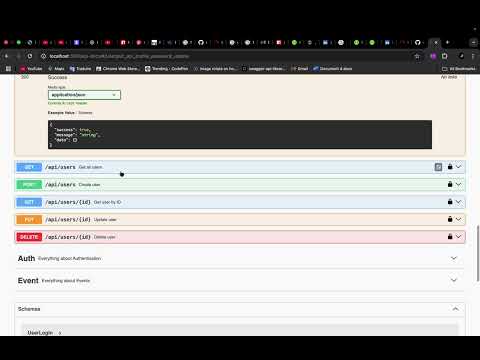
📖 The API documentation is auto-generated using Swagger (OpenAPI).
- URL: http://localhost:3001/api-docs
- Format: YAML files stored in
src/docs/ - Tags: User, Auth, Event
- Auth:
/api/- Authentication and authorization - Users:
/api/users- User management - Events:
/api/events- Event operations
{
  "email": "john.doe@example.com",
  "password": "123456Aa"
}{
"title": "Team Hackathon",
"date": "2025-08-15",
"location": "Berlin",
"nbParticipants": 50
}| Method | Endpoint | Description | Protected |
|---|---|---|---|
| POST | /api/register | Register a new user | ❌ |
| POST | /api/login | User login (JWT issued) | ❌ |
| GET | /api/events | List all events | ✅ |
| POST | /api/events | Create a new event | ✅ |
| GET | /api/events/stats | Get event statistics | ✅ |
| GET | /api/events/:id | Get event by ID | ✅ |
| PUT | /api/events/:id | Update event by ID | ✅ |
| DELETE | /api/events/:id | Delete event by ID | ✅ |
All protected endpoints require JWT authentication. Validation is performed for event creation, update, and ID parameters.
Run tests using Docker or locally:
# Using Docker
make test

# Or locally
pnpm testCopy .env.example to .env and configure the following variables:
# Database
MONGODB_URI=mongodb://localhost:27017/event-platform

# Server
PORT=3001
NODE_ENV=development

# JWT
JWT_SECRET=your-secret-key
JWT_EXPIRES_IN=7d
-
Build the application:
pnpm run build
-
Start production server:
pnpm run start:prod
make prod-build  # Build production images
make prod # Start production environment# Development
pnpm run start:dev # Start with nodemon
pnpm run build # Build TypeScript
pnpm run start:prod # Start production server
# Testing
pnpm run test # Run tests
pnpm run test:watch # Run tests in watch mode
# Linting
pnpm run lint # Run ESLint
pnpm run lint:fix # Fix ESLint issues- Backend Framework: Node.js with Express.js
- Database: MongoDB with Mongoose ODM
- Language: TypeScript
- Documentation: Swagger (OpenAPI)
- Validation: Joi
- Authentication: JWT
- Containerization: Docker & Docker Compose
- Package Manager: pnpm
- Fork the repository
- Create your feature branch (
git checkout -b feature/amazing-feature) - Commit your changes (
git commit -m 'Add some amazing feature') - Push to the branch (
git push origin feature/amazing-feature) - Open a Pull Request
- Follow TypeScript best practices
- Use ESLint configuration provided
- Write tests for new features
- Update documentation as needed
-
MongoDB Connection Error
- Ensure MongoDB is running
- Check
MONGODB_URIin.env
-
Port Already in Use
- Change
PORTin.env - Kill existing processes:
lsof -ti:3001 | xargs kill
- Change
-
Docker Issues
- Clean containers:
make clean - Rebuild images:
make dev-build
- Clean containers:
If you encounter any issues or have questions:
- Check the API Documentation
- Review the troubleshooting section
- Open an issue on GitHub
This project is licensed under the MIT License - see the LICENSE file for details.
- Built with the backend
- Inspired by modern event platforms
- Community contributions welcome
Happy Event Planning! 🚀