
Keep a ball on a moving plate. Then find out how six robot legs do it.
A free browser lab for kinematics, dynamics and feedback control. No account, installation or physical hardware connection.
Play Ball Lab → · First experiment · Videos

Real solver states, edited into a short loop—not a speed benchmark. Still image · Video with pause controls. Motion preferences may select the still or start the lab paused.
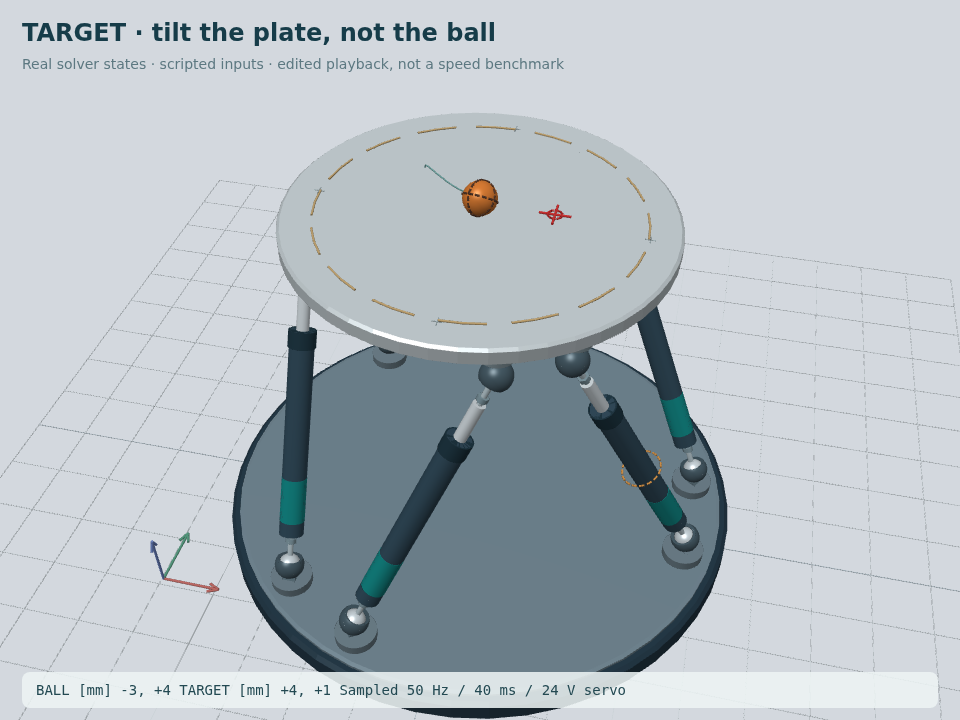
The README is an animated preview. Live deck clicks and X/Y/Z–roll/pitch/yaw sliders run on GitHub Pages, not inside this document.
Press Run when paused. Click the 3D deck to place the red goal crosshair; drag the scene to orbit. The small top view also supports click/drag and arrow keys. The controller tilts the plate, not the ball. Its green world-space trail follows the ball off the edge and down to the floor. Try Trace a circle and Push the ball. The dashed boundary is a guide, not an invisible wall.
Take over and come back: use Tilt the plate manually, or select Manual effort in the Control tab. The header's Return to ball control and the Ball Lab tab restore automatic feedback without rebuilding the drive. Manual effort starts paused because position holding is off. Reset a fallen ball with Reset ball & balance; use Reset tested setup after a numerical stop.
Save first: classic presets and drive-profile changes start a new run. Save/Load project preserves full state and opens imports paused. Platform CSV and Ball CSV are distinct measurements; geometry-only export is not a resumable project.
| Experiment | What it teaches |
|---|---|
| IK: move the plate | Pose → six lengths → physical motor forces. |
| FK: recover the pose | Six lengths → a local assembly pose, not a force command. |
| Compliance: push a spring | How stiffness changes deflection under the same force. |
| Gravity compensation | Supporting weight is not position holding. |
| Passive joints | Motor-off joints can still exert spring and damping forces. |

The default Ball Lab uses a generic 24 V motor/screw servo, sampled encoders, gyro/FK pose estimation and delayed ball-position measurements. Compare it with the ideal-force profile or reduce its speed/current limits. The top view is coordinate telemetry, not camera vision. Speed limits govern references; actual back-driven speed is displayed separately. All hardware parameters are assumptions, not product calibration.
Inspect 18 active/passive joint groups, change geometry/mass, and follow equations into source and tests. Inapplicable controls are disabled instead of silently doing nothing. Control and recovery guide · Ball physics · Drive and sensing
Start with motion, then progress through experiments, equations, code, and evidence. References are sources of ideas, not validation of this implementation.
python build.py                 # standard library only
# Open site/index.html, then choose Ball Lab.
Use Contributing for all tests and the complete learning site. Edit src/ and docs/; site/ is generated. The Korean original is frozen and checksum-guarded.
This is educational software: no general self-collision, certified bearing geometry, thermal/switching electronics or hardware safety guarantee. Retention is tested only within stated conditions. PR checks and separate public-URL tests reduce regressions; they do not guarantee zero bugs or outages.
MIT · Cite · Report a reproducible problem