
Minecraft 4K, but fixed.
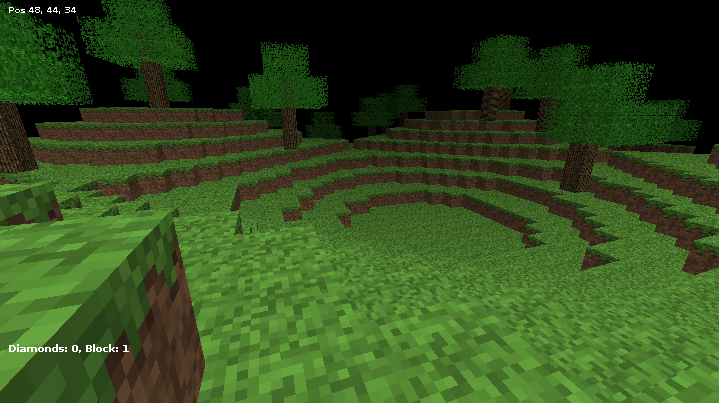
To run mc4k, you will need the Java Runtime Environment (JRE) >= 8.0, to build this you will need the Java Development Kit (JDK) >= 8.0. Both Oracle and OpenJDK versions of the programs were tested and work correctly.
To build mc4k, do:
makeThat will generate an executable JAR file under the build/ directory, run it like:
java -jar ./build/Minecraft4K.jar1: Grass2: Dirt3: Diamond4: Stone5: Bricks6: Dirt7: Wood8: Leaves9: Blue bricks10-15: Dirt
- Movement:
"WASD" - Next block: Mouse wheel, left arrow
- Previous block: Mouse wheel, right arrow
- Save world:
'G' - Load world:
'C' - Quit:
Esc - Screenshot:
F2 - Show/hide HUD:
F1
- Ported the code from a Java Applet to a Java application.
- Modified controls to not depend on the keypad.
- Added a better world saving and loading system.
- Added a player data saving and loading system.
- Added a diamond counter, and removed it from the default "inventory".
- Added world generation.
- Packed the program in a single JAR.
- Modified the code internally, to make it more friendly.
- Made small changes and fixes to the way the GUI works and looks.
- Added automatic world and player data saving on exit.
- Added screenshot feature.
- Added external textures support.
- Added multiple worlds support.
- Added basic HUD and show/hide HUD keys.
- Added support for a
scalecommand line argument. - Added partial support for the MCPI API.
- Fixed some bugs.
Player and world data are saved under $HOME/.mc4k (UNIX-like systems) or %APPDATA%\.mc4k (Windows). Screenshots, are saved to the current directory. To change the game scale on startup, execute it from the command line, like:
JAVA_CMD -jar JAR SCALEWhere JAVA_CMD is the command or path to Java, JAR is the path to the Minecraft4K.jar file, and SCALE is a floating point value equal to or greater than 1.0.
mc4k now partially supports the Minecraft: Pi Edition API. Currently the list of supported functions is:
world.getBlock(x,y,z)world.setBlock(x,y,z,id)world.getHeight(x,y)world.setting(key,value)world.checkpoint.save()world.checkpoint.restore()player.getPos()player.getTile()player.setPos(x,y,z)player.setTile(x,y,z)
- The coordinates should be in MCPI format, but without negative numbers (i.e. valid coordinates are
0,0,0-63,63,63). - Currenlty the only valid setting
keyisworld_immutable, and the only validvalues are0and!0(FalseandTrue). - Block IDs should be in MCPI format (e.g.
45for brick, not5), but unavailable blocks will be replaced by dirt (3in MCPI,2in mc4k).
I don't even know from where the original code comes, but I downloaded it from a post in the MCForums. It looks like it was a modified version of the original reverse-engineered Minecraft 4K code.
All my modifications were made for the only purpose of making it more enjoyable, feel free to modify and distribute them, with the following conditions:
- Redistribute the modified sources.
- Keep the attributions in the files.
- Redistribute a copy of this file, with this section unmodified.