
Chunked large-file upload and sliced download with resumable upload, instant upload, pause/cancel, and Vue / React hooks.


English | 简体中文
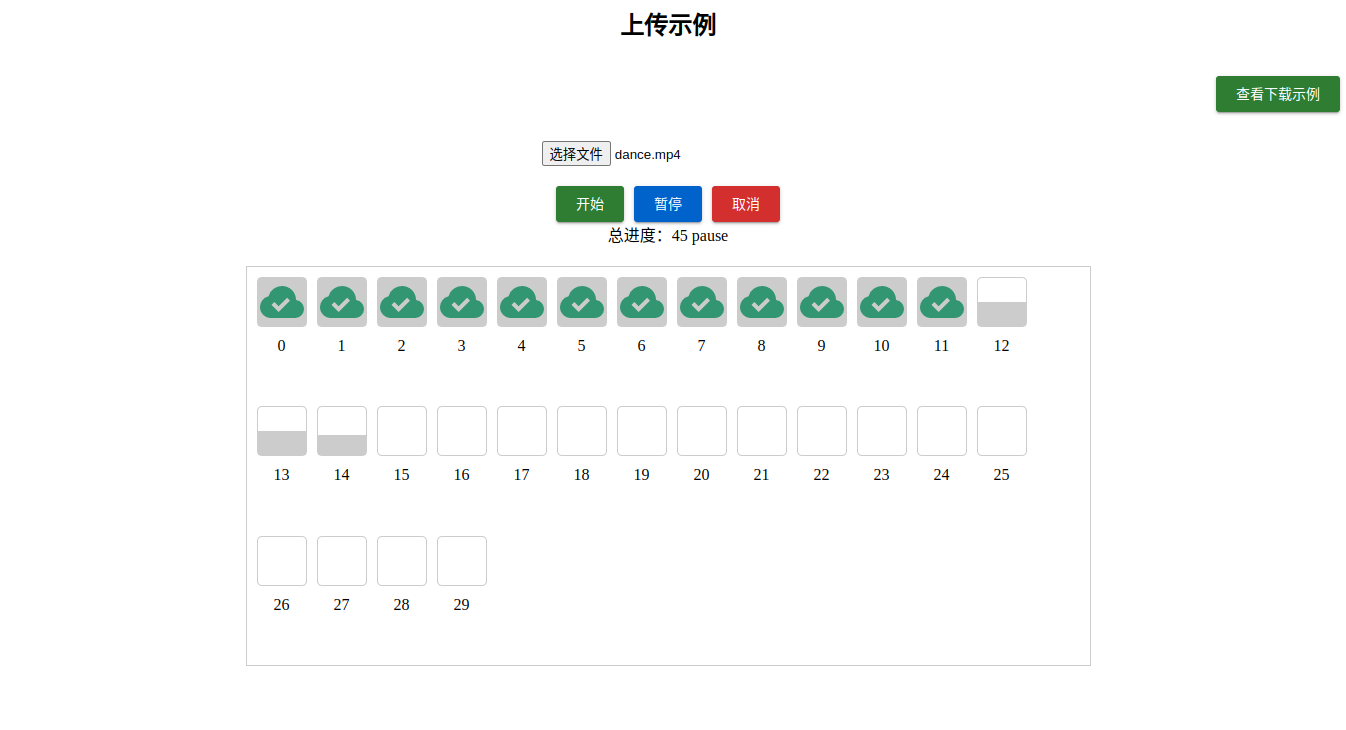
slice-upload-utils is a TypeScript library for large-file chunked upload and sliced download. It supports resumable upload, instant upload, pause, cancel, and Vue / React hooks.
On upload, files are split into chunks and assigned a preHash and chunkHash. Hashes use SHA-256: small payloads prefer the browser-native Web Crypto API, while @noble/hashes provides the ESM fallback and incremental large-file path. By default, the library uses sampled hashes, which fit most business scenarios. Enable realPreHash or realChunkHash when strict verification is required, at the cost of more hashing time.
On download, the library sends concurrent HTTP Range requests, merges chunks in order into a File, and saves it automatically by default.
pnpm add slice-upload-utilsimport { defineSliceDownload, defineSliceUpload } from 'slice-upload-utils'
import { useSliceDownload, useSliceUpload } from 'slice-upload-utils/vue'
import { useSliceDownload as useReactSliceDownload } from 'slice-upload-utils/react'The main entrypoint is framework-neutral. Vue and React hooks live in explicit optional sub-entrypoints, so apps only install and bundle the framework adapter they actually use.
The package only ships ESM builds. It is recommended for Vite, Nuxt, Next, modern Node ESM, or other bundlers/runtimes that support ESM. Tooling and Node-side usage should run on Node >=20.19; the playground uses Node 24.
Current versions use SHA-256 instead of MD5. If you are upgrading from an older MD5-based release, existing server-side resumable upload caches will not match the new preHash and chunkHash values. Clear old partial uploads or keep the client and server hash strategy in sync during migration.
pnpm devpnpm dev starts both:
- Vue example app:
playground/vue - Local upload/download server:
playground/server
The Vue example accesses /api through the Vite proxy. The server runs at http://127.0.0.1:10010.
The playground server is implemented in TypeScript and runs directly on Node 24. The repository includes playground/fixtures/mp4.zip, which is exposed by the server as a test download file. It is a Git LFS file and is only used by the GitHub repository, playground, and tests. The npm package only includes dist, so this fixture is not published.
Before the first checkout, install and enable Git LFS so git pull replaces LFS pointer files with real files:
git lfs install
git pull
If you already checked out the 134-byte pointer file, run:
git lfs pull --include=playground/fixtures/mp4.zipFor flow charts, architecture notes, implementation details, and reviewed edge cases, see Upload And Download Flow.
Use params.ajaxRequest inside your request function. It is already bound to the current chunk and works correctly with concurrent uploads, async pre-checks, retries, pause, and cancel.
<script setup lang="ts">
import { ref } from 'vue'
import type { PreVerifyUploadParams, UploadFinishParams, UploadParams } from 'slice-upload-utils'
import { useSliceUpload } from 'slice-upload-utils/vue'

const file = ref<File>()
// 2 MiB per chunk. Adjust this to match your backend limits.
const chunkSize = 1024 ** 2 * 2

// Bind the current file and upload lifecycle callbacks.
const { progress, status, start, pause, cancel } = useSliceUpload({
  chunkSize,
  file,
  request: uploadChunk,
  preVerifyRequest,
  onFinish: mergeChunks,
})

async function preVerifyRequest(params: PreVerifyUploadParams) {
  // Ask the server which chunks already exist.
  // Return true for instant upload, or chunkHash[] for resumable upload.
  const result = await fetch('/api/upload/verify', {
    body: JSON.stringify(params),
    headers: { 'Content-Type': 'application/json' },
    method: 'POST',
  }).then((res) => res.json())

  return result.data as string[] | true
}

async function uploadChunk(params: UploadParams) {
  // ajaxRequest is a helper bound to this chunk. Send the rest as form fields.
  const { ajaxRequest, ...fields } = params
  const data = new FormData()

  // The playground protocol expects chunkSize together with each chunk.
  data.append('chunkSize', String(chunkSize))
  Object.entries(fields).forEach(([key, value]) => {
    if (value === null || value === undefined) return
    data.append(key, typeof value === 'number' ? String(value) : value)
  })

  const result = await ajaxRequest<{ code: number }>({
    data,
    url: '/api/upload/chunk',
  })

  return result.code === 200
}

async function mergeChunks(params: UploadFinishParams) {
  // Called after every missing chunk is accepted.
  await fetch('/api/upload/merge', {
    body: JSON.stringify(params),
    headers: { 'Content-Type': 'application/json' },
    method: 'POST',
  })
}

function handleFileChange(event: Event) {
  // Updating file lets the hook prepare chunks for the selected file.
  file.value = (event.target as HTMLInputElement).files?.[0]
}
</script>

<template>
  <input type="file" @change="handleFileChange" />
  <button :disabled="status === 'uploading'" @click="start">Upload</button>
  <button @click="pause">Pause</button>
  <button @click="cancel">Cancel</button>
  <progress :value="progress" max="100" />
</template>import { useState } from 'react'
import type { PreVerifyUploadParams, UploadFinishParams, UploadParams } from 'slice-upload-utils'
import { useSliceUpload } from 'slice-upload-utils/react'
// 2 MiB per chunk. Adjust this to match your backend limits.
const chunkSize = 1024 ** 2 * 2
export function UploadPanel() {
const [file, setFile] = useState<File | null>(null)
// Bind the current file and upload lifecycle callbacks.
const upload = useSliceUpload({
chunkSize,
file,
request: uploadChunk,
preVerifyRequest,
onFinish: mergeChunks,
})
return (
<>
<input type="file" onChange={(event) => setFile(event.target.files?.[0] ?? null)} />
<button disabled={upload.status === 'uploading'} onClick={upload.start}>
Upload
</button>
<button onClick={upload.pause}>Pause</button>
<button onClick={upload.cancel}>Cancel</button>
<progress value={upload.progress} max="100" />
</>
)
}
async function preVerifyRequest(params: PreVerifyUploadParams) {
// Ask the server which chunks already exist.
// Return true for instant upload, or chunkHash[] for resumable upload.
const result = await fetch('/api/upload/verify', {
body: JSON.stringify(params),
headers: { 'Content-Type': 'application/json' },
method: 'POST',
}).then((res) => res.json())
return result.data as string[] | true
}
async function uploadChunk(params: UploadParams) {
// ajaxRequest is a helper bound to this chunk. Send the rest as form fields.
const { ajaxRequest, ...fields } = params
const data = new FormData()
// The playground protocol expects chunkSize together with each chunk.
data.append('chunkSize', String(chunkSize))
Object.entries(fields).forEach(([key, value]) => {
if (value === null || value === undefined) return
data.append(key, typeof value === 'number' ? String(value) : value)
})
const result = await ajaxRequest<{ code: number }>({
data,
url: '/api/upload/chunk',
})
return result.code === 200
}
async function mergeChunks(params: UploadFinishParams) {
// Called after every missing chunk is accepted.
await fetch('/api/upload/merge', {
body: JSON.stringify(params),
headers: { 'Content-Type': 'application/json' },
method: 'POST',
})
}Common useSliceUpload return values:
const { start, pause, cancel, chunks, progress, status, instance } = uploadBefore downloading, usually fetch file metadata first, call setFileOptions, then call start(). params.ajaxRequest automatically sends the current chunk Range header.
<script setup lang="ts">
import type { DownloadParams } from 'slice-upload-utils'
import { useSliceDownload } from 'slice-upload-utils/vue'

const filename = 'mp4.zip'

// autoSave saves the merged File after all ranges finish.
const { progress, status, start, pause, cancel, setFileOptions } = useSliceDownload({
  autoSave: true,
  request: downloadChunk,
})

async function downloadChunk(params: DownloadParams) {
  // ajaxRequest automatically adds the Range header for this chunk.
  return params.ajaxRequest<Blob>({
    url: `/api/files/${encodeURIComponent(params.filename)}/content`,
  })
}

async function handleDownload() {
  // Fetch metadata first so the hook knows the file name, size, and MIME type.
  const meta = await fetch(`/api/files/${encodeURIComponent(filename)}/meta`)
    .then((res) => res.json())
    .then((res) => res.data)

  // setFileOptions must run before start() when options are loaded async.
  setFileOptions({
    filename: meta.filename,
    fileSize: meta.fileSize,
    fileType: meta.fileType,
  })
  await start()
}
</script>

<template>
  <button :disabled="status === 'downloading'" @click="handleDownload">Download</button>
  <button @click="pause">Pause</button>
  <button @click="cancel">Cancel</button>
  <progress :value="progress" max="100" />
</template>import type { DownloadParams } from 'slice-upload-utils'
import { useSliceDownload } from 'slice-upload-utils/react'
function DownloadButton() {
// autoSave saves the merged File after all ranges finish.
const download = useSliceDownload({
autoSave: true,
request: downloadChunk,
})
async function downloadChunk(params: DownloadParams) {
// ajaxRequest automatically adds the Range header for this chunk.
return params.ajaxRequest<Blob>({
url: `/api/files/${encodeURIComponent(params.filename)}/content`,
})
}
async function handleDownload() {
// Fetch metadata first so the hook knows the file name, size, and MIME type.
const meta = await fetch('/api/files/mp4.zip/meta')
.then((res) => res.json())
.then((res) => res.data)
// setFileOptions must run before start() when options are loaded async.
download.setFileOptions({
filename: meta.filename,
fileSize: meta.fileSize,
fileType: meta.fileType,
})
await download.start()
}
return (
<>
<button disabled={download.status === 'downloading'} onClick={handleDownload}>
Download
</button>
<button onClick={download.pause}>Pause</button>
<button onClick={download.cancel}>Cancel</button>
<progress value={download.progress} max="100" />
</>
)
}Common useSliceDownload return values:
const { start, pause, cancel, setFileOptions, chunks, progress, status, instance } = downloadThis repository includes a dependency-free Node playground server that can be used as a backend protocol reference.
Request body:
{
  "preHash": "file-hash",
  "filename": "demo.txt",
  "chunkSize": 2097152,
  "chunkTotal": 10
}
Response:
{
  "code": 200,
  "data": ["uploaded-chunk-hash"]
}
When every chunk is already present, data returns true and the client enters the finished state directly.
multipart/form-data fields:
chunkindexchunkTotalpreHashfilenamechunkHashchunkSize
Call this after upload finishes. The server merges chunks by index:
{
  "preHash": "file-hash",
  "filename": "demo.txt",
  "chunkSize": 2097152,
  "chunkTotal": 10
}Returns file metadata needed before download:
{
  "code": 200,
  "data": {
    "filename": "demo.txt",
    "fileSize": 1024,
    "fileType": "text/plain; charset=utf-8",
    "url": "/api/files/demo.txt/content"
  }
}Supports Range: bytes=start-end. Sliced downloads automatically send the Range header.
interface UseSliceUploadOptions {
  /**
   * File to upload.
   */
  file: Ref<File | null | undefined>
  /**
   * Upload request function.
   */
  request: UploadRequest
  /**
   * Error handler.
   */
  onError?: UploadEventType['error']
  /**
   * Finish handler.
   */
  onFinish?: UploadEventType['finish']
  /**
   * Pre-verify function.
   */
  preVerifyRequest?: PreVerifyUploadRequest
  /**
   * Chunk size in bytes.
   * @default 1024 * 1024 * 2 bytes
   */
  chunkSize?: number
  /**
   * Upload concurrency.
   * @default 3
   */
  poolCount?: number
  /**
   * Request retry count after failure.
   * @default 3
   */
  retryCount?: number
  /**
   * Request retry delay after failure, in milliseconds.
   * @default 300 ms
   */
  retryDelay?: number
  /**
   * Request timeout in milliseconds.
   * @default 15000 ms
   */
  timeout?: number
  /**
   * Hash the full file. Slower when enabled.
   * @default false
   */
  realPreHash?: boolean
  /**
   * Hash every chunk. Slower when enabled.
   * @default false
   */
  realChunkHash?: boolean
}interface UseSliceDownloadOptions {
/**
* File size in bytes.
*/
fileSize?: number
/**
* File name.
*/
filename?: string
/**
* File MIME type.
* @default application/octet-stream
* @see https://developer.mozilla.org/docs/Web/HTTP/Basics_of_HTTP/MIME_types/Common_types
*/
fileType?: string
/**
* Whether to save automatically.
* @default true
*/
autoSave?: boolean
/**
* Chunk size in bytes.
* @default 1024 * 1024 * 2 bytes
*/
chunkSize?: number
/**
* Download concurrency.
* @default 3
*/
poolCount?: number
/**
* Request retry count after failure.
* @default 3
*/
retryCount?: number
/**
* Request retry delay after failure, in milliseconds.
* @default 300 ms
*/
retryDelay?: number
/**
* Request timeout in milliseconds.
* @default 15000 ms
*/
timeout?: number
/**
* Download request function.
*/
request: DownloadRequest
/**
* Error handler.
*/
onError?: DownloadEventType['error']
/**
* Finish handler.
*/
onFinish?: DownloadEventType['finish']
}pnpm format:check
pnpm typecheck
pnpm lint
pnpm test -- --run
pnpm build